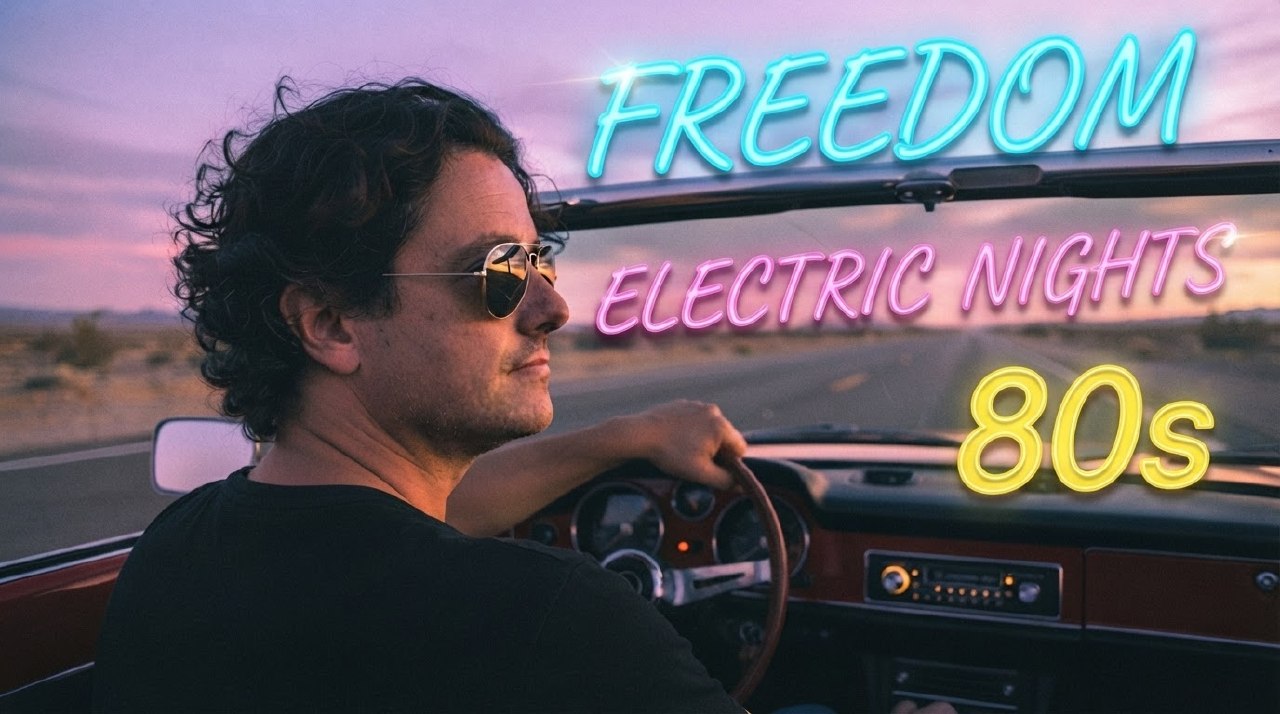
What if I told you that in just five minutes, with nothing more than an iPhone, a professional microphone, and four AI tools, you could transform yourself into an 80s pop star — complete with your own voice, your own face, and a fully produced music video? That’s exactly what I did. And in this article, I’m going to break down every single step of the process, the tools I used, the results I got, and what this means for the future of creative content production.
▲ Press play above to watch the final music video
The Premise: Why I Did This
Let me be honest with you. I’m not a musician. I’m not a singer. I’m not a video producer. I’m a tech entrepreneur who spends his days building mobile games and tinkering with artificial intelligence. But I’ve always had a fascination with the 1980s — the neon aesthetics, the synth-driven melodies, the raw energy of pop music from that era. There’s something about the combination of driving down an empty highway at dusk with synthwave blasting through the speakers that feels like pure freedom.
So when AI tools started getting good enough to clone voices, generate photorealistic images, and create video content from scratch, a question formed in my mind: Could I become an 80s pop star without actually being one?
The answer turned out to be yes. And the entire process took less than five minutes of active work. Not five minutes of rendering or processing — five minutes of my time. The AI did the rest.
The Toolkit: What I Used
Before we dive into the process, let’s talk about the arsenal. Here’s everything that went into this project:
- 1x iPhone — My everyday phone, used for capturing reference photos of my face.
- 1x Professional Microphone — A studio-grade mic for recording clean vocal samples.
- 4 AI Tools — Each handling a different part of the pipeline: voice, music, image, and video.
That’s it. No studio. No camera crew. No expensive software licenses. No team of producers. Just a phone, a mic, and four AI models working in concert.
Let me break down each component.
The iPhone: More Than a Phone
I used my iPhone to take a series of selfies and reference photos. Nothing fancy — good lighting, neutral background, multiple angles. The goal wasn’t to get a perfect headshot; it was to give the AI enough visual data to work with. The iPhone’s camera is already exceptional, and for AI image generation purposes, you don’t need professional photography. You need clarity, consistency, and enough variation for the model to understand your facial structure from different perspectives.
I took about 15-20 photos in total. Some front-facing, some profile shots, some at three-quarter angles. The whole process took maybe two minutes. The key insight here is that your iPhone is not just a camera — it’s your data capture device. Every photo is a training sample for the AI to understand what you look like.
The Professional Microphone: Why It Mattered
You might be wondering: why a professional microphone? Couldn’t I just use the iPhone’s built-in mic? Technically, yes. But the quality difference is night and day. AI voice cloning models are trained on clean, high-fidelity audio. Feed them a compressed, noisy recording from a phone mic, and you’ll get a muddy, inconsistent clone. Feed them a crisp, studio-quality recording, and the results are stunning.
I used a standard condenser microphone with a pop filter, connected via USB to my computer. I recorded about 30 seconds of myself speaking — reading a short paragraph, humming a melody, and doing a few vocal runs. That’s all the AI needed to capture my timbre, my cadence, my unique vocal fingerprint.
The microphone wasn’t about being a perfectionist. It was about giving the AI the best possible raw material. Garbage in, garbage out — as the old saying goes. But clean audio in? That’s where the magic happens.
The Four AI Tools: The Real Magic
Now we get to the heart of it. Four AI tools, each handling a specific domain:
AI #1 — Voice Cloning: This tool took my 30-second vocal sample and created a full digital replica of my voice. Not a generic approximation — my actual voice, with all its quirks, warmth, and character. Once the model had my voice, I could make it sing anything. And I mean anything. The AI didn’t just copy my speaking voice; it understood how my voice would sound if I were singing. It extrapolated pitch, vibrato, breath control — things I never recorded — from the underlying patterns in my vocal data.
AI #2 — Music Generation: This was the composer. I gave it a simple text prompt: “80s synthwave pop, driving beat, nostalgic, neon energy.” Within seconds, it produced a complete instrumental track — drums, bass, synths, the works. A full arrangement that sounded like it was recorded in a studio in 1984. The chord progressions, the drum machine patterns, the soaring synth leads — all generated from a single sentence of input.
AI #3 — Image Generation: Using the reference photos from my iPhone, this tool created photorealistic images of me as an 80s pop star. Not a cartoon. Not a stylized illustration. A photograph that looked like it was taken on a film set in 1985. The AI understood my facial features and placed them in a completely new context — vintage clothing, dramatic lighting, retro aesthetics. It was me, but a version of me that existed in an alternate timeline where I had a music career in the 80s.
AI #4 — Video Generation: The final piece of the puzzle. This tool took the generated images, the cloned voice, and the AI-composed music, and synthesized them into a cohesive music video. Not a slideshow. An actual video with movement, transitions, lip-syncing, and visual effects. The kind of thing that would have required a production team, a director, a cinematographer, an editor, and several days of work — all done by a single AI model in under a minute.
The Process: Five Minutes to Pop Stardom
Here’s where it gets interesting. The actual time I spent doing things was about five minutes. Here’s the breakdown:
Minute 1: Photo Capture
I grabbed my iPhone, stepped near a window for natural light, and snapped 15-20 photos of myself from different angles. No tripod, no special setup. Just me, my phone, and good lighting. I uploaded these to the image generation AI as reference material.
Minute 2: Voice Recording
I sat in front of my professional microphone, hit record, and spoke for about 30 seconds. I read a short passage, hummed a few notes, and did a couple of vocal exercises. That was all the data the voice cloning AI needed. I uploaded the audio file and waited for the model to process it — which took another few seconds.
Minute 3: Music Prompt
I typed a single sentence describing the kind of music I wanted: “80s synthwave pop with a driving beat, nostalgic melody, and neon energy.” The music AI generated a complete track in under 30 seconds. I listened to it, liked it, and moved on. No tweaking, no iterating. The first result was good enough.
Minute 4: Image Generation
Using my reference photos and a text description — “80s pop star, retro outfit, dramatic studio lighting, film grain, vintage aesthetic” — the image AI generated a series of photorealistic images. Each one looked like a still from a 1985 music video. I picked the best ones for the video AI to work with.
Minute 5: Video Assembly
This was the moment of truth. I fed the video AI the generated images, the cloned voice singing along to the AI-composed music, and a brief description of the visual style I wanted. The AI went to work — and in less than a minute, it produced a complete music video. My face, my voice, AI-composed music, all woven together into a seamless audiovisual experience.
Five minutes. From idea to finished product. That’s not a metaphor. That’s a stopwatch.
The Result: What It Looked and Sounded Like
I’ll be direct: the result was better than I expected. Significantly better.
The video opens with a shot of me — or rather, the AI-generated version of me — driving a convertible down an empty desert highway at sunset. The sky is a wash of pink and purple. The synth melody kicks in, and then my voice starts singing. And it’s my voice. Not a robot approximation. Not a generic singer. My actual voice, singing notes I never sang, with a confidence and a tone that I certainly don’t possess in real life.
The AI had taken my 30-second vocal sample and done something remarkable. It understood not just what my voice sounds like, but what it would sound like if I could sing. It filled in the gaps — the musicality, the phrasing, the emotional delivery — using patterns it had learned from thousands of hours of vocal performances. The result was a version of me that never existed: a me who can sing, who can perform, who can command a stage.
The music itself was uncannily good. The synthwave production was authentic — the kind of lush, layered arrangement that defined the 80s pop sound. Arpeggiated synths, a driving four-on-the-floor beat, a bass line that sat perfectly in the mix. It sounded like something you’d hear on a retro radio station at 2 AM, driving through the desert with the windows down.
And the visuals — the AI-generated images of me were photorealistic enough that people who know me would recognize me instantly, but stylized enough to feel like they belonged in a different era. The film grain, the color grading, the wardrobe — everything screamed 1985. It was like looking at an alternate universe version of myself.
What This Means: The Bigger Picture
Now, let’s step back. Because this isn’t just about me pretending to be an 80s pop star. This is about something much bigger.
What I described above — five minutes, one person, no studio, no budget — would have been impossible two years ago. Not difficult. Impossible. To produce a music video in 2023, you would have needed:
- A recording studio (for the vocals) — $200-500/hour
- A music producer (for the track) — $500-5,000
- A photographer/videographer (for the visuals) — $500-3,000
- A video editor (for post-production) — $300-2,000
- A set or location — $200-1,000
- Wardrobe and styling — $200-1,000
- Days or weeks of coordination
Total cost: easily $2,000 to $12,000 or more. Total time: days to weeks. Team size: 4-6 people minimum.
I did it for the cost of four AI subscriptions and in five minutes of active work.
That’s not an incremental improvement. That’s a paradigm shift. It’s the difference between needing a printing press and having a printer in your pocket. It’s the democratization of an entire creative pipeline that was previously locked behind professional expertise and significant capital.
The Democratization of Creation
Think about what this means for the average person. Not the professional musician or the established creator — the average person who has an idea, a spark of creativity, but no technical skills to execute it. The kid in their bedroom who has a melody in their head but can’t play an instrument. The aspiring filmmaker who has a vision but no camera. The storyteller who can hear the soundtrack of their life but has no way to share it.
For the first time in history, the barrier between imagination and creation is collapsing. Not because the tools are cheaper — they are — but because the tools now understand what you want. You don’t need to learn music theory to compose a song. You don’t need to learn color grading to produce a cinematic image. You don’t need to learn video editing to create a music video. You just need to describe what’s in your head, and the AI translates your intent into output.
This doesn’t mean professional skills are obsolete. Far from it. A professional musician using these same tools will produce something dramatically better than what I produced — because they understand arrangement, dynamics, emotional pacing, and all the subtle craft that separates good music from great music. But the floor has been raised. The baseline of what a non-expert can achieve has gone from “nothing” to “surprisingly good.”
The Four AI Tools: A Closer Look
Let me go deeper into each of the four AI tools I used, because the technology behind each one is worth understanding.
Voice Cloning: The Science of Your Sound
Voice cloning has come a long way from the robotic, obviously-synthetic text-to-speech of a decade ago. Modern voice cloning models use deep neural networks to analyze the unique characteristics of your voice — not just pitch and tone, but the subtle patterns that make your voice identifiable. These include:
- Formant frequencies — the resonant frequencies that give your voice its unique timbre
- Vocal fold vibration patterns — how your vocal cords produce sound
- Articulatory habits — how you shape vowels and consonants
- Prosody — the rhythm, stress, and intonation of your speech
- Breath patterns — how and when you take breaths while speaking
The AI doesn’t just record these characteristics — it builds a model of your vocal apparatus. It learns how your voice would produce sounds you never actually made. That’s why it can make me sing even though I only spoke into the microphone. It’s not stitching together recorded syllables — it’s generating new audio from scratch, using my vocal fingerprint as the foundation.
The ethical implications here are significant, and I want to acknowledge that. Voice cloning technology can be misused — for fraud, for misinformation, for creating unauthorized content of real people. The tools I used require explicit consent and verification, but the technology itself is becoming widely available. As a society, we’re going to need to develop new frameworks for authentication and consent in a world where anyone’s voice can be perfectly replicated.
Music Generation: The AI Composer
The music generation tool I used is part of a new wave of AI models that can produce complete, multi-instrumental compositions from text descriptions. These models are trained on vast datasets of music across genres, eras, and styles. They learn not just what music sounds like, but how music works — chord progressions, song structures, instrumentation choices, mixing techniques, and the emotional associations of different musical elements.
When I typed “80s synthwave pop with a driving beat,” the AI understood that meant:
- Tempo: 110-130 BPM
- Time signature: 4/4
- Instrumentation: analog synth pads, arpeggiated leads, drum machine (likely LinnDrum or Simmons-style), electric bass
- Harmonic language: minor keys with occasional major-key choruses, extended chords
- Production style: gated reverb on drums, chorus effects on guitars, lush reverb on vocals
It understood all of this from six words. And then it composed an original track that hit every one of those markers. That’s not just pattern matching — that’s musical intelligence.
Image Generation: Seeing Yourself Anew
The image generation tool took my reference photos and placed me in a context I’d never been in. This required two things: understanding what I look like, and understanding what an 80s pop star looks like. The AI had to reconcile these two things — my actual face and a fictional scenario — and produce images that felt authentic on both counts.
The technology behind this is based on diffusion models, which start with random noise and progressively refine it into a coherent image based on the input constraints. In my case, the constraints were: “this person’s face” + “80s pop star aesthetic.” The AI navigated the space between these two constraints and produced images that were simultaneously recognizable as me and believable as a 1985 music video still.
What’s remarkable is the level of detail the AI got right. The skin texture, the hair, the way light fell on my face — all consistent with how I actually look. But the wardrobe, the styling, the color palette — all consistent with the 80s aesthetic I requested. The AI didn’t just paste my face onto a generic body. It created a holistic image where every element worked together.
Video Generation: The Final Synthesis
The video generation tool was the most impressive of the four, because it had to integrate everything. It took the static images, the singing voice, and the music, and created a moving, breathing video. This required:
- Lip synchronization — matching the mouth movements to the lyrics being sung
- Temporal consistency — keeping my face looking the same across different frames
- Visual pacing — cutting between shots in a way that matched the music’s rhythm
- Atmospheric effects — adding film grain, color grading, light leaks, and other period-appropriate visual treatments
The result was a music video that felt intentional. It had pacing, it had mood, it had visual storytelling. It wasn’t just a technical demo — it was a piece of art. Albeit a piece of art created by AI from a five-minute prompt, but art nonetheless.
The Reaction: What People Said
When I shared the video, the reactions were a mix of amazement and slight unease. People who know me personally were blown away by how accurately the AI had captured my likeness and voice. Several people asked which studio I’d recorded at. When I told them it was all AI, generated in five minutes, the reaction shifted from impressed to slightly unsettled.
And I understand that reaction. There’s something both thrilling and disorienting about seeing yourself doing something you never did, in a place you’ve never been, looking like you belong there. It raises questions about identity, authenticity, and the nature of creative expression. If an AI can make me a pop star, what does it mean to be a pop star? If an AI can clone my voice and make it sing, what does it mean to be a singer?
These aren’t rhetorical questions. They’re the questions we need to be asking as this technology becomes more powerful and more accessible.
The Future: Where This Is Going
What I did in five minutes today is going to take thirty seconds in a year. And in five years, it might take no time at all — you’ll think of a song, and your AI assistant will produce it in real-time, with your voice, your image, and a video to match. The pipeline I assembled from four separate tools will be integrated into a single interface. The quality will improve. The cost will drop. The barrier to entry will approach zero.
This has implications far beyond music videos. Consider:
- Education: Students could create historical reenactments with themselves as participants. Imagine learning about the French Revolution by starring in a video about it.
- Marketing: Small businesses could produce professional-quality video content without hiring agencies. A local restaurant could have a cinematic commercial for the cost of an AI subscription.
- Therapy: Therapeutic applications could allow people to visualize themselves in empowering scenarios — overcoming fears, practicing social interactions, or simply seeing themselves as they wish to be seen.
- Entertainment: The boundary between consumer and creator will blur. We won’t just watch content — we’ll generate it, personalize it, and star in it.
But there are risks too. Deepfakes, identity theft, the erosion of trust in media — these are real concerns that need serious attention. The same technology that let me become an 80s pop star for fun could be used to create convincing misinformation. The same voice cloning that made me sing could be used to impersonate world leaders. We need guardrails, not as an afterthought, but as a fundamental part of how these tools are designed and deployed.
Practical Takeaways: How You Can Do This Too
If you’re reading this and thinking, “I want to try this,” here’s my practical advice:
- Invest in a decent microphone. You don’t need a $1,000 studio mic. A $100-200 USB condenser microphone will dramatically improve your results. The cleaner your audio input, the better the voice clone.
- Take good reference photos. Natural lighting, multiple angles, neutral expression. Your iPhone is fine — just be thoughtful about it. Avoid sunglasses, hats, or anything that obscures your face.
- Be specific in your prompts. “80s synthwave pop” works better than “retro music.” “Driving down a desert highway at sunset” works better than “cool video.” The AI rewards precision.
- Iterate if you have time. I accepted the first result because I was testing speed. If you have the luxury of time, generate multiple versions and pick the best. The difference between the first and third generation can be significant.
- Have fun with it. This technology is still new enough that experimentation is the whole point. Try being a jazz singer, a rock star, a folk musician. The AI doesn’t judge — it just creates.
Final Thoughts: The Five-Minute Revolution
I started this experiment with a simple question: could I become an 80s pop star in five minutes? The answer was yes. But the real discovery wasn’t the music video itself — it was the realization that we’ve crossed a threshold.
For most of human history, creating art required skill. You had to learn to paint, to play an instrument, to operate a camera. The tools were extensions of human capability, but they still required human expertise. What’s different now is that the tools don’t just extend our capabilities — they replace the expertise. You don’t need to know how to compose music. You need to know what you want to hear. You don’t need to know how to grade footage. You need to know what mood you want to create.
This is either terrifying or liberating, depending on your perspective. For professional creators, it’s a disruption that threatens livelihoods and craft. For everyone else, it’s an unlock — a door to creative expression that was previously closed.
Me? I’m choosing to see it as liberating. I made a music video. I sounded like a pop star. I looked like I belonged in 1985. And it took five minutes. If that’s not a glimpse of the future, I don’t know what is.
So go ahead. Press play. Watch the video. And then ask yourself: what would you create if you had five minutes and the entire creative pipeline of a production studio in your pocket?
The answer might surprise you.
Article by Kaito for Ruocco.it — July 2, 2026. The music video referenced in this article was generated using AI voice cloning, AI music composition, AI image generation, and AI video synthesis. No professional studios were harmed in the making of this project.