Published: October 22, 2026 | By Vito Ruocco
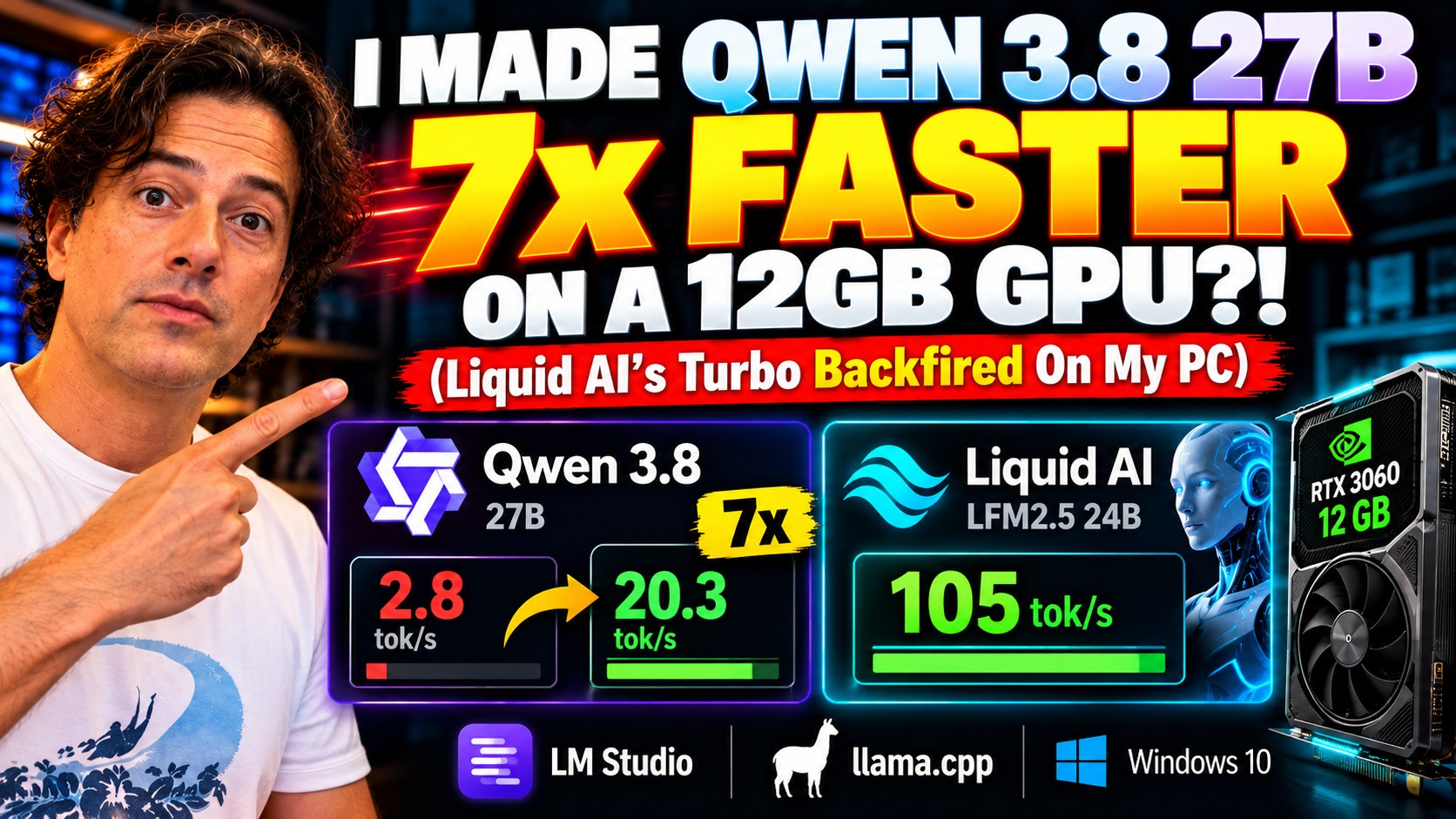
A twenty-seven-billion-parameter AI, on a five-year-old graphics card with just twelve gigabytes of memory, completely offline. Out of the box it writes less than three words a second. With the right file and three settings, the same model on the same card runs about seven times faster. Next to it, Liquid AI’s brand-new LFM2.5 24B does over a hundred tokens a second. I recorded every click on my own PC, from an empty desktop, and at the end I tested the speed booster Liquid quietly published on Hugging Face on October 19. It did not do what I expected.
The Short Version
- Hardware: a normal gaming PC. Intel Core i5-12400, 64 GB of RAM, NVIDIA RTX 3060 with 12 GB of video memory, Windows 10. Nothing exotic, nothing rented in the cloud.
- Qwen 3.8 27B (Alibaba, dense): 2.8 tokens per second with a normal 17.9 GB file and default settings. About 18 to 21 tokens per second with ISTA-DASLab’s 10 GB GSQ-RCO file, every layer on the graphics card and the right launch options. Up to about 28 with MTP speculative decoding and thinking switched off.
- Liquid LFM2.5 24B A2B (Liquid AI, mixture of experts): around 105 tokens per second on screen, 124 to 127 in my clean measurements, with Unsloth’s 10.9 GB file fully on the card.
- Liquid’s DSpark “turbo”: a small helper model published on Hugging Face on October 19, with the main model card still saying “coming soon”. On this card, with one conversation at a time, it made generation slower every single time: 29 against 101 tokens per second in the recorded run, 10 to 40 percent slower in the clean bench.
- Real jobs, offline: both models answered questions about private documents correctly and wrote a correct Python script for a 400-row spreadsheet. On a full browser game, Qwen won clearly.
- Everything is free: LM Studio, llama.cpp and both models cost nothing and run without an internet connection.
What Liquid AI Released
Liquid AI published LFM2.5-24B-A2B on October 13, 2026. The name tells you the trick: 24 billion parameters in total, about 2 billion active. It is a mixture of experts. Inside its expert blocks there are sixty-four small specialists, and for every word the model writes only four of them wake up. You still need room for all 24 billion parameters, but the computer only does the work of roughly two billion for each word. That is why it can be fast on ordinary hardware.
Compared with the previous LFM2-24B-A2B, Liquid says it roughly doubled the pre-training data, from 17 to 33 trillion tokens, and quadrupled the context window, from 32,768 to 131,072 tokens. It is a reasoning model: it always thinks out loud before it answers. Liquid also trained it inside real agent tools, naming OpenClaw, Hermes Agent, Pi and OpenCode, because the target is private assistants that run on your own device and call tools.
On speed, Liquid quotes 184 tokens per second on an Apple M5 Max and 114 on an AMD Ryzen AI Max+ 395. On quality, its own benchmark table puts the model ahead of Qwen3.6-35B-A3B on agent and instruction tests (AutomationBench 27.69 against 8.72, IFBench 74.69 against 64.21) and behind on coding and hard science questions (SWE-Bench Verified 51.0 against 66.2, GPQA Diamond 74.42 against 83.69). These are Liquid’s own numbers. I did not find an independent evaluation, so read them as the vendor’s claims.
The licence is the LFM Open License v1.0: the weights are open, and commercial use is allowed as long as your company makes less than ten million dollars a year.
Why a 27B Dense Model Does Not Fit
The rival is Qwen 3.8 27B from Alibaba, released in August under the Apache 2.0 licence. This one is dense: all 27 billion parameters work on every single word. At full precision it is about 54 gigabytes. My card has twelve. Something has to give.
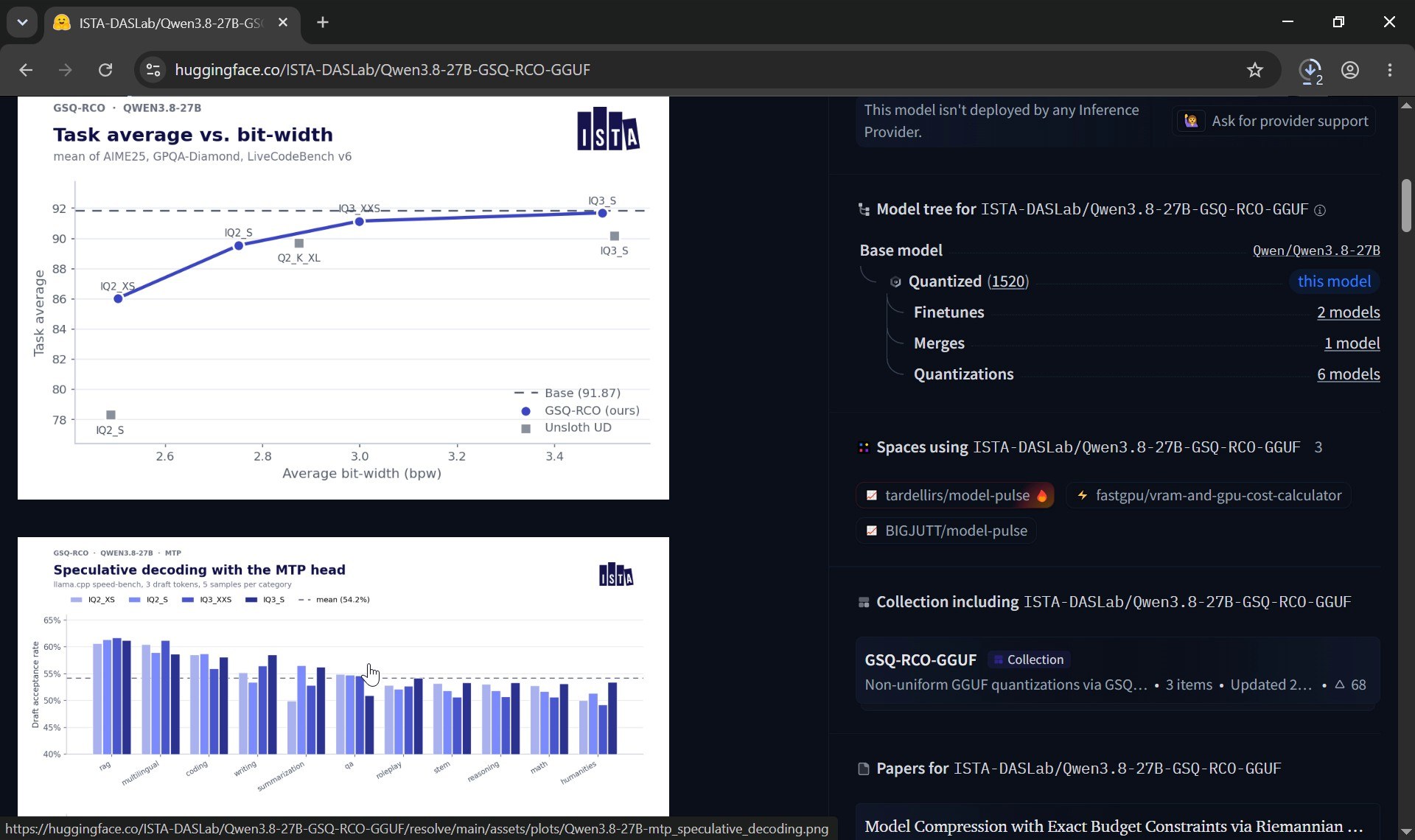
The usual answer is quantization: storing each number in the model with fewer bits. A normal four-bit file of Qwen 3.8 27B is still about 18 gigabytes, so it does not fit either. The interesting answer comes from ISTA, a research institute in Austria. Their GSQ-RCO files do not squeeze every part of the model equally. GSQ works out how accurately each tensor can be stored at different low-bit formats; RCO then decides where to spend a fixed size budget, giving more precision to the sensitive parts and less to the rest. On their published chart, the three-bit versions score almost exactly like the full model. Their recommended file is 11.8 GB, too big for my card once you add memory for the conversation, so I took the next one down: IQ3_XXS with an MTP head, 10.4 GB.
Step 1: Install LM Studio
I started from an empty Windows desktop, exactly like someone who has never done this. In Chrome, go to lmstudio.ai and click the big download button. The current Windows build is called LM Studio Bionic, and the installer is about 730 megabytes. When it finishes, click the file in Chrome’s download panel. The installer asks whether to install for you only or for everyone (keep the default), then the folder (keep it), then installs in a minute or two. Leave “Run” ticked and click Finish. LM Studio opens, and it is free.
I switched the interface to English and the dark theme in Settings, and checked the Runtime page: the CUDA engine was already selected, which means LM Studio will use the NVIDIA card.
Step 2: Download the Models From Hugging Face
Open models live on Hugging Face. Go to huggingface.co, click the search bar and type LFM2.5-24B-A2B-GGUF. GGUF is the file format that runs on normal PCs with llama.cpp and LM Studio. Two results come up: the official one from Liquid AI and one from Unsloth.
On the official page you can see the licence (lfm1.0) and, on the right, the hardware box with every size. The four-bit Q4_K_M file is 14.5 GB, the eight-bit one 25.5 GB. Click “Files and versions” to get the full list, then the small download arrow next to the file you want. Chrome downloads it straight into your Downloads folder.
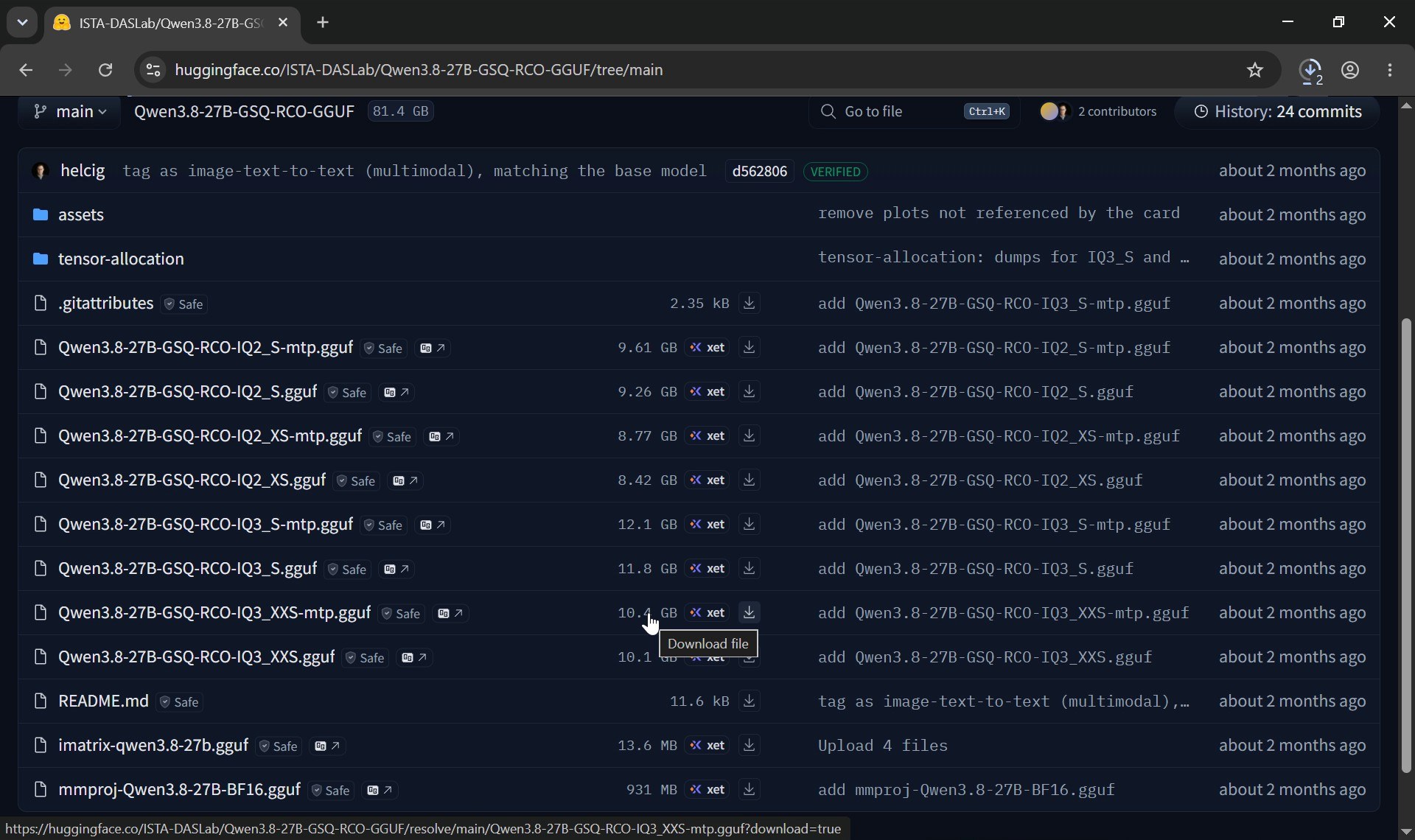
I also downloaded a second, smaller version from Unsloth, a team that makes very good compressed files: UD-Q3_K_XL, 10.9 GB. On a 12 GB card that difference matters, as you will see. Then the Qwen file from ISTA-DASLab’s page: Qwen3.8-27B-GSQ-RCO-IQ3_XXS-mtp, 10.4 GB. Three large downloads at once took a few minutes; two of them stopped halfway with “Check internet connection”, and Chrome’s Resume button finished them.
Step 3: Put the Files Where LM Studio Looks
LM Studio wants its models in a specific folder, with one folder per publisher and one per model inside it. In LM Studio go to Library, click the three dots and choose “Open in File Explorer”. Create the publisher folders (LiquidAI, unsloth, ISTA-DASLab) and inside each one a folder named after the model. Then open a second File Explorer window on Downloads, type “gguf” in its search box so only the model files show, put the two windows side by side and drag each file into its folder. Back in LM Studio, all the models appear in the Library with their sizes.
You can chat right there: pick a model at the bottom, type, press Enter. But LM Studio’s chat window does not show the generation speed, and speed is what this test is about. So for the next part I used the engine LM Studio is built on.
Step 4: llama.cpp, the Engine Underneath
llama.cpp is free and open source, and it shows every setting. On its GitHub releases page, scroll down to Windows and take the version for CUDA 13 plus the CUDA DLL package next to it. Open the Command Prompt (type cmd in the taskbar search), make a folder with `mkdir C:\llama`, go into it with `cd /d C:\llama`, and unzip both archives there with `tar -xf` followed by the file name. A quick `dir` confirms that llama-server.exe and the CUDA library are there.
`llama-server` starts the model and prints an address, 127.0.0.1 plus a port. Open that address in Chrome and you get a full chat page running on your own PC, and under every answer it shows the token count, the time and the speed in tokens per second.
The Speed Recipe on Qwen 3.8 27B
Same prompt every time: “Write a complete calculator web app in a single HTML file, with CSS and JavaScript: digits, the four operations, decimal point, clear, and keyboard support.”
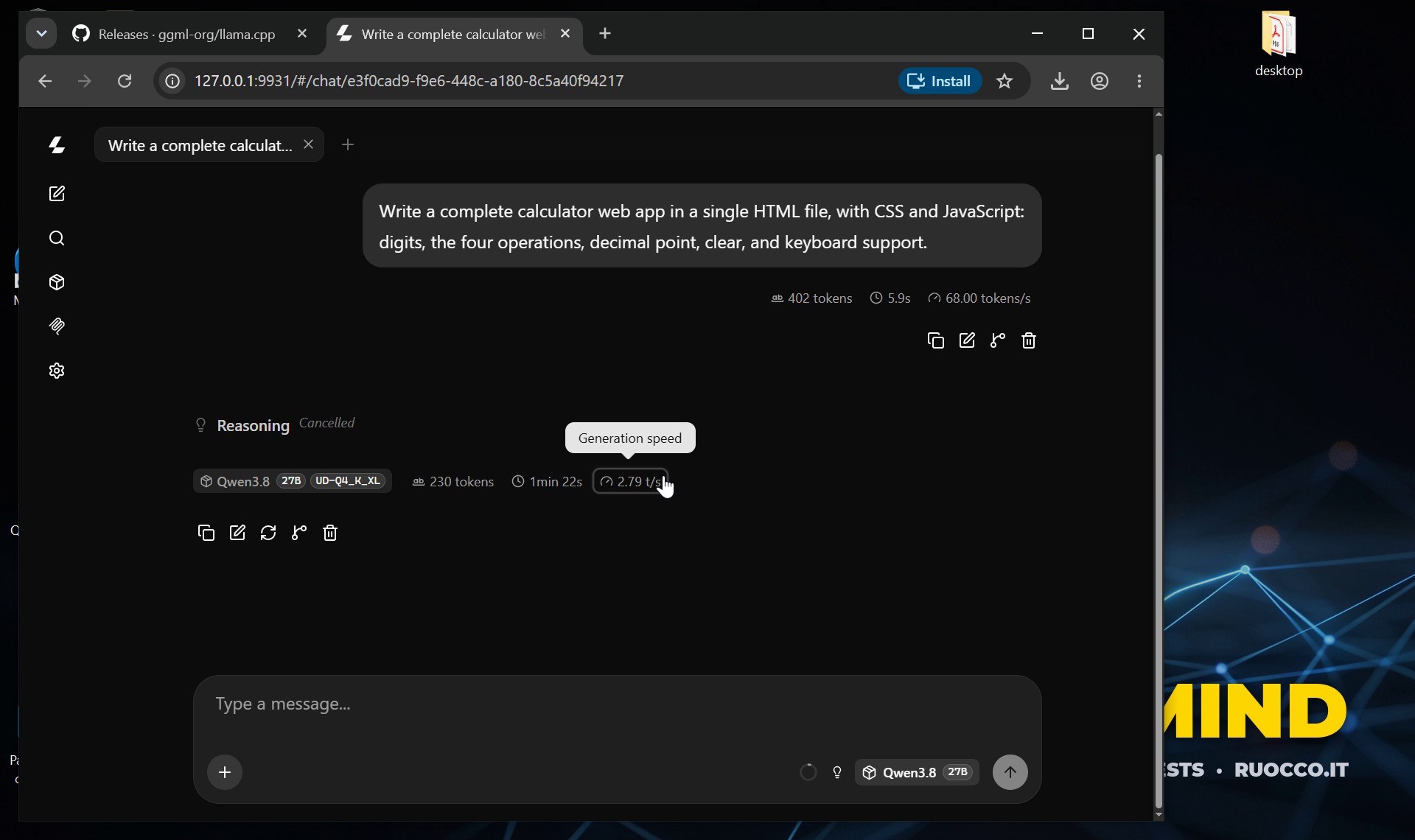
The mistake almost everyone makes: 2.8 tokens per second
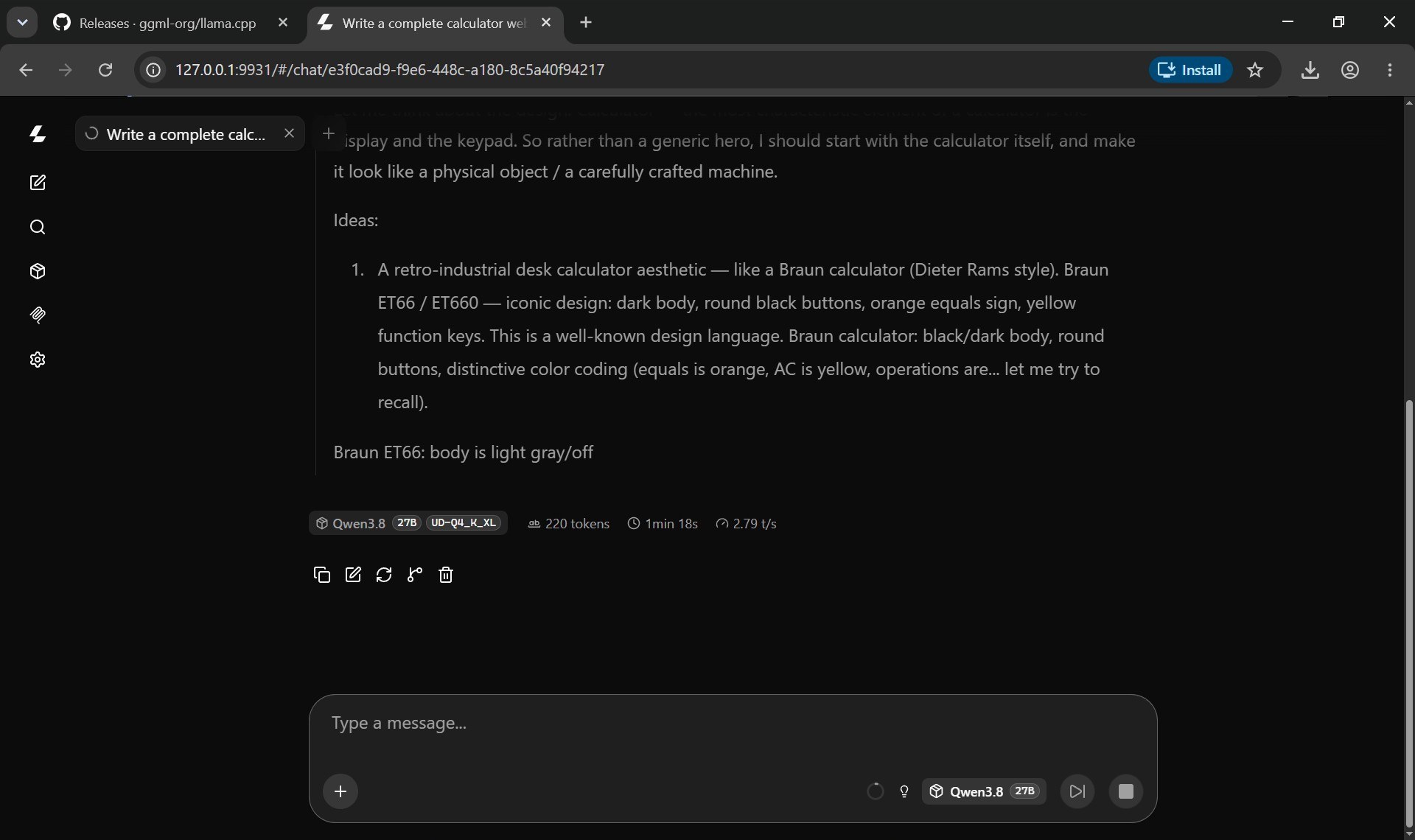
I started the ordinary four-bit Qwen file, 17.9 GB, with no options at all. The model loads, the chat works, and the counter under the answer settles at 2.8 tokens per second. Unusable. The file does not fit in twelve gigabytes, so part of the model sits in normal system memory, and every single word has to travel between the processor and the graphics card.
Fix one: the right file, everything on the card: 18 tokens per second
Control C stops the server. Then: the 10 GB GSQ-RCO file, `-ngl 99` to put every layer on the graphics card, `-fa on` for flash attention, `-np 1` for one conversation at a time (the default reserves memory for four) and `-c 8192` for eight thousand tokens of context. Same prompt: 18.3 tokens per second. From under three to eighteen, on the same card, without buying anything.
Fix two: KV cache and MTP, and what really happened
Next I stored the conversation memory, the KV cache, at eight bits instead of sixteen (`-ctk q8_0 -ctv q8_0`), and switched on MTP with `–spec-type draft-mtp`. MTP means the model carries an extra head that guesses the next few words; the main model then checks them in one pass, and if the guesses are right you get several words for the price of one step.
Here is the honest result on a 12 GB card. While Qwen is thinking out loud, its guesses are right less than half the time and the speed barely moves; in one run with thinking on it even dropped to 13.5 tokens per second. With thinking switched off (the small bulb next to the model name in the chat page), it writes the code straight away: 20.3 tokens per second on screen, and up to about 28 in my longer measurements through the API, where eight guesses out of ten were accepted. The memory is full to the last megabyte (11.97 of 12.29 GB), so the gain is much smaller than people report on 16 GB cards. On this card the big win was the right file and the right settings.
I also learned the hard way that a full card has side effects: my screen recorder used the same GPU’s video encoder, and twice it crashed when the model filled the memory. I switched the recording to the processor.
Liquid LFM2.5 24B: 105 Tokens per Second
Same prompt, Unsloth’s 10.9 GB file, every layer on the card. The answer streams in at 105 tokens per second, more than four thousand tokens in thirty-nine seconds. That is what two billion active parameters buy you on a gaming card. In my clean bench the same setup measured 124 to 127 tokens per second, and even the official 14.5 GB file with the default “fit what you can” behaviour still managed 57.
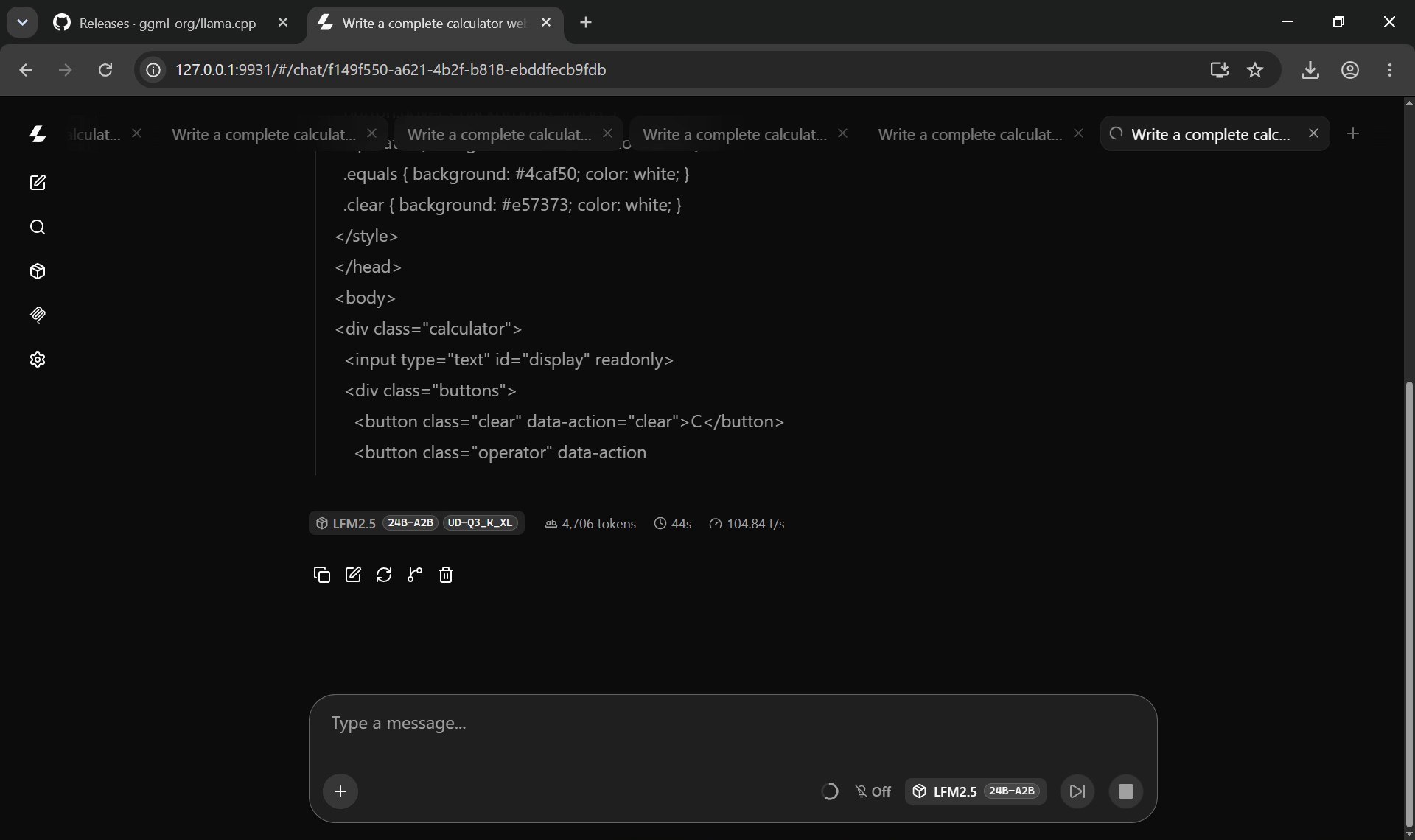
One warning: it thinks a lot. With eight thousand tokens of context it ran out of room before finishing the calculator code. For real work give it more context; `-c 32768` fits comfortably on this card.
Three Real Jobs, Offline
Speed is nice, but what can these models do for you without an internet connection? I gave both the same three jobs.
Private documents
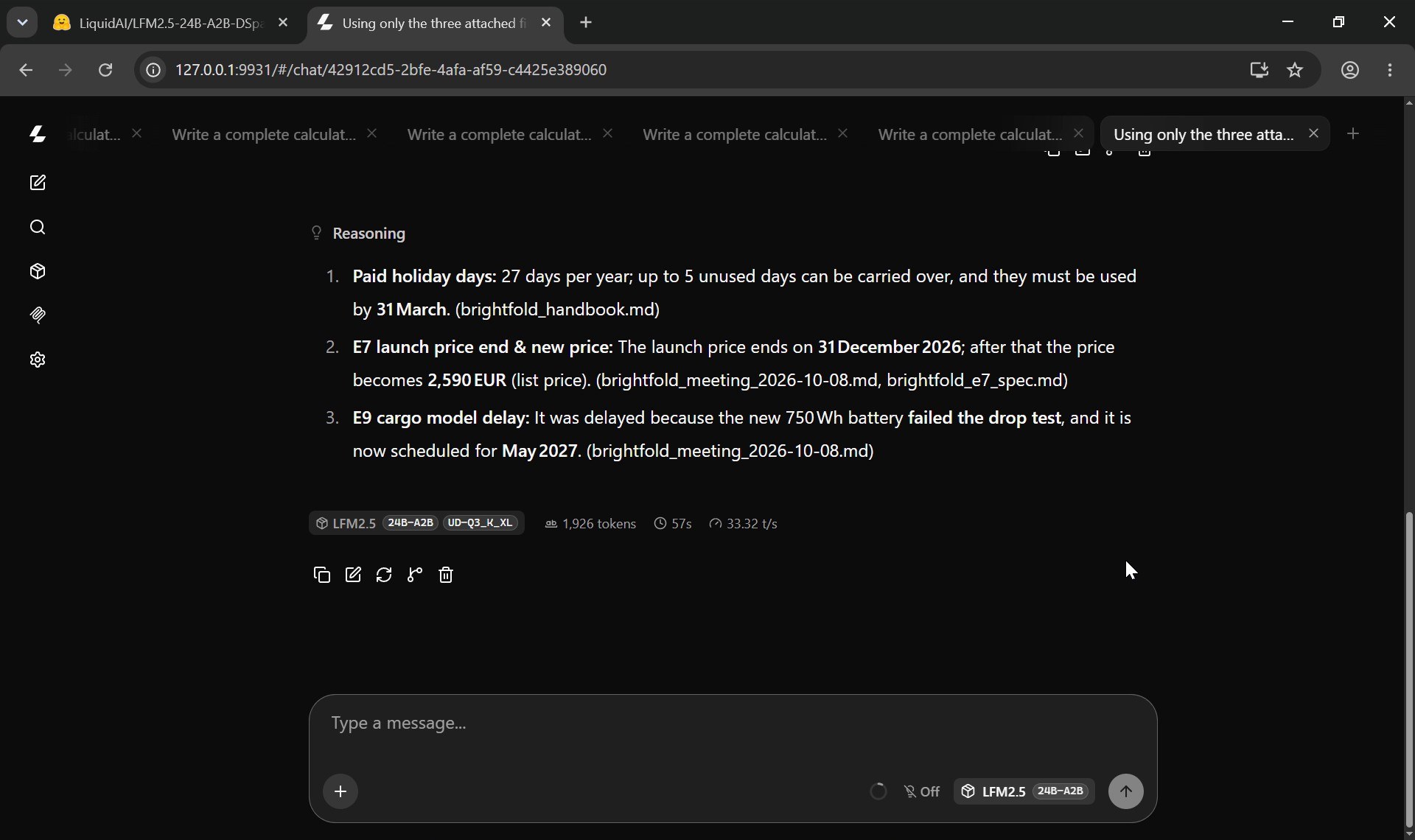
Three files from a made-up e-bike company: a staff handbook, a product sheet and the minutes of a product meeting. In the chat page you click the plus, Add files, select the three files and attach them. Then three questions: how many paid holiday days I get and until when I can carry them over, when the launch price of a bike ends and what it becomes, and why a new cargo model was delayed and to when.
Both models got all three answers right and named the file each answer came from. Liquid used more words to think (1,737 tokens against Qwen’s 527) but finished in 14 seconds; Qwen took about 25. Nothing left the PC.
A 400-row spreadsheet
Four hundred orders from a fictional online shop. My first attempt was to paste the whole file and ask the model to add things up in its head: both models ran out of room. The right way, and the way you should do it with any model, is to show it the header and a few rows and ask for a short Python script, then run the script yourself on the real data.
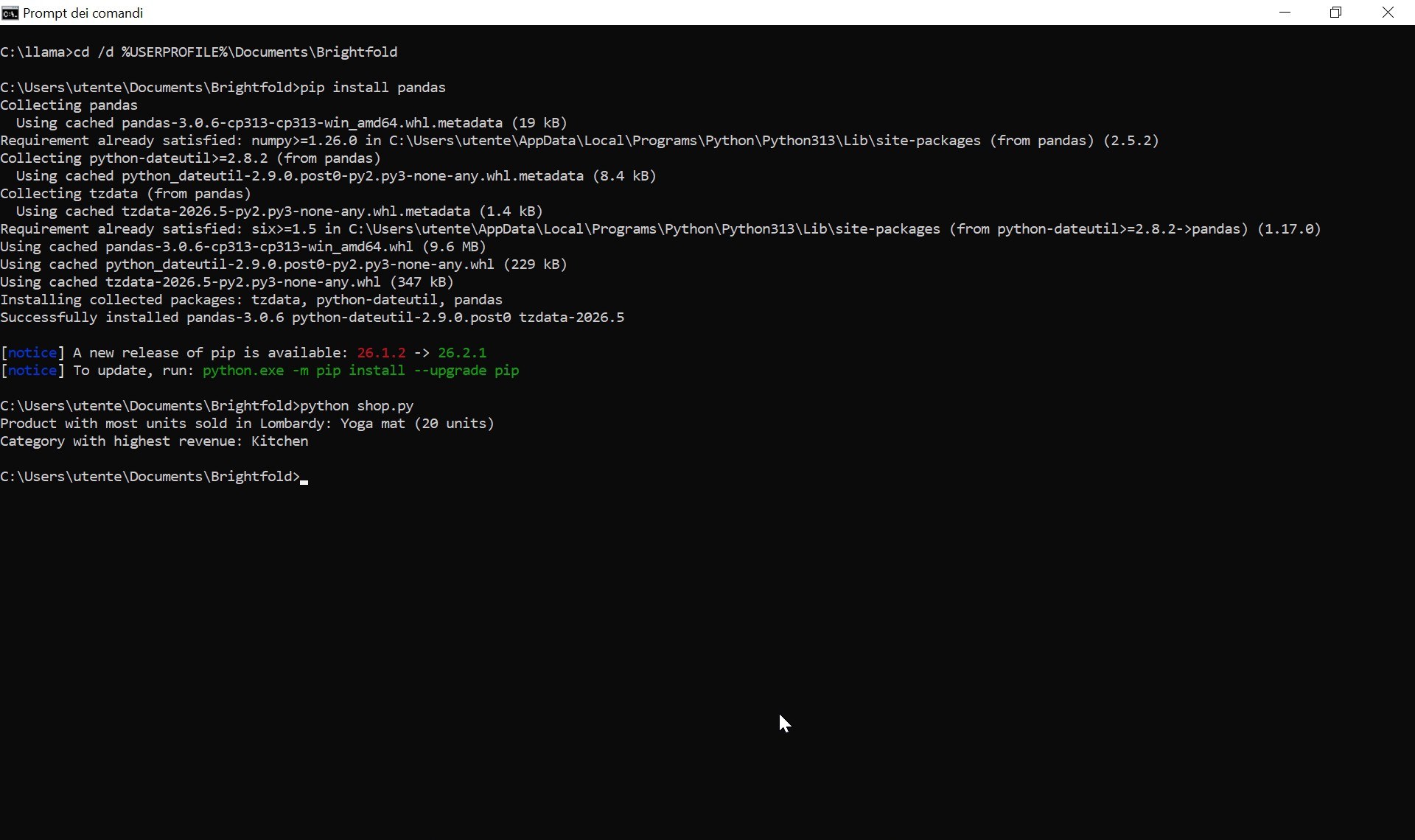
Copy the script with the button at the top of the code block, paste it into Notepad and save it as shop.py in the same folder as the data. In the Save dialog choose “All files”, otherwise Windows quietly adds .txt. In the Command Prompt go to that folder, install pandas with `pip install pandas` and run `python shop.py`. The answers: the yoga mat sold the most units in Lombardy (twenty), and Kitchen is the category with the highest revenue. I checked both against the data myself: correct. Qwen’s script was correct too; Liquid wrote its version about four times faster (14 seconds against about a minute).
A browser game: Qwen wins
The hard one. A night-time city street scrolling from right to left, an e-bike that switches between three lanes, potholes and traffic cones, glowing battery packs that fill a charge bar for a turbo, a HUD, a start screen and a game-over screen, all in one HTML file drawn with canvas shapes.
Here Qwen wins clearly. With thinking on, it reasoned for 24,000 tokens and never started writing the code. With thinking off it delivered a complete game: parallax city, street lights, cones, potholes, batteries, the charge bar and the turbo, and it worked on the first try. It took about ten minutes at 20 tokens per second.
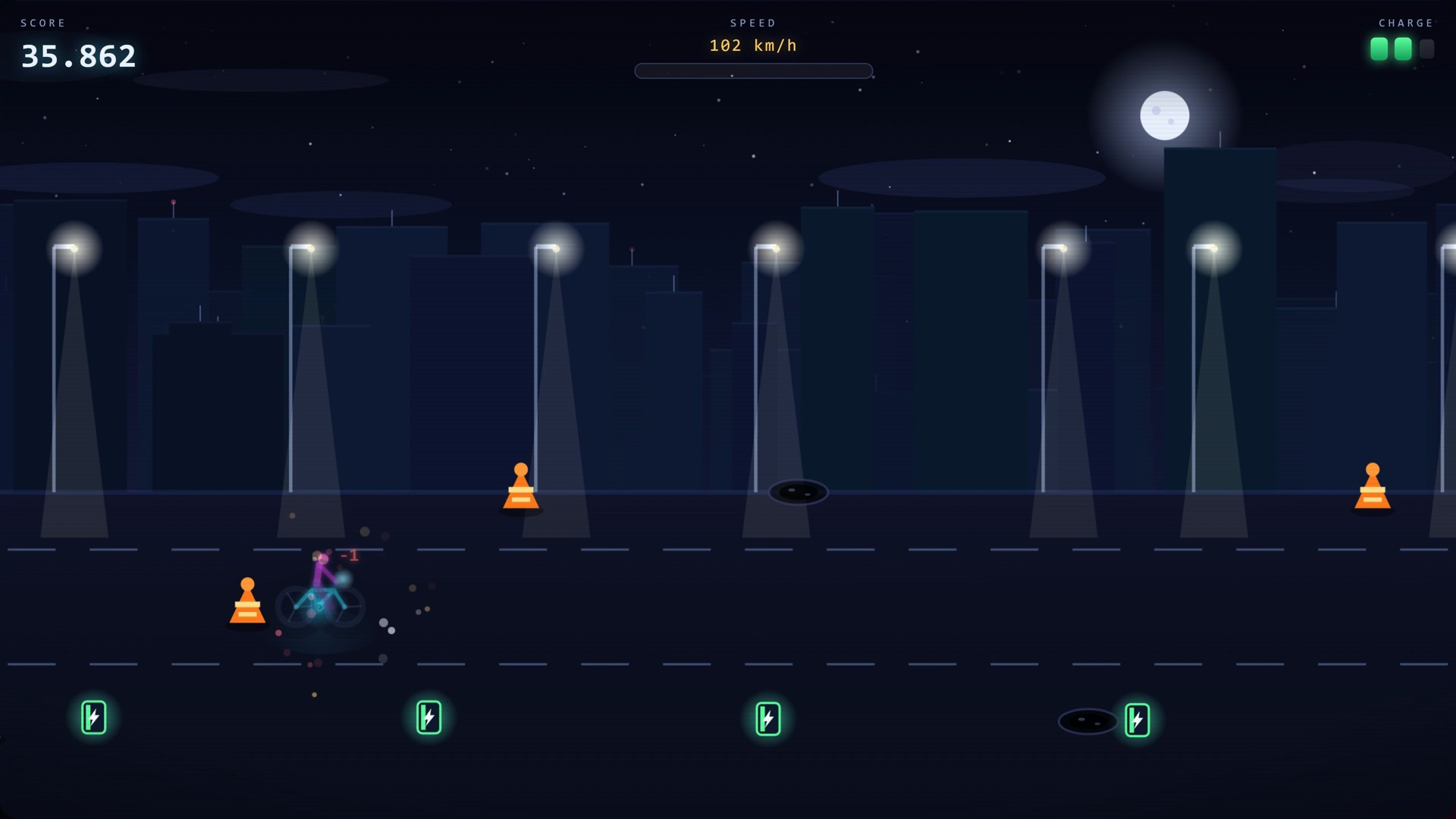
Liquid was done in three minutes, but its game called a function it never wrote, so it showed a black screen. One empty function fixes it (the line is marked in the file), and what is left is a very basic game with short runs. That matches Liquid’s own charts: strong on agents and documents, behind on coding.
Liquid’s Hidden Turbo: DSpark
On October 19, without any announcement I could find, Liquid published a second repository on Hugging Face: LFM2.5-24B-A2B-DSpark. It is a tiny helper model, about a third of a billion parameters, that proposes blocks of words for the big model to confirm. This is speculative decoding again, with a dedicated draft model instead of a built-in head. A ready-to-use GGUF file of 660 MB appeared the next day. The main model card still lists DSpark as “coming soon”.
Liquid’s page says it is 2.38 times faster on average. The small print matters: that figure is measured on an NVIDIA B300, a data-centre GPU, with the SGLang engine and an FP8 version of the model, and Liquid’s own numbers drop to 1.71 times at high concurrency.
I downloaded the file, moved it next to Liquid with one command, and started llama.cpp with the helper: `-md` for the draft model and `–spec-type draft-dspark`. Same prompt: 29 tokens per second. Then I restarted without the helper, same prompt, same screen recording running: 101. In my clean bench, without any recording, the picture was the same in direction if not in size: 72 to 110 tokens per second with DSpark against 124 to 127 without it. Never faster.
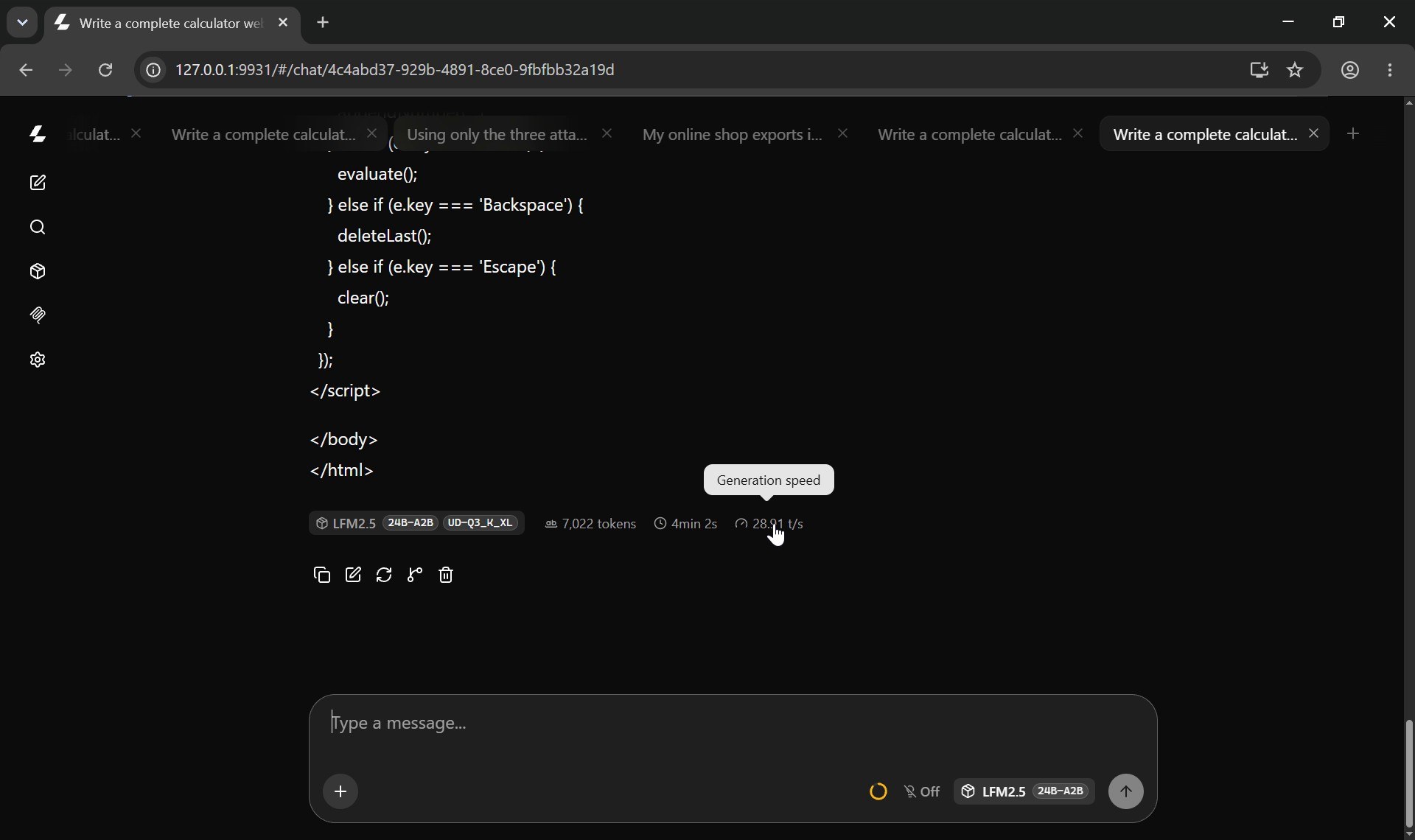
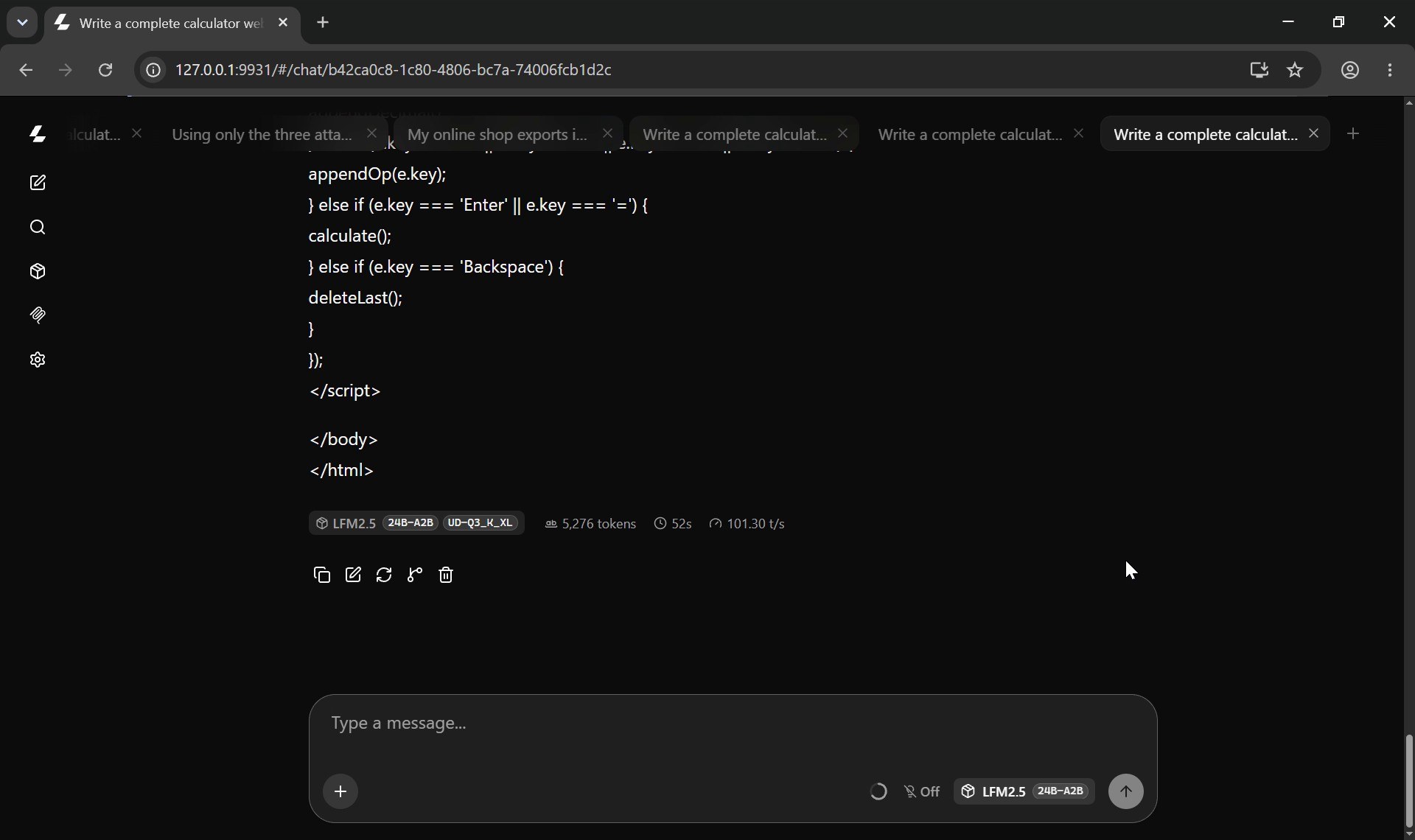
Why? On this card, with one conversation at a time, only about 44 percent of the helper’s guesses were accepted (21 percent when I let it propose longer blocks), so a lot of the extra work was thrown away. Liquid is already extremely light per word, so the helper’s own cost is no longer negligible. And because it is a mixture of experts, checking several guessed words at once can wake up different experts for each word, which eats into the saving. llama.cpp’s DSpark support is also brand new. It may well shine on the hardware it was built for, with many users at once. On a gaming PC today, leave it off.
So Which One Should You Run on 12 GB?
- Liquid LFM2.5 24B A2B for private documents, scripts, data work and agents: about 100 tokens per second with Unsloth’s UD-Q3_K_XL file fully on the card, and it was right every time in my document and spreadsheet tests. Give it a big context, because it thinks a lot.
- Qwen 3.8 27B for writing real code and anything that needs depth: about 20 tokens per second with ISTA-DASLab’s GSQ-RCO IQ3_XXS file, every layer on the GPU, and thinking switched off when you want the code now.
- Skip the DSpark helper on a consumer card for now.
Both are free, both run without an internet connection, and both fit on a card that costs less than a phone.
Try Every Demo, and Get the Code
Both games the models wrote on this PC, Liquid’s untouched original with the black screen, and the full speed table are online and playable in your browser: Liquid LFM2.5 24B vs Qwen3.8 27B on a 12 GB RTX 3060. Every other demo from my videos is in the AI demos menu.
The exact prompts, every launch command, the benchmark scripts and the fictional test files (documents and the 400-row shop export) are in the Ruocco Academy. The Academy is not open yet: join the waiting list and you will get one email when it opens.
Sources
- Liquid AI: LFM2.5-24B-A2B, Built for Fast On-Device Agents
- LiquidAI/LFM2.5-24B-A2B-GGUF on Hugging Face and unsloth/LFM2.5-24B-A2B-GGUF
- LiquidAI/LFM2.5-24B-A2B-DSpark and its GGUF
- ISTA-DASLab/Qwen3.8-27B-GSQ-RCO-GGUF
- LM Studio and llama.cpp
- LFM Open License v1.0
A Note on the Numbers
Every speed in this article was measured on my PC (i5-12400, 64 GB RAM, RTX 3060 12 GB, Windows 10) with llama.cpp release b11797 or b11799 and the settings written next to each number. They are not a universal benchmark: another card, driver, file or prompt will give different results. The benchmark scores quoted for both models are the vendors’ own. The e-bike company, its people and documents, and the shop orders are fictional and were made for this test. One game needed a one-line fix, marked in the file; the untouched original is published next to it.
If you like real AI tests you can run at home, subscribe to @VitoMind on YouTube.