Published: October 24, 2026 | By Vito Ruocco
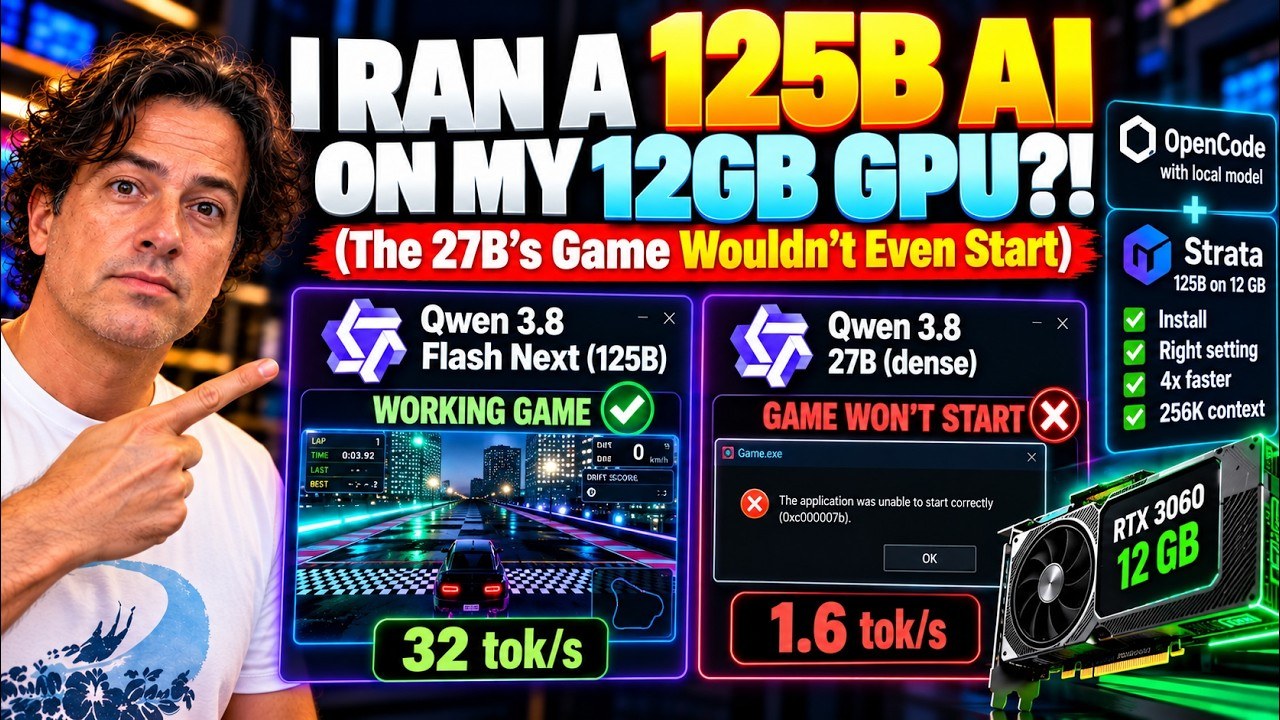
A one-hundred-and-twenty-five-billion-parameter AI, running offline on a five-year-old graphics card with twelve gigabytes of memory. Not a cloud demo: my own PC. And it does not just chat. I gave it a real coding job inside the OpenCode agent, with the full 256,000-token context, and it built a working game on its own, twice. Next to it I ran the model everyone recommends for a card like mine, the dense Qwen 3.8 27B, at full context too, with the same prompt on the same PC. One of them finished in half an hour. The other took more than two hours, and its game would not even start.
The Short Version
- Hardware: an ordinary gaming PC. Intel Core i5-12400, 64 GB of RAM, NVIDIA RTX 3060 with 12 GB of video memory, Windows 10. Nothing rented, nothing in the cloud.
- Qwen 3.8 Flash Next (Alibaba, mixture of experts): about 125 billion parameters in total, 512 experts, only 10 of them active for each word. ISTA-DASLab’s three-bit GSQ-RCO IQ3_S file weighs 84 GB, seven times my video memory. It runs with Strata, a free MIT-licensed app from GitHub that spreads the model across the graphics card, the system RAM and the SSD.
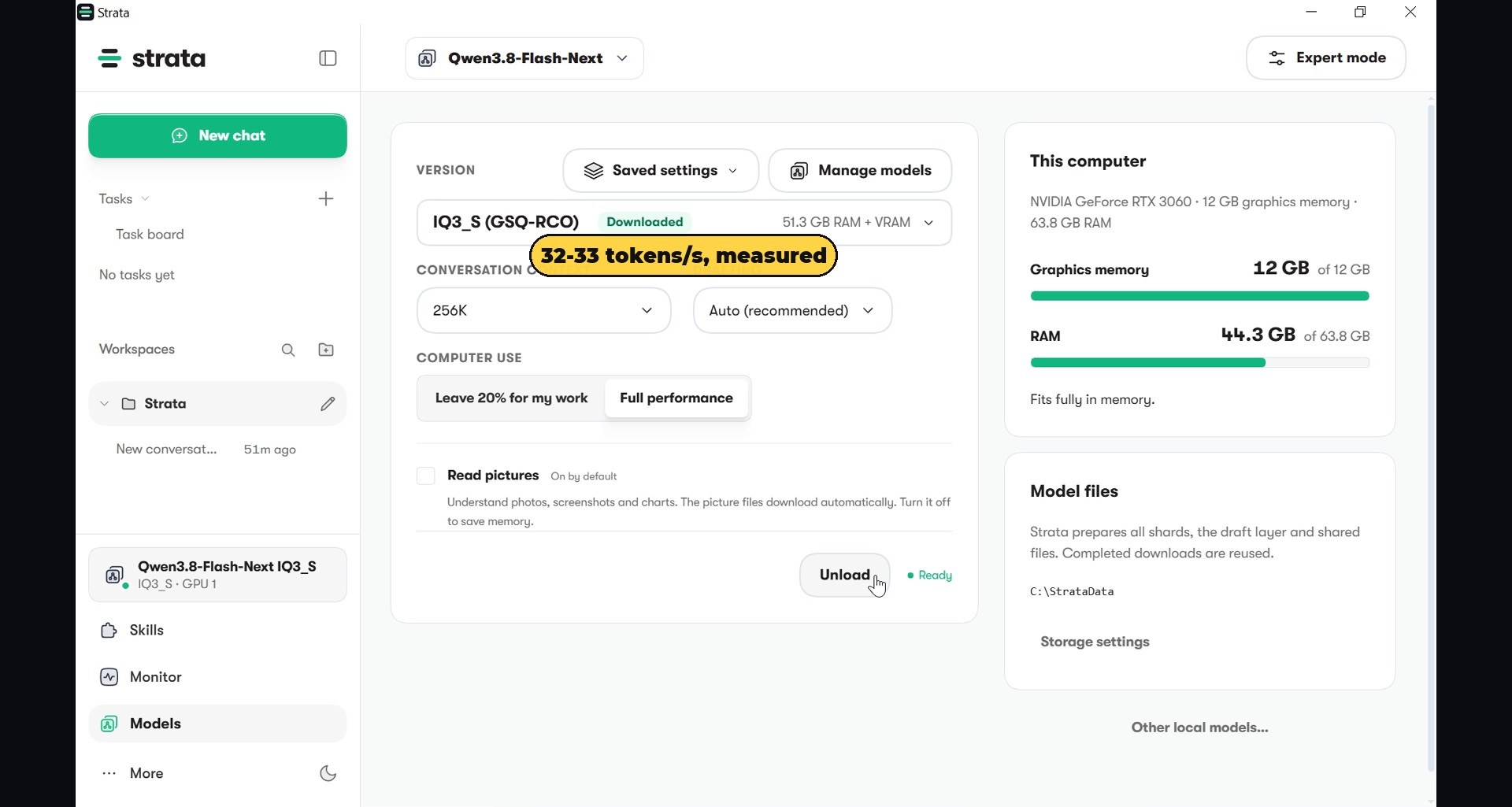
- One setting, four times faster: with Strata’s default “Leave 20% for my work”, 6.5 to 8.3 tokens per second. With “Full performance”, 32 to 33 tokens per second.
- Qwen 3.8 27B (dense) on llama.cpp: at the full 262K context the conversation memory has to live in system RAM, so it starts at 5.3 tokens per second and falls as the conversation grows, down to 1.6 tokens per second at the end of the job.
- The agent test: the same nine-file space shooter prompt in OpenCode for both. Flash Next: 27.5 minutes off camera and 33 minutes on camera, two working games, no fixes. Qwen 27B: zero files after 65 minutes with thinking on; nine files after 2 hours 13 minutes with thinking off, and a game that stops on its title screen until two lines are fixed.
- Everything is free: Strata, OpenCode, llama.cpp and both models cost nothing and run without an internet connection.
Why This Video Exists
This one is a viewer’s idea. Under my previous video, where I made Qwen 3.8 27B run about seven times faster on this same card, a viewer called @amortalbeing left a tip: try Qwen 3.8 Flash Next with Strata. On his RTX 3080 with 10 GB and 64 GB of RAM, he wrote, he gets forty to fifty tokens a second with more than three hundred thousand tokens of context. Other viewers asked a different question: fine, but what happens with the 27B at its full context, inside a real coding agent, not in a chat window?
I promised I would test both. So I did, on my own PC, and I recorded every click: the download page on GitHub, the installer, every choice in the setup, the configuration file for OpenCode, the full build and the games being played. If you want to repeat it at home, the steps below are exactly the ones in the video.
Why an Agent Needs a Huge Context
A chat model gets one short question and writes one answer. A coding agent like OpenCode works very differently. Before you type a single word, its instructions and the description of its tools already take about 7,400 tokens. Then every file it writes, and every file it reads back to check its work, goes back into the conversation, so the context keeps growing for the whole job.
On this project the conversation reached 54,000 tokens for Flash Next and 67,000 tokens for Qwen 27B. A model with an 8K or 16K context window simply runs out of memory halfway through and starts forgetting the files it wrote at the beginning. That is why I wanted both models at their maximum context: 256K for Flash Next in Strata, 262K for Qwen 27B in llama.cpp. It is also exactly what makes local agents hard on a consumer card, because every token of context costs memory.
Qwen 3.8 Flash Next: 512 Experts, 10 Per Word
Flash Next is Alibaba’s preview of the next Qwen architecture, released in August 2026 under the qwen-community-1.0 licence. When I opened the GGUF file’s metadata, the architecture is listed as qwen4exp: 48 blocks, 512 experts with 10 used for every token plus a shared expert, and full attention only in every fourth layer, with the other layers using a lighter, compressed form of attention (Gated DeltaNet). The declared context is 262,144 tokens.
The idea behind a mixture of experts is simple. The model is huge, about 125 billion parameters, but for every word it writes only ten of its experts wake up, roughly six billion parameters of work. So the computer does the work of a small model while keeping the knowledge of a big one. That is why it can be fast.
The catch is size. Even squeezed to about three bits per number, the files weigh 84 GB: ISTA-DASLab’s GSQ-RCO IQ3_S comes in two parts of 54.8 and 28.8 GB, and the second part is a large lookup table that is read from the SSD. My card has 12 GB. So the whole trick is deciding where to put everything: the parts the model uses on every word go on the graphics card, the experts go into the 64 GB of system RAM, and whatever is left is read straight from the SSD when it is needed.
Doing that juggling by hand with launch options is possible, but painful. That is exactly what Strata automates.
Step 1: Download Strata From GitHub
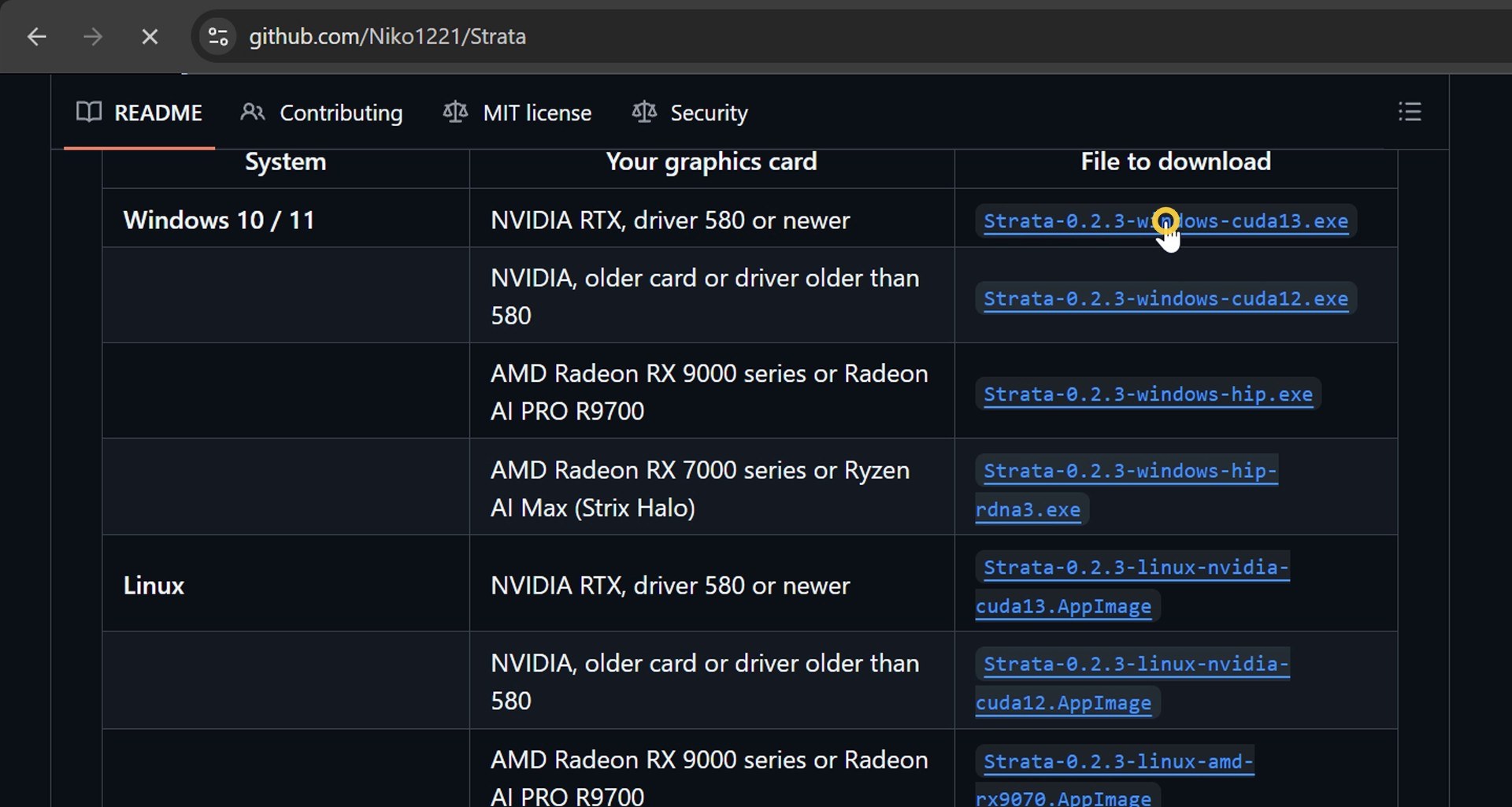
Strata is a free, open source app under the MIT licence, published by a developer on GitHub at github.com/Niko1221/Strata. The README opens with a short pitch, “Run a state-of-the-art model on your own gaming PC”, and support for NVIDIA, AMD, Intel, Mac and Linux.
Scroll down to the install table. It has one row per system and graphics card: pick your operating system, then your card. I have an NVIDIA RTX with a recent driver (580 or newer), so I took the first Windows file, the CUDA 13 build. The installer is about 615 MB. I checked its SHA-256 hash against the SHA256SUMS file published with the release, and it matched. That takes ten seconds and I recommend it for any installer you download from GitHub.
Step 2: Install It
Windows SmartScreen may warn you about an unrecognized app, because the installer is new and not yet widely downloaded. Click More info, then Run anyway. The installer asks where to put Strata: keep the default folder. It installs for your user only, so no administrator rights are needed. Then Next, and Finish.
On the first start, Windows Firewall asks whether Strata may use the network. Strata only needs to talk to your own PC, so allowing private networks is enough. Then comes the welcome screen, “State of the art. At home.”, and a Let’s get started button.
Step 3: Let Strata Pick the Model and the Context
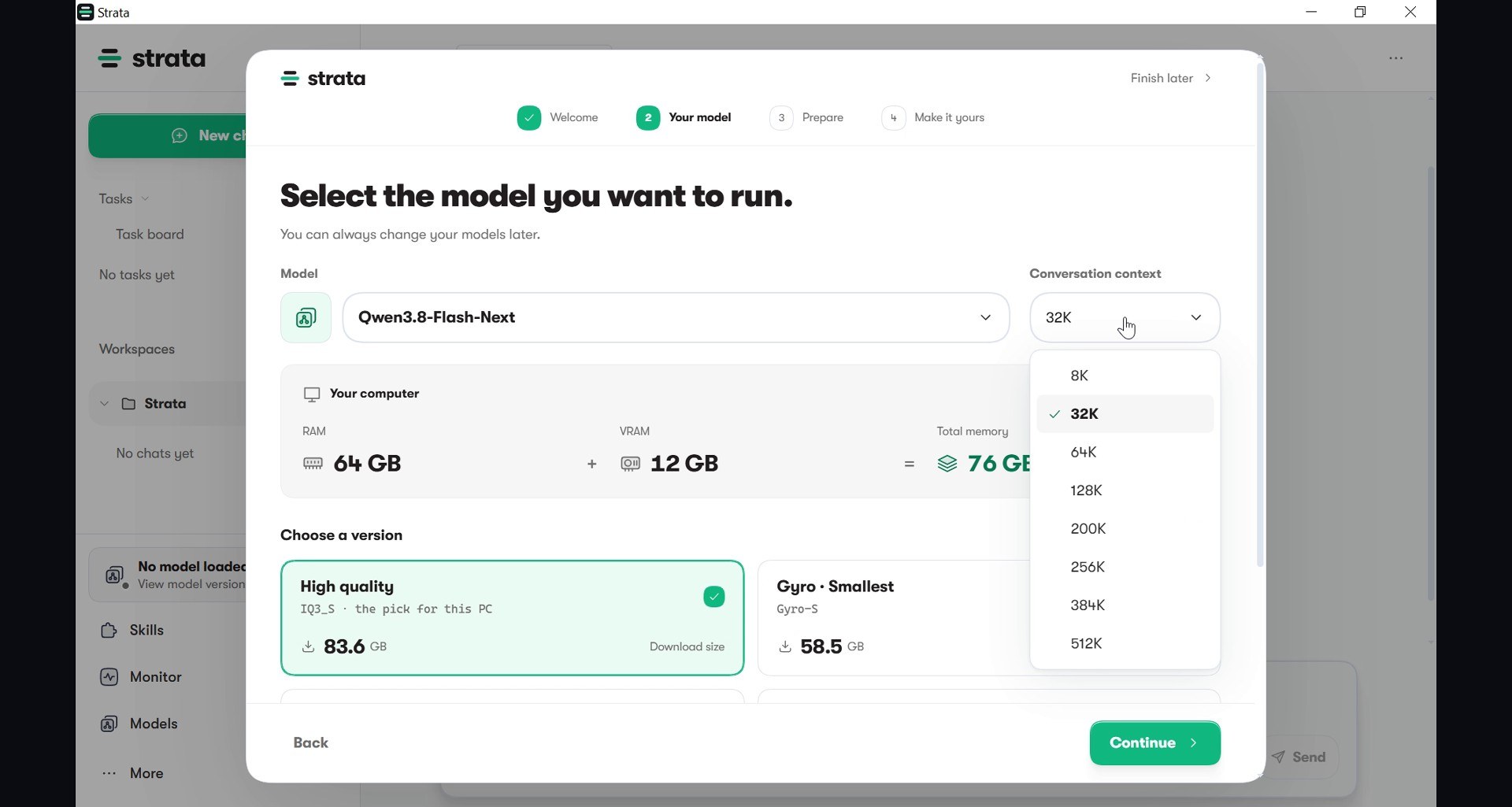
This is the part I liked most. Strata reads your hardware and does the arithmetic for you. On my PC it found 64 GB of RAM plus 12 GB of video memory, 76 GB in total, and when I chose Qwen3.8 Flash Next it showed the available versions with a label on each one. The high quality version, IQ3_S at 84 GB, is marked as the pick for this PC.
Then the conversation context: open the menu and choose 256K, the maximum. For a normal chat you would never need it. For an agent, as we saw above, it is the difference between finishing the job and forgetting half of it.
Step 4: Reuse the Files You Already Have
I had already downloaded the model files for my own tests, and 84 GB is not something you want to download twice. Strata has a link for exactly this: Already downloaded the model? Type the folder, click Use this folder, and Strata links the files instead of copying them (hard links on the same drive), so no space is wasted and nothing is downloaded again.
It only fetched one extra piece, about 6.5 GB: a draft layer, the MTP head, that guesses the next few words ahead so the big model only has to confirm them. This is speculative decoding, and in my runs between 78 and 82 percent of the guesses were accepted, which is a large part of why the speed is so good. A small pack of shared files, about 1.5 GB, came with it.
One warning from my own experience: an 84 GB model, plus Strata’s extra files, plus everything else, is a lot of disk. My C: drive was the real bottleneck in this test, and I had to free space twice. Check your free space before you start.
Step 5: The Choice That Matters Later
Next Strata asks how you want to work with it. The default is Leave 20% for my work: the app keeps a fifth of your memory free so you can keep using the PC normally while the model runs. The other option is Full performance. Remember this choice, because it turned out to be the most important setting in the whole test.
After a short tuning pass (“A little tuning. A better fit.”), Strata is ready and greets you with “Hello, I’m Strata.” You can chat with it right there, but for an agent we need one more step.
Step 6: Serve the Model to Other Apps
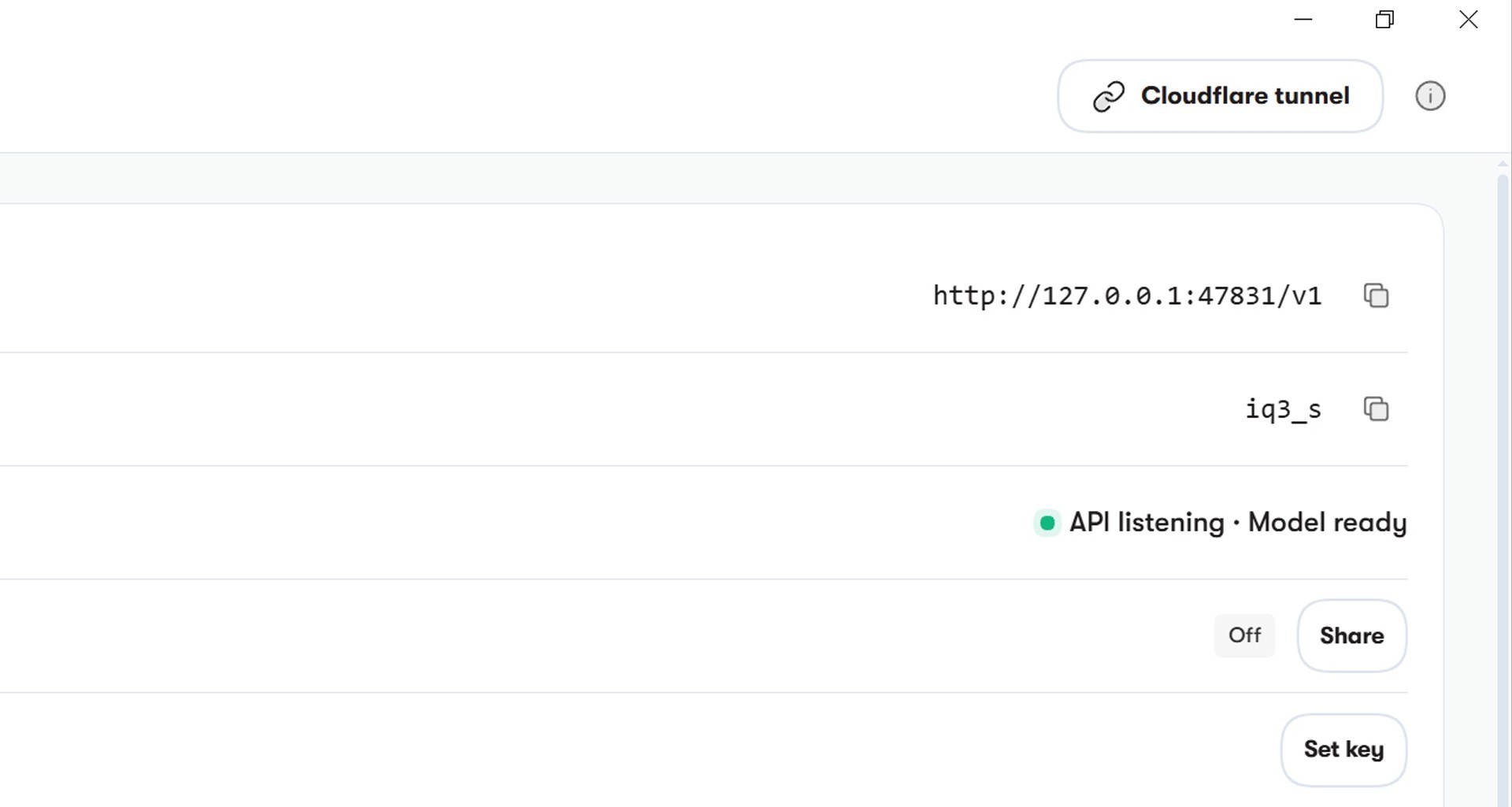
To let other programs use the model, open More, then Serving. Here is the address of the local API, which speaks the same language as the OpenAI API: http://127.0.0.1:47831/v1, with the model name iq3_s. Network sharing stays off, so nothing leaves the PC. The status line reads “API listening · Model ready”.
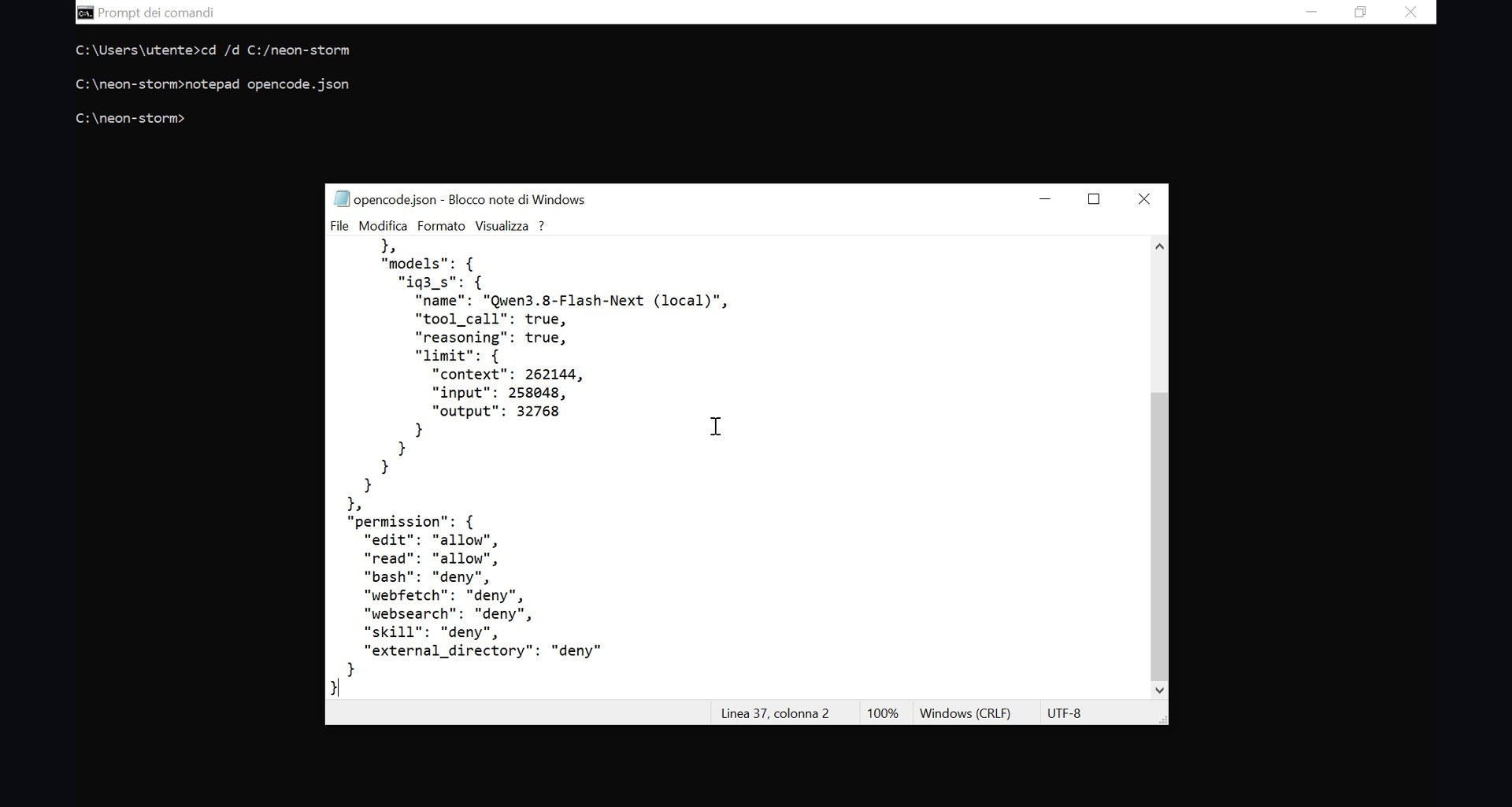
Strata can even print a ready-made configuration for OpenCode with its strata connect opencode command, with tool calling and reasoning switched on and the input limit set to 258,048 tokens.
The Setting That Made It Four Times Faster
My first speed test, with the default setting, was a disappointment: 6.5 tokens per second while recording the screen, 8.3 without. That is usable for a chat, not for an agent that has to write thousands of lines.
Strata’s log explained why. Leaving twenty percent of memory free meant that only about 35 GB of experts fit in RAM. Everything else was read from the SSD over and over, and during that one test the app read 277 GB from the disk. Even a fast SSD is far slower than RAM.
So go to Models, switch Computer use to Full performance, and load the model again. Same prompt, same card, reasoning off: 32.0 and 33.0 tokens per second in two runs without recording, 26.3 while recording the screen. Four times faster with one click. The status panel now says “Fits fully in memory”, with 12 GB of video memory and 44.3 GB of RAM in use.
The price is that the PC is busy while the model runs. Close what you do not need, and do not plan to edit 4K video at the same time. My viewer’s numbers on a 10 GB RTX 3080 were 40 to 50 tokens per second; on my 3060 with its slower memory, 32 to 33 is right where I would expect it.
The Rival: Qwen 3.8 27B at 262K Context
Qwen 3.8 27B is a very different animal. It is dense: every one of its twenty-seven billion parameters works on every single word. In my previous video I made it run at about twenty tokens per second on this card, with ISTA-DASLab’s GSQ-RCO IQ3_XXS file and every layer on the graphics card. But that was with a modest context.
The problem is the conversation memory, the KV cache. Two hundred and sixty-two thousand tokens of context do not fit in 12 GB next to the model itself. So I ran it with llama.cpp (release b11836), all layers on the graphics card, and the context memory moved to system RAM with eight-bit entries. That is the price of full context:
- 5.3 tokens per second with an almost empty conversation (1K tokens)
- 2.1 tokens per second at 32K tokens
- reading a prompt at about 130 tokens per second, so a 32K-token conversation takes four minutes just to be read
For comparison, with the context memory kept on the graphics card instead, the same model ran at 20.8 tokens per second at 1K and 18.5 at 16K, with a 32K context. Fast, but too small for a nine-file project. You cannot have both on 12 GB: either speed with a short memory, or a long memory at a crawl.
The Real Test: OpenCode With a Local Model
Here is the setup, exactly as in the video. I made an empty project folder called neon storm, opened the command prompt and went into it. Then I typed notepad opencode.json and said yes when Notepad offered to create the file.
The configuration does two things. First, it adds Strata as a provider, with the address from the Serving page and the model with its full context. Second, it limits what the agent may do: it can read and edit files in that folder, and nothing else. No terminal, no web access, no files outside the project. A local agent running on your own PC should never be allowed to touch the rest of it, and I follow that rule in every test I do with free or local models.
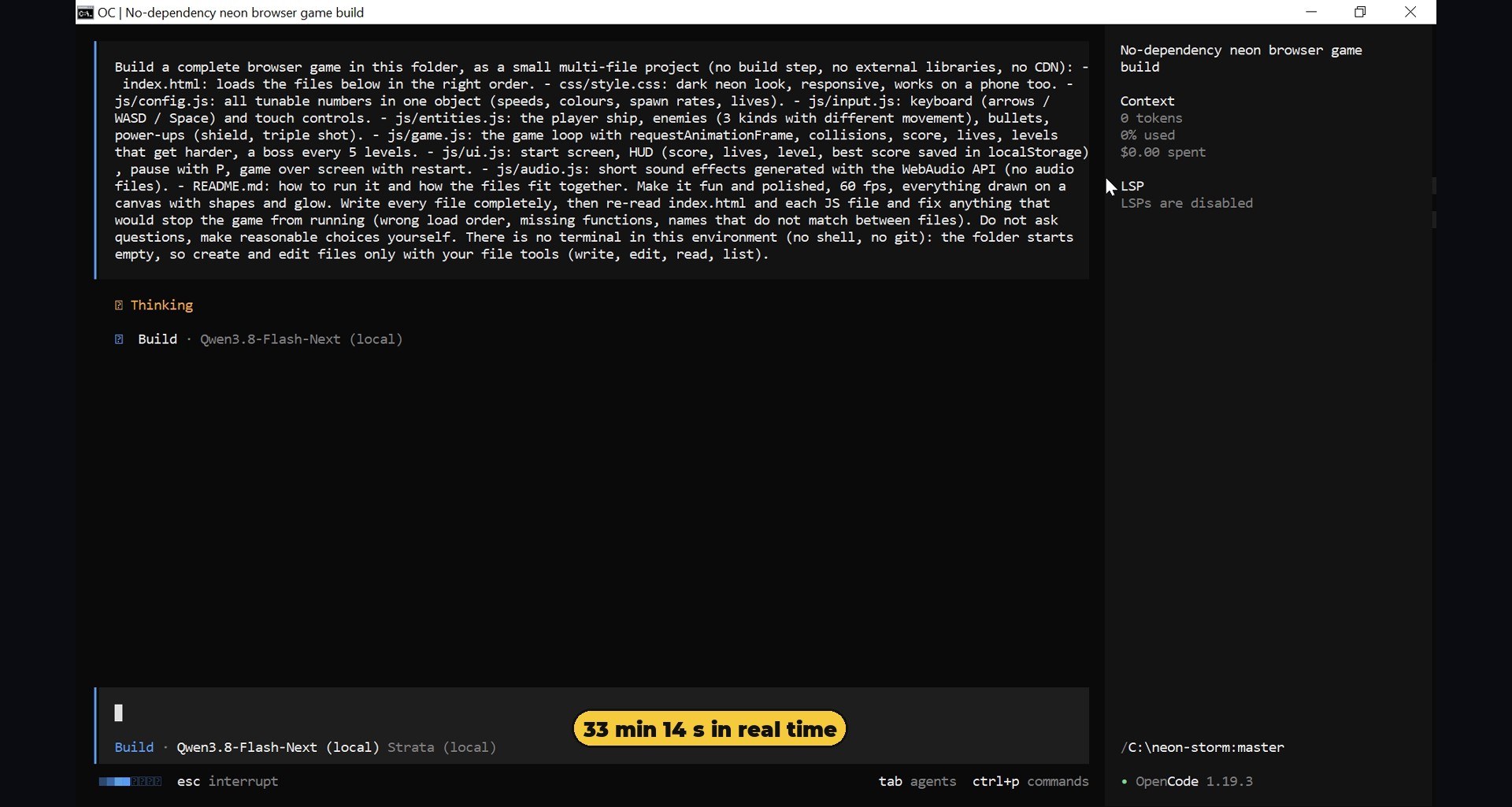
Then I typed opencode. It opened with Qwen Flash Next selected, served by Strata. The prompt was the same for both models: a complete space shooter for the browser, split into nine files, with three kinds of enemies, power-ups, a boss every five levels, a best score that is saved between sessions, and sound effects generated in code, with no external assets. And at the end: re-read every file and fix anything that would stop the game from running.
One fair detail: in my first runs, Flash Next tried to use a terminal command to look around the folder, which my configuration denies, and wrote the command as plain text instead of creating files. So I added one line to the task, for both models: there is no terminal, use only your file tools. After that, neither model had that problem.
Flash Next’s Run: 33 Minutes, a Working Game
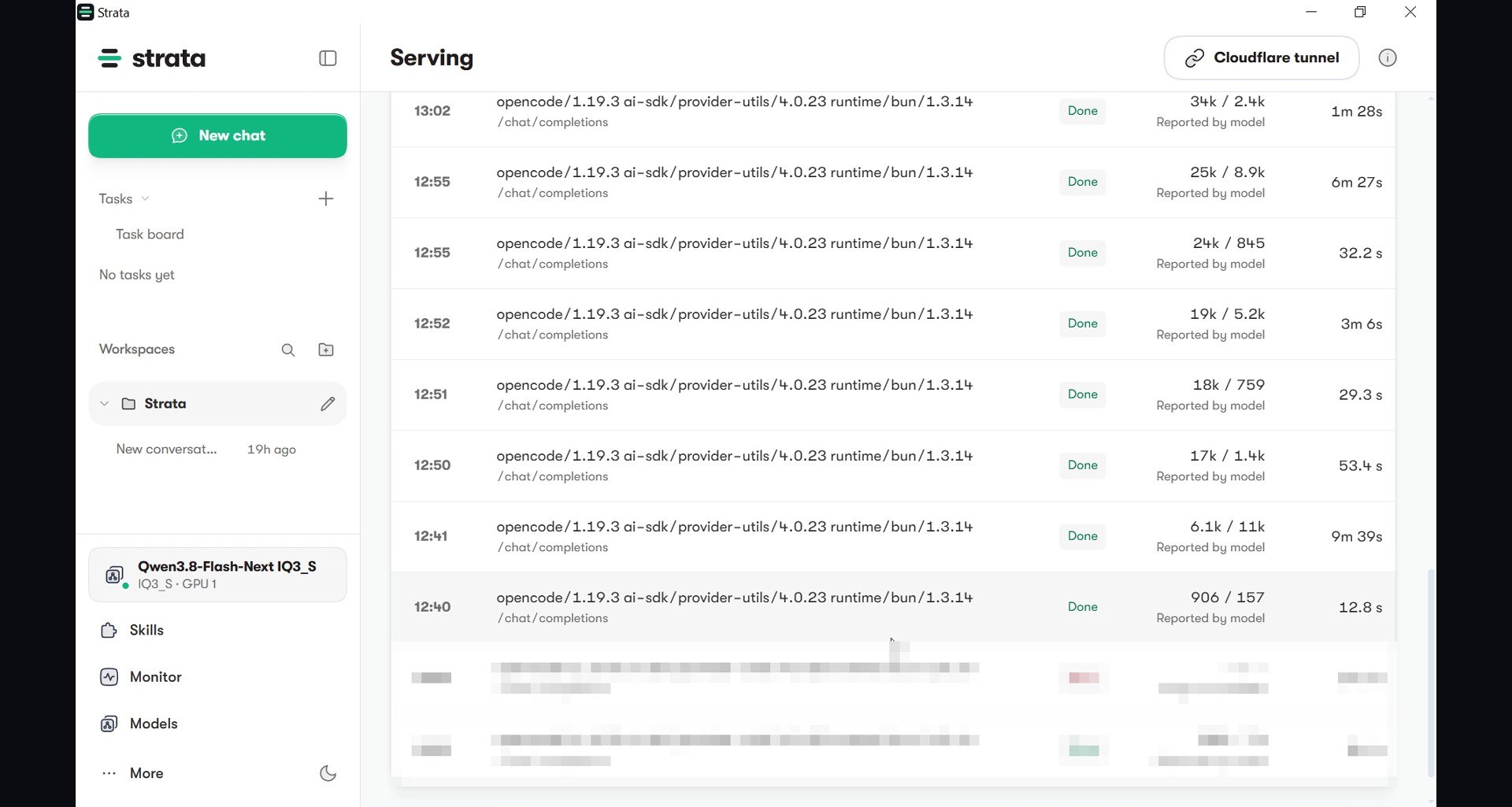
Then you wait. In the video you can watch it think, write a file, read it back and move on, sped up. In real time the recorded run took 33 minutes and 14 seconds. The conversation grew to 54,400 tokens, about a fifth of the 256K context. Strata’s Serving page lists every request OpenCode sent: 22 calls, some of them writing eleven thousand tokens in one go. With the screen recording and Chrome running at the same time, speed during the run was around 19 tokens per second; in the run I did without recording it stayed between 25 and 33.
In its final review pass, exactly as the prompt asked, the model found and fixed three bugs of its own: a crash when the player object did not exist yet, a read from a missing HUD element, and an overlap between the pause and game-over screens.
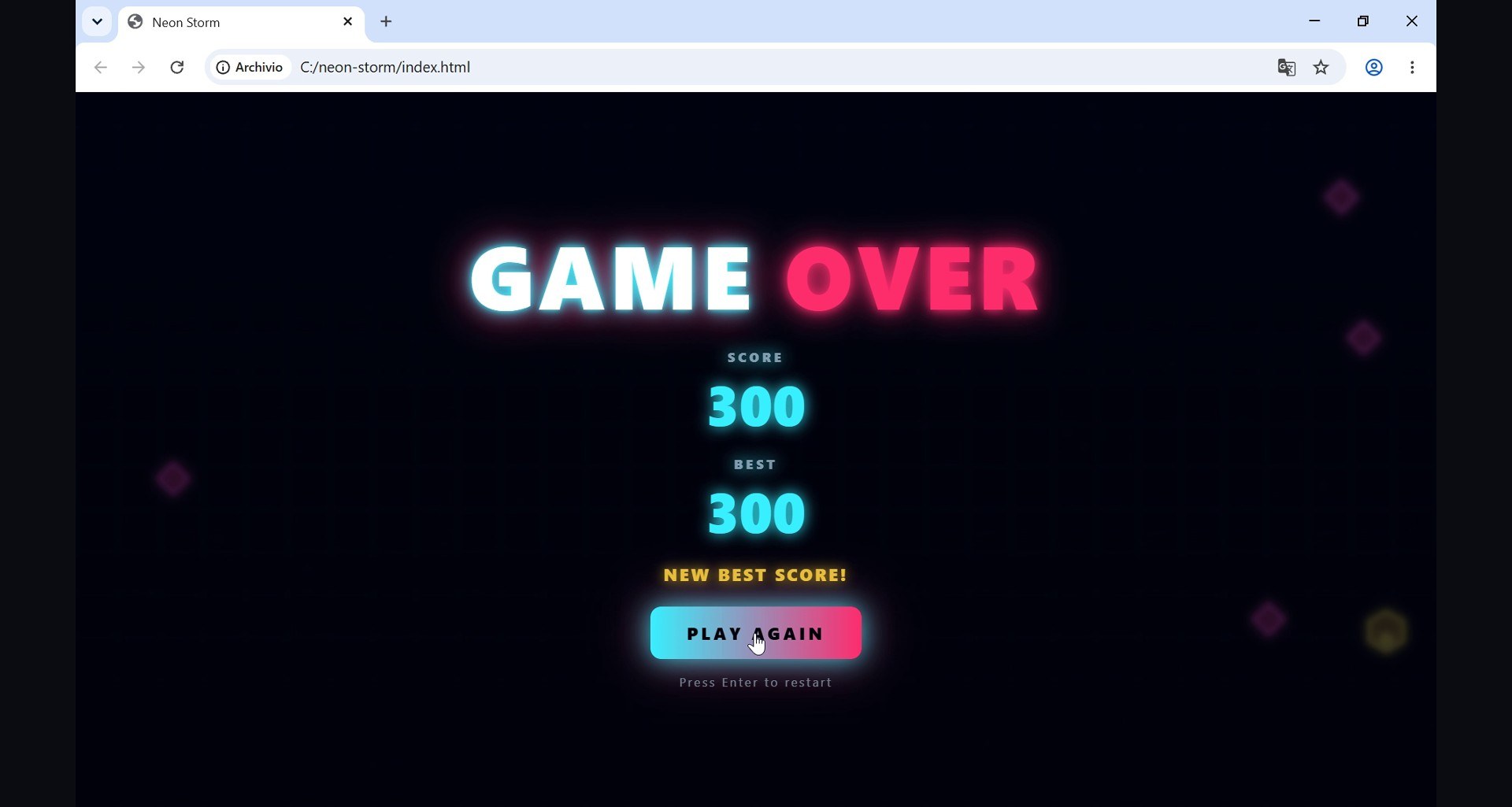
So, does it work? I opened the index file in Chrome. Neon Storm. Start. The ship flies, it fires, enemies come in waves, the power-ups drop, and when you die your best score is saved. First try, no fixes: 9 files, 1,716 lines, no errors in the console.
I ran this job twice. The first valid run, off camera, took 27.5 minutes and produced 9 files and 1,493 lines, with a boss every five levels and three enemy types. The second is the one you see in the video. Two runs, two working games, zero fixes from me.
Qwen 27B’s Run: Two Hours, and a Title Screen
Now Qwen 3.8 27B, at full context, with the same prompt.
My first run had thinking switched on, which is the model’s default. After 65 minutes: zero files. It thought for about sixteen thousand tokens in a single answer, hit the output limit, and never wrote a line. That is a useful lesson in itself: a dense model, with thinking on, at a long context, on a small card, can burn an hour and produce nothing.
So I ran it again with thinking off. This time it wrote all nine files, 1,453 lines, but it took 2 hours and 13 minutes, and it got slower and slower as the conversation grew:
- 5.2 tokens per second at 14,500 tokens of context
- 4.0 at about 37,000
- 3.0 and then 1.6 as it approached 67,000
That is the dense model paying for every single word. Its own review pass even made four fixes.
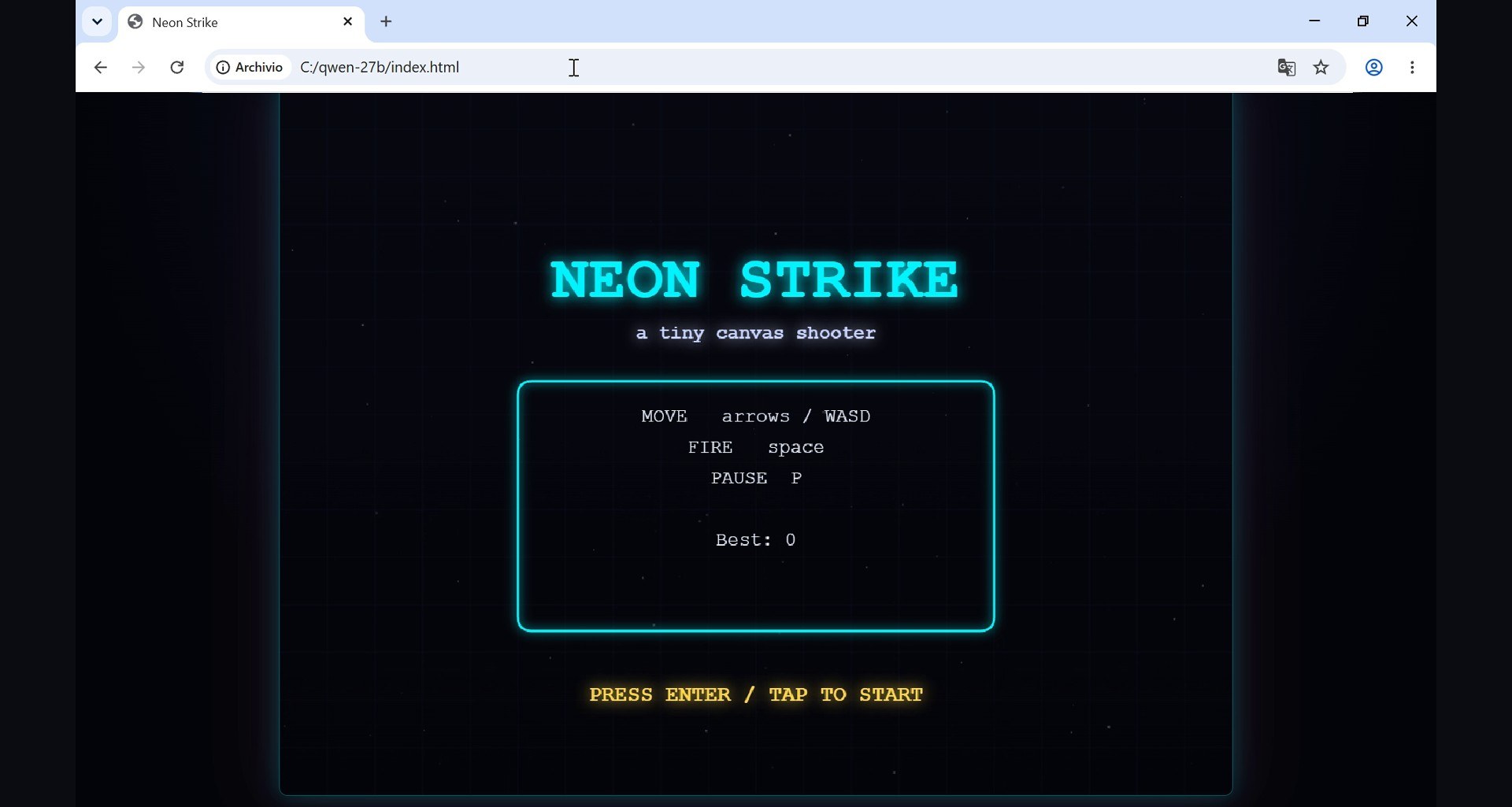
And the result? It looks nice: Neon Strike, “a tiny canvas shooter”, with a clean neon title screen. I press Enter. Nothing. Again. Nothing. The game never starts.
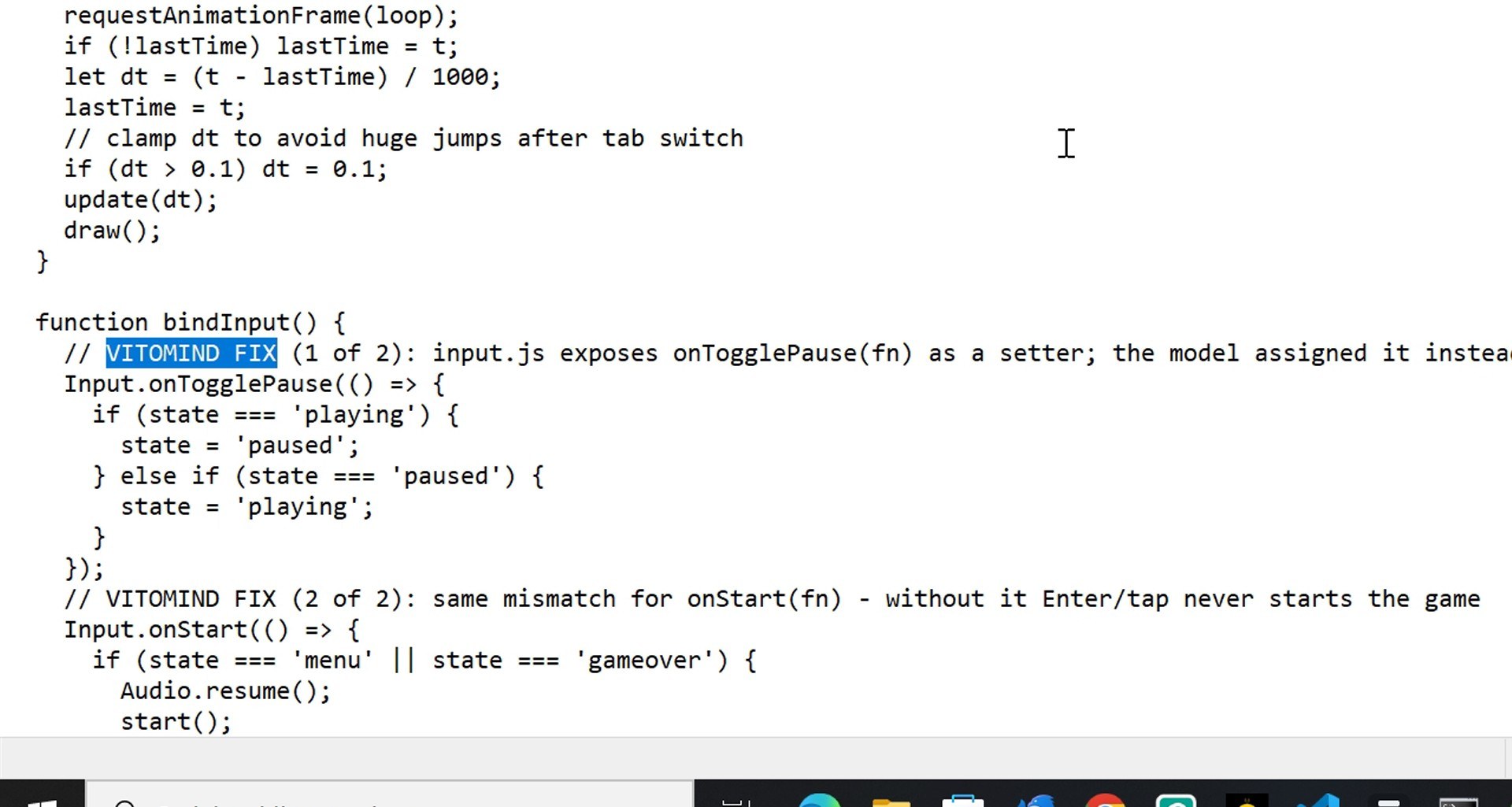
The reason is exactly the kind of mistake the prompt told it to check for: a mismatch between files. The input file exposes two functions, onStart and onTogglePause, that other code is supposed to call to register what happens when you press Enter or pause. The game file does not call them: it overwrites them with its own functions. So the key presses are never connected to anything. Two lines fix it, and I marked both in the code with a comment. After the fix, Neon Strike plays well: the ship, three enemy types, power-ups and a HUD. On camera I reached level 4 with 2,400 points.
But out of the box, it is a title screen. And I want to be fair here: this is one run per model, a single sample. The original, untouched build is published next to the fixed one, so you can see the bug yourself.
Play All the Games
All the builds are online and playable in your browser: both of Flash Next’s games, and Qwen 27B’s, both the original that does not start and the version with the two-line fix. They are on the gallery page for this test: Qwen 3.8 Flash Next vs Qwen 3.8 27B in OpenCode on a 12 GB RTX 3060. Every other demo from my videos is in the AI demos menu.
A Windows OpenCode Gotcha You Should Know
One honest lesson from this test, and it is useful even if you never run a local model. On Windows, if you start OpenCode from a script with a long, multi-line prompt, the opencode.cmd launcher cuts the prompt at the first line break. The model only ever sees the first line.
My first runs were hit by this: both models received only “build a complete browser game” without the rest of the specification, and both built a neon breakout instead of a space shooter. I noticed because the results made no sense against the prompt, tested the launcher with a tiny script, and found the cut. Those runs are not used in the video or in the comparison above; all the results here come from runs with the full prompt.
The fix is simple: if you script OpenCode on Windows, call opencode.exe directly, or keep the prompt on one line. On camera I typed the prompt as a single line in the OpenCode window, which works fine.
So Which One Should You Run on 12 GB?
- Qwen 3.8 Flash Next with Strata if you have a 12 GB card and 64 GB of RAM. It is the surprise of this test: a much bigger model that ran about six times faster than the dense 27B at full context, and it did the agent job right, twice, with no fixes. Set Full performance, and keep the PC free while it works.
- Qwen 3.8 27B is still a great model, and I mean that. With a shorter context kept on the graphics card it runs at about twenty tokens per second, which is excellent for chat and for single-file code. At full context on this card it crawls, and for a multi-file agent job that is what kills it. If you use it in an agent, switch thinking off, or it may think until the output limit and write nothing.
- Whatever you run, sandbox the agent. File tools only, inside one project folder. No terminal, no web.
The bigger lesson is a bit counterintuitive: on a consumer card, a huge mixture-of-experts model can beat a much smaller dense one, because it only does six billion parameters of work per word, and a good tool can hide the rest in RAM and on the SSD.
Get the Exact Prompt and Every Setting
The exact project prompt, the complete opencode.json for Strata, the llama.cpp launch line for Qwen 27B at 262K, and the speed-test scripts are in the Ruocco Academy. The Academy is not open yet: join the waiting list and you will get one email when it opens.
Sources
- Strata on GitHub (Niko1221/Strata, MIT licence)
- OpenCode
- llama.cpp
- ISTA-DASLab on Hugging Face (GSQ-RCO quantizations)
- My previous test: Qwen 3.8 27B 7x faster on a 12 GB RTX 3060
- The Strata tip: a public comment by @amortalbeing under that video on YouTube
A Note on the Numbers
Every speed and time in this article was measured on my PC (Intel i5-12400, 64 GB RAM, RTX 3060 12 GB, Windows 10) with Strata 0.2.3 and llama.cpp b11836, and the settings written next to each number. They are not a universal benchmark: another card, driver, file, prompt or background load will give different results, and screen recording alone cost Flash Next several tokens per second. Each model’s result in the agent test is a small sample (two valid runs for Flash Next, one with thinking off for Qwen 27B). Qwen 27B’s game needed a two-line fix, marked in the file; the untouched original is published next to it. Flash Next’s builds were not modified.
If you like real AI tests on real hardware you can run at home, subscribe to @VitoMind on YouTube.