Published: November 3, 2026 | By Vito Ruocco
Can you tell my real voice from a copy made by a free app? This week I installed VoiceStudio, one of the fastest growing projects on GitHub, on my own Windows PC. I gave it twenty seconds of my voice, recorded into my microphone, and it spoke a sentence I never said, on my own graphics card, without sending anything to the internet. In the video I play you both clips side by side, and you have to guess which one is me. Before that, I went through five more free repositories that are exploding on GitHub right now, plus a bonus from Cloudflare. One of them made every animation in the video. One runs a whole fleet of coding agents. Two are fighting over the same job, so I put them through the same test. And one got its author hired after he lost his job. Here is everything I found, with the numbers checked and the catches nobody mentions.
The Short Version
- HyperFrames (HeyGen, about 78,000 stars): you write a web page, it turns it into a video. Every animation in my video was made with it, including the 3D version of me.
- Orca (about 114,000 stars): a free desktop app that runs several coding agents side by side, each in its own copy of your project. The app is free; the agents are not.
- Impeccable vs Hallmark (about 101,000 and 47,000 stars): two skills that promise to make AI websites stop looking like AI websites. I gave both the same prompt on the same model. Impeccable had the best idea; Hallmark did the most careful job; both beat no skill at all.
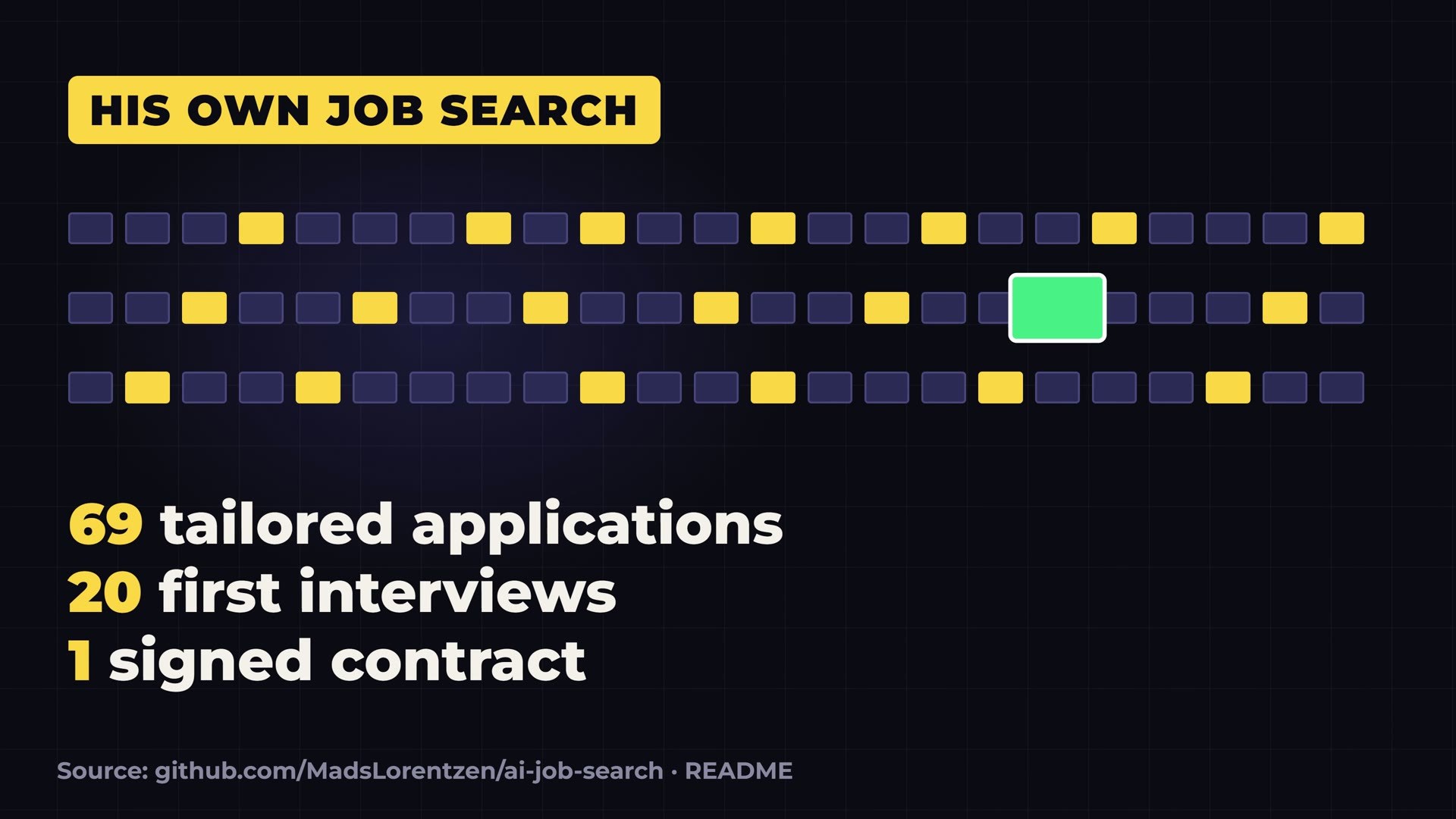
- AI Job Search (about 69,000 stars): a geophysicist lost his job, built his own job search on top of Claude Code, sent 69 applications, got 20 first interviews and one contract.
- Bonus, Cloudflare’s security audit skill (about 58,000 stars): it hunts bugs in your code, and then a second agent tries to prove every bug wrong.
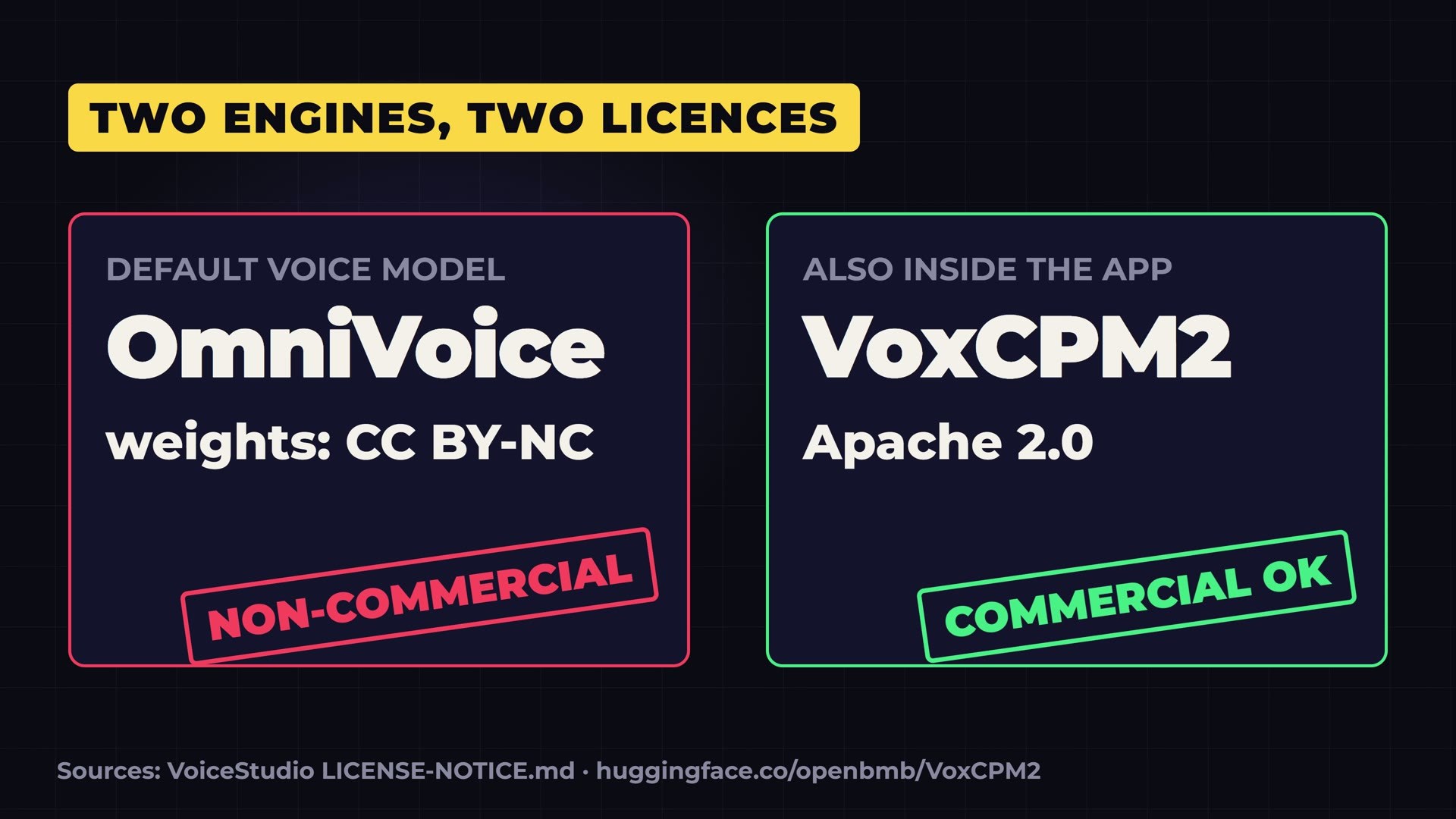
- VoiceStudio (almost 100,000 stars): voice cloning that runs on your own PC. The app is free for commercial use, but its default voice model is not. The engine I used, VoxCPM2, is.
- Try the design test yourself: the three pages are live at ruocco.it/ai-demos/impeccable-vs-hallmark-vs-no-skill-opus-5-5.
A quick note on the numbers: every star count in this article comes from GitHub on November 3, 2026, the day I made the video. Stars move every hour on projects this hot, so what you see today will be higher.
Number One: HyperFrames, Video From a Web Page
HyperFrames comes from HeyGen, the company known for AI video avatars, and it had about 78,000 stars when I checked. The idea fits in one line: you write a web page, and it turns that page into a video. HTML goes in, an MP4 comes out.
This sounds like a gimmick until you see how it works, because the way it works is the whole point.
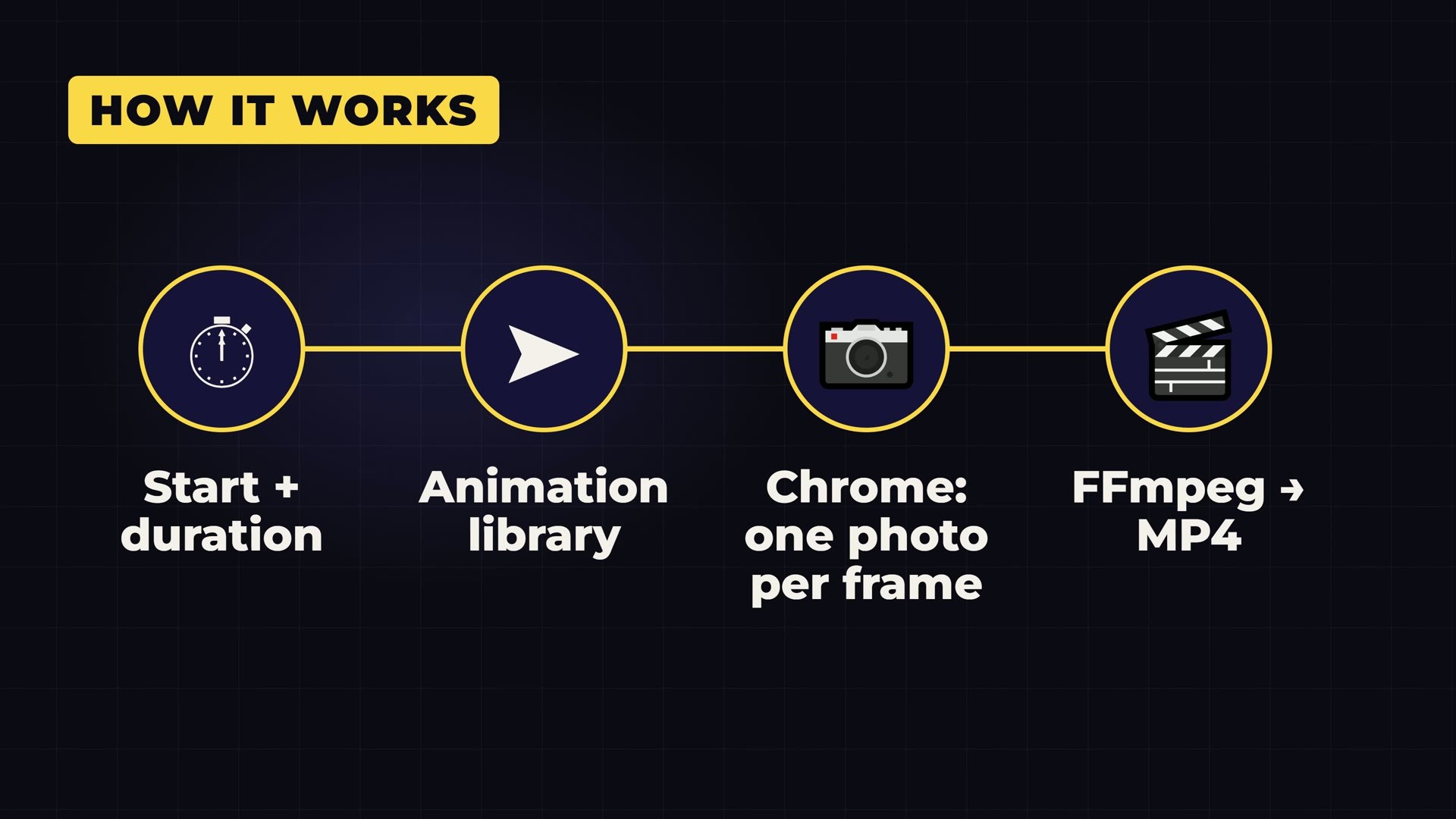
How it works, step by step
Every element on the page, a title, a picture, a chart, gets a start time and a duration. The movement comes from an ordinary animation library. Then a headless Chrome browser, which is Chrome running with no window, jumps to every single frame of the timeline, one by one, and takes a picture of it. It never plays the animation in real time, so a slow computer cannot drop a frame or stutter. At the end, FFmpeg glues the pictures and the audio into a video file.
That gives you a property most video tools don’t have: the same input always produces the same video. Change one word in the page, render again, and you get exactly the same video with exactly one word changed.
Why it matters: it was built for coding agents
HyperFrames was designed for coding agents like Claude Code, because agents are already very good at writing web pages. You describe a scene, the agent writes the page, HyperFrames turns it into video. It ships with “skills”, instruction packs that teach your agent the rules of the format.
So I installed it for real: the command line tool and its skills for my coding agent. On my PC it did not work on the first try. The skills installer needs Git, and my Git for Windows installation turned out to be broken: it had lost the part that talks to websites over HTTPS. I reinstalled the official Git for Windows, and after that everything worked.
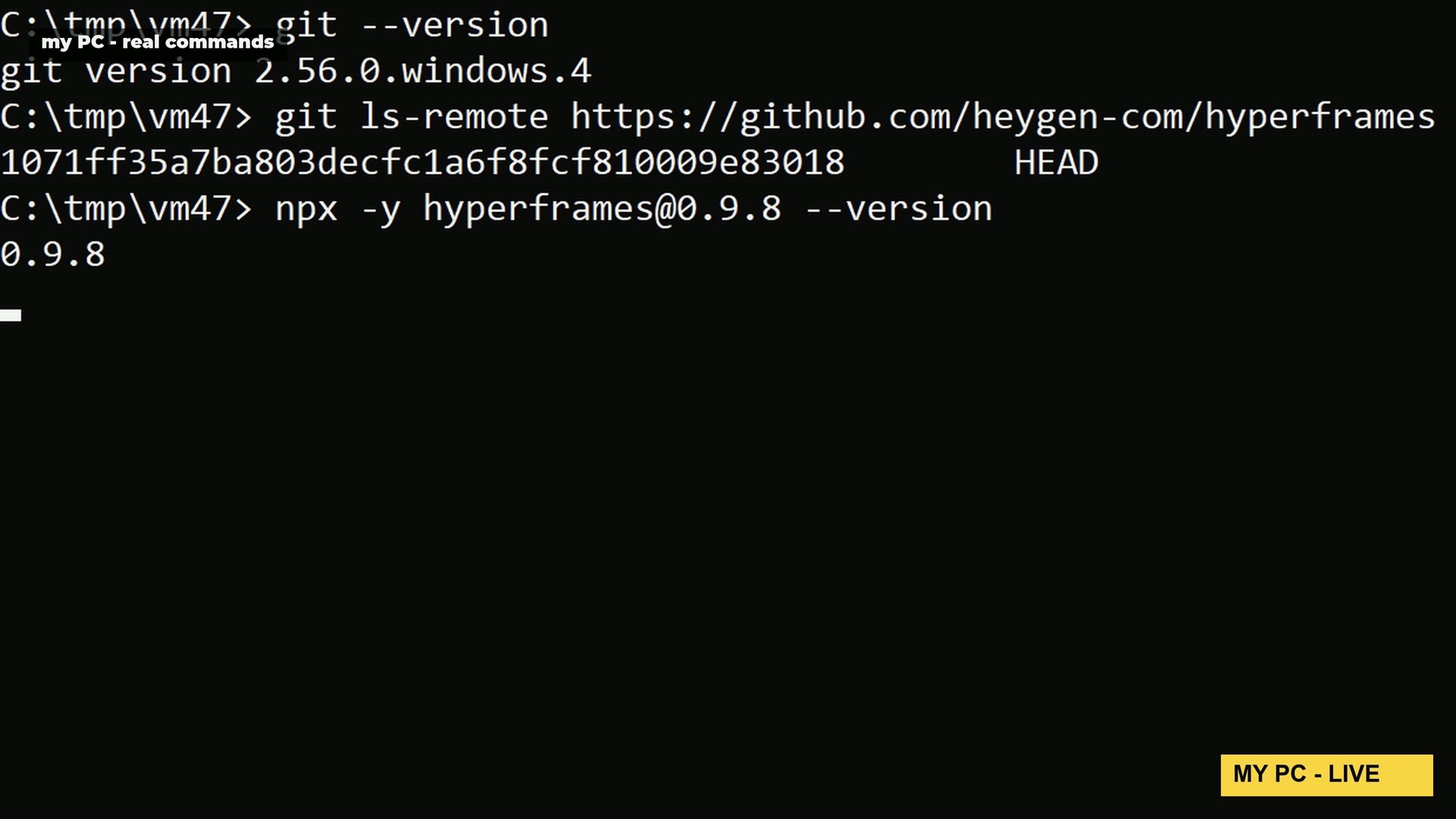
Then I used it the way it was meant to be used. Every animation in the video is a web page rendered by HyperFrames: 34 scenes at 3840 by 2160, including the 3D version of me that points at things. A six-second 4K scene took about 17 to 50 seconds to render on my machine, depending on how much moves in it.
The number that surprised me, and the one catch
HyperFrames says it was inspired by Remotion, the best known tool for making videos with code. Remotion has been around since 2020 and has about 70,000 stars. HyperFrames passed it in less than eight months: its repository was created in March 2026.
The catch is the speed of change. Between March 25 and November 3 the project published 589 releases. That is more than two a day. If you build anything on top of it, pin the exact version you tested, as I did with 0.9.8, or something will break on you without warning.
Number Two: Orca, a Fleet of Coding Agents
Orca, by Stably, had about 114,000 stars. It is a free desktop app for running a whole fleet of coding agents side by side: Claude Code, Codex, OpenCode and many more. Its own site calls it the agent IDE.
The trick is the worktree
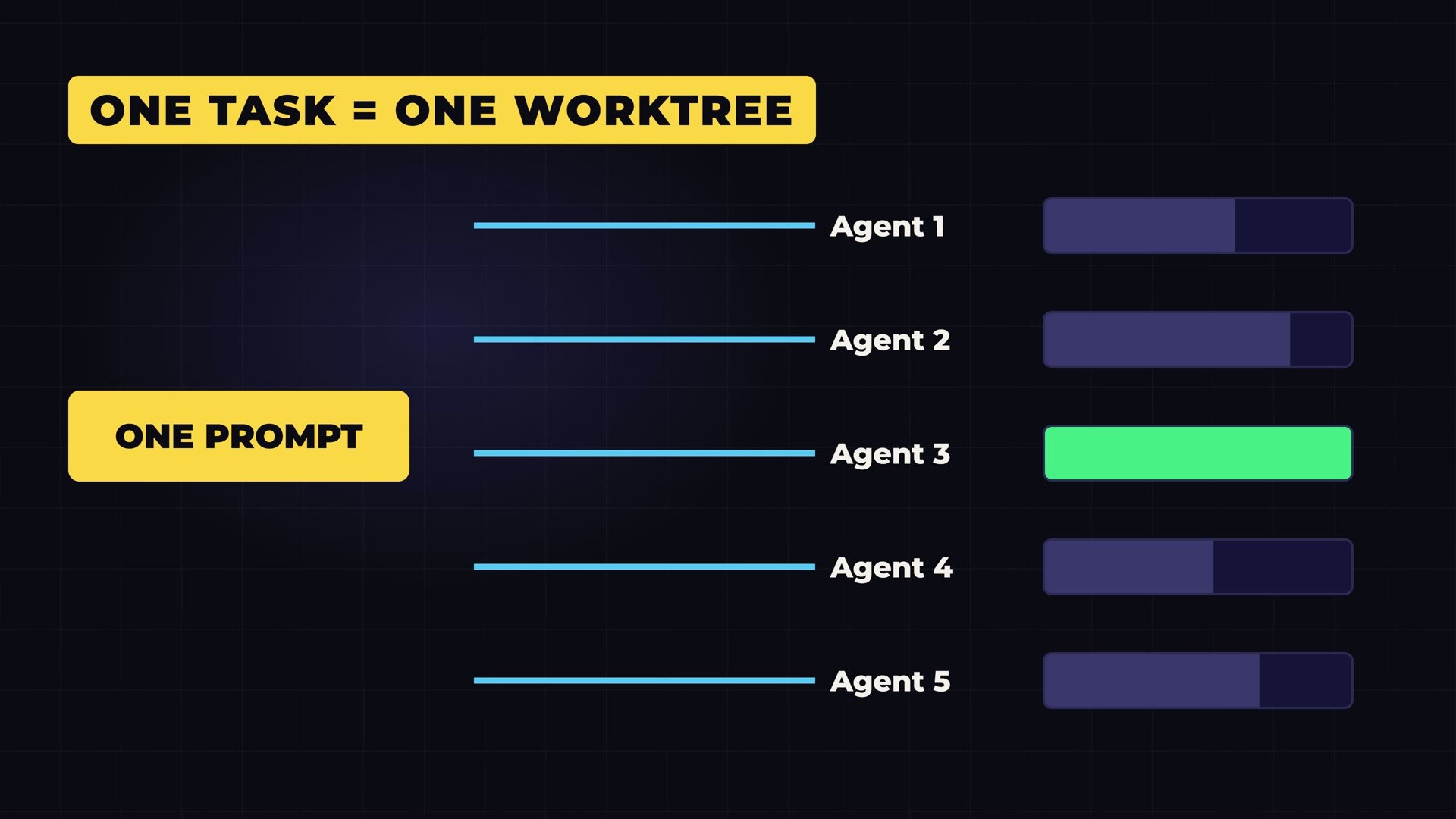
The clever part is a Git feature called a worktree. Every task you give to an agent gets its own copy of your project, on its own branch. So two agents can never overwrite each other’s files, even if they work at the same time on the same project.
That opens a way of working that is hard to do by hand. You can send the same request to five agents, watch them build in parallel, compare what each one made, and keep the winner. There is even a phone app, so you can check on your agents and send them follow-ups from the sofa.
What Orca is not
Understand what you are installing. Orca brings no AI of its own. It runs the agents you already have, with the subscriptions or API keys you already pay for. So five agents on one task means five times the tokens.
Orca is free. Your bill is not. If you are on a flat subscription you will hit its limits five times faster; if you pay per token, you pay five times. Used carefully, on the tasks where comparing several attempts really helps, it is a great tool. Used on everything, it is an expensive habit.
Numbers Three and Four: Impeccable vs Hallmark
These two fight over the same job, and both were on GitHub’s trending page in the same week.
You know the look of a website made by AI. The same soft gradients. The same three cards in a row. A tiny label in capital letters above every heading. One word in the headline in a different colour. Once you notice it, you see it everywhere. Two skills for coding agents promise to kill that look.
Impeccable, by Paul Bakaus, had about 101,000 stars. It gives your agent a design vocabulary: commands like polish, bolder, critique and audit, plus the knowledge behind them. You still direct the work; Impeccable gives the agent the words and the taste to follow you.
Hallmark, made by Together AI, had about 47,000 stars. It works differently. It picks a visual theme out of fifty, builds the page around what the visitor came to do, and then runs a checker that opens the page in a real browser at eight different widths, hunting for the tells that look machine made. It also has a long list of hard rules: no purple-to-blue gradients, no card inside a card, no invented testimonials, and about eighty words at most on any one screen.
My test: same prompt, same model, three folders
Descriptions are easy to write, so I tested them. Same prompt, same model, Claude Opus 5.5 in Claude Code, three separate folders. One folder had no skill at all. One had only Impeccable. One had only Hallmark. Each run could see only its own skill, so nothing leaked from one test into another.
The prompt asked for a one-page website for a small, fictional bike repair shop in Naples called Ruota Libera, with prices for three services, the opening hours and the address. Warm, local, a little hand-made, confident. No photos. And I told the model not to ask me any questions and to finish the page on its own.
No skill: pleasant, and familiar
With no skill, the page was done in two minutes and forty seconds, in four steps. It is pleasant: cream background, tomato red, ink blue, a drawn bicycle with a basket and handwritten notes. But you know this look. Rounded buttons, a coloured and underlined word in the headline. It is a good page that you have seen a hundred times.

Impeccable: the best idea
With Impeccable, it took four minutes and seventeen steps, and it came back with the most original idea of the three. The booking form is drawn as the paper repair tag a mechanic hangs on your bike, hanging from a nail on a string, on a deep maiolica green background. The headings look like a hand-painted shop sign. You book a repair by filling in the tag and “tearing it off”.
One limit of my setup: in its folder the agent was not allowed to run Impeccable’s helper scripts or to open a browser, so it never saw its own page. It said so honestly at the end, and asked me to check it at desktop and phone width.

Hallmark: the most careful job
With Hallmark, it took almost six minutes and fifty-three steps, and most of those extra steps were checks. Hallmark’s own linter opened the page in a real browser at laptop, wide and phone sizes, and the agent kept fixing until it passed with nothing flagged. It chose a theme called Formwork: concrete grey, near-black text, one safety-orange colour, square corners and big capital letters. “Flat tyre? Bring it in.” It looks like a real workshop.
One thing it got wrong: I wanted a page for a shop in Naples, and it wrote the whole page in English. The other two wrote in Italian without being told.

My verdict on the design skills
Impeccable had the best idea. Hallmark did the most careful job. Both beat no skill at all, by a clear margin: neither of their pages looks like the default.
Keep the scale of this test in mind. It is one prompt and one run each, so it is a sample, not a benchmark. Run the same thing tomorrow and you will get different pages. But the difference in character was clear: Impeccable pushed the model towards an idea, Hallmark pushed it towards discipline. If you build pages with an agent, try both on your own project.
Number Five: AI Job Search, the Best Story on the List
AI Job Search had about 69,000 stars, and it has the best story of the six. Its author, Mads Lorentzen, is a geophysicist. His position was cut at the end of 2025. So he built his own job search on top of Claude Code, and he used it every week on his own career.
The results are in the README, in his words: sixty-nine tailored applications, twenty first interviews, and one signed contract. In June 2026 he started a new job as an AI engineer. He also writes that he was upfront with every employer about how he searched, and that it usually started a real technical conversation instead of counting against him.
How it works
It is a folder of commands for your coding agent, and each command does one job.
- Setup reads your CV and builds your profile.
- Scrape searches the job boards for new postings.
- Rank scores every posting against your profile, so you see the best fits first.
- Apply writes a tailored CV and a cover letter. Then a second agent checks them with fresh eyes, against your real history, so nothing invented ends up in an application.
- Interview helps you prepare for each round, and Outcome keeps track of what happened.
There is one detail I really liked. Before your agent reads a job ad, it treats the ad as untrusted. It does not follow instructions it finds inside a posting, and it does not open links from it. That is a real defence: a job ad is text written by a stranger, and it could hide instructions aimed at your agent.
Two warnings
First, the job boards it searches out of the box are Danish: Jobindex, Jobnet and the like. Outside Denmark you need to add your own, and the README explains the pattern.
Second, and more important, the README itself says it: a fork of a public repository is always public, and setup writes your personal data into it, your name, your work history and your salary expectations. So use a private copy. Never a public fork.
Bonus: Cloudflare’s Security Audit Skill
The bonus comes from Cloudflare: a security audit skill with about 58,000 stars, around nine thousand of them added in a single week.
You point your coding agent at a codebase and it runs a real audit in six phases. It maps the project, its boundaries and its inputs. It hunts for bugs, phase by phase. And then comes the part I like most: every bug it finds goes to a fresh agent whose only job is to prove that bug wrong. Only what survives the attempt ends up in the report.
That one design choice addresses the biggest problem of AI code review, which is false alarms. An agent that finds bugs wants to find bugs; an agent that is paid to disprove them balances it.
Cloudflare says this skill is the seed of the system it uses to find vulnerabilities itself, which grew into a much larger, fleet-wide harness. The skill is the single-repository starting point it evolved from.
Number Six: VoiceStudio, My Voice Cloned on My Own PC
And now the voice. VoiceStudio had almost 100,000 stars, about 99,800 when I checked. It calls itself the open source alternative to ElevenLabs: voice cloning, voice design, dubbing videos into other languages, audiobooks, dictation, in 646 languages. And it all runs on your own computer.
Read the licence before you install it
Almost nobody reads this, so I will say it plainly. The app is free, even for commercial use. The default voice model inside it is not. Its default engine, OmniVoice, has its code under Apache 2.0, but its weights are licensed CC BY-NC: personal and research use only. So if your channel makes money, you cannot just press the default button and publish what comes out.
Inside the same app, though, there is another engine, VoxCPM2, from OpenBMB. It is released under Apache 2.0, and its makers say it plainly on its page: free for commercial use. It clones a voice from a short sample, it works in thirty languages including English and Italian, and it outputs studio-quality 48 kHz audio. So that is the one I used.
How I Installed VoiceStudio, Step by Step
Here is exactly what I did on my own Windows PC, an ordinary desktop with an NVIDIA RTX 3060 with 12 GB of video memory.
1. Download the installer
On the GitHub page, I scrolled down to Platforms and opened the Windows section, which links straight to the installer. That took me to the latest release, version 0.5.7. In the download table I picked Windows x64, the installer, about 212 MB.
Before running it, I checked its fingerprint. Every file on a GitHub release now has a published SHA-256 digest; you can compute the same thing on your PC with one command, certutil -hashfile followed by the file name and SHA256, and compare. Mine matched. It takes ten seconds and it is worth it, especially for a project this popular: on October 23 its maintainers added an automatic check that removes malware commands strangers had posted in the repository’s issues and comments.
2. Get past the Windows warning
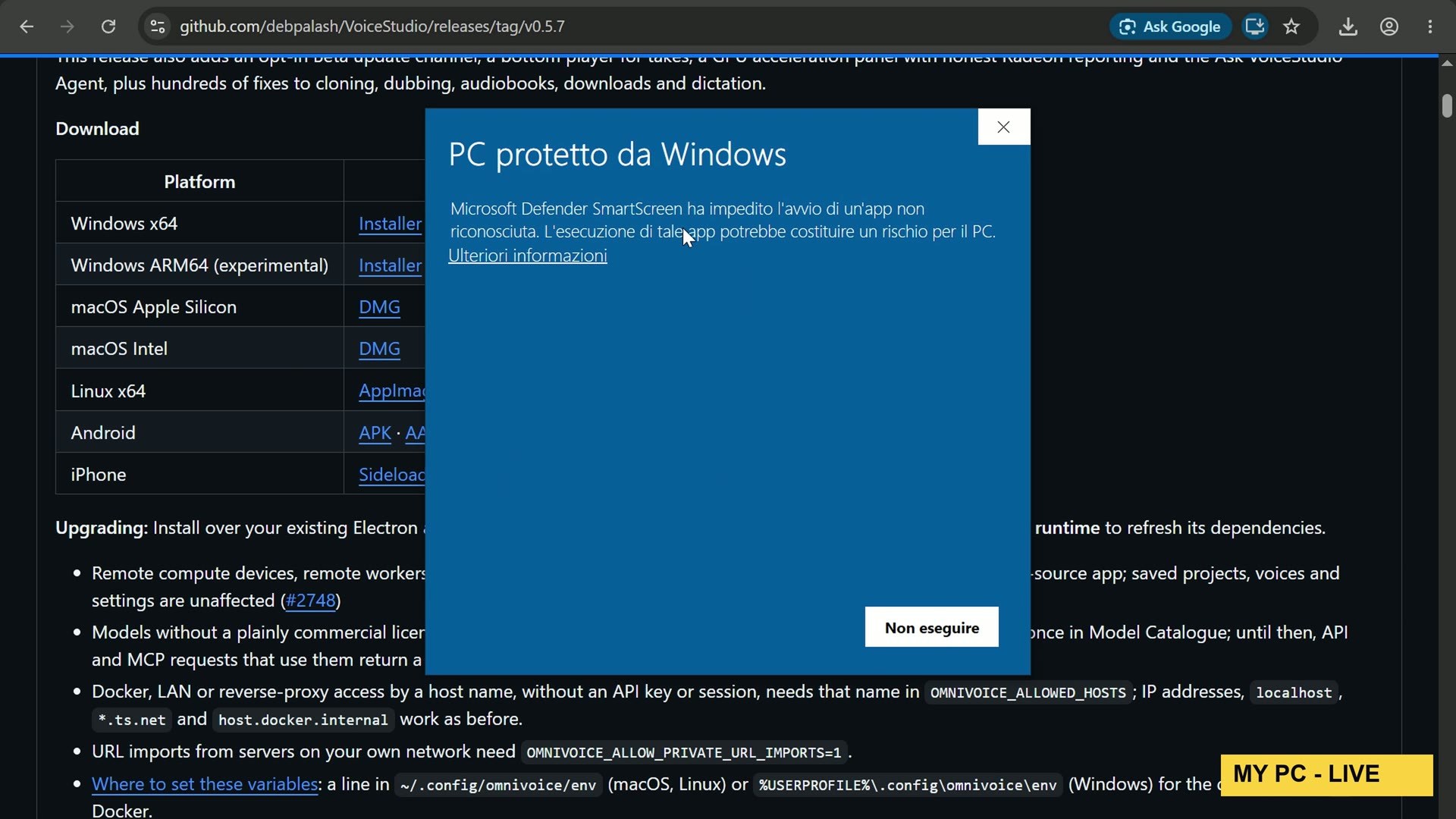
When I opened the installer, Windows showed the blue warning: Windows protected your PC. That is because the installer is not signed with a code-signing certificate, which costs money and is common for small open source projects. If you trust the source, click More info, then Run anyway. The setup is the usual: next, install, finish.
3. Let it install its environment, and watch your disk
On first launch, VoiceStudio installs its own local environment: Python, PyTorch for the graphics card, and everything else it needs. On my PC that was about 9.6 GB before any voice model. Then each model adds its own weight: VoxCPM2 is about 5 GB, OmniVoice about 2.4 GB. And the app wants some free space as a safety margin before it downloads anything.
My disk was nearly full, and the app refused to download with a clear “not enough disk space” message, so I had to free space first. Plan for 20 GB free before you start.
4. Choose the engine by its licence
Then it asks which voice models you want, and this is where you look at the licence icons. Every model card has one. OmniVoice has a red one: hover it, and it says personal and research use only. VoxCPM2 has a green one: Apache 2.0, commercial use allowed.
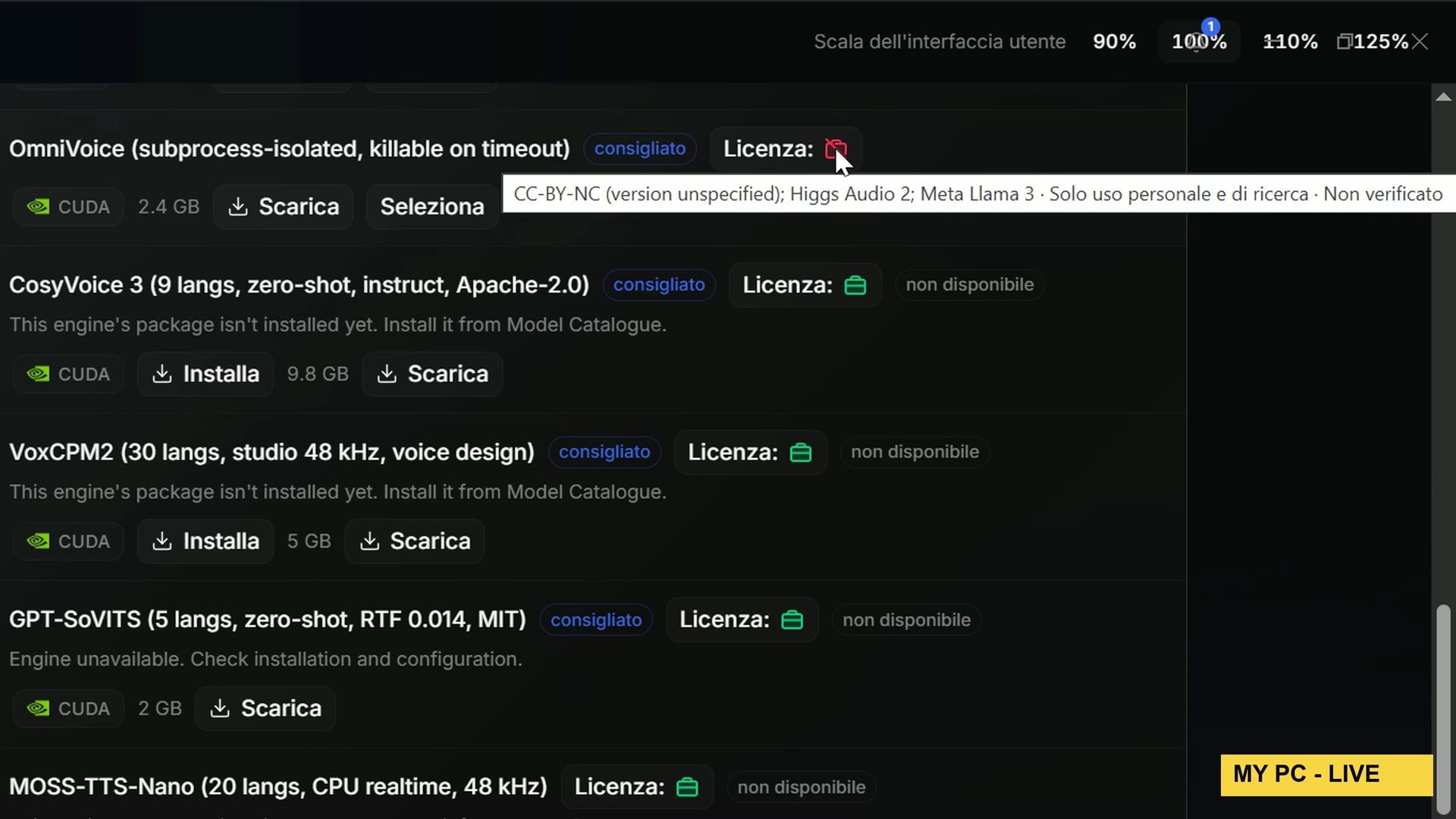
I installed VoxCPM2 and downloaded its weights. One catch: the setup will not let you into the studio until the default OmniVoice model is downloaded too, because the app marks it as required. So I downloaded it, but I never used it. Every cloned word you hear in my video comes from VoxCPM2, and I checked in the app’s own settings that VoxCPM2 was the active engine.
5. The privacy page
On the privacy page I said no to the anonymous usage statistics, and I left the invisible watermark switched on. It marks the generated audio as made by AI. I think that is the right default for a tool this good, and I’d recommend keeping it on.
6. The clone itself
Voice, then Clone. I recorded my real voice into my microphone, about twenty seconds of me reading a couple of sentences calmly, and loaded the clip. I typed what I said into the transcript box, which is optional but helps the engine, and saved the profile with my name. Then I typed a new sentence and pressed Synthesize.
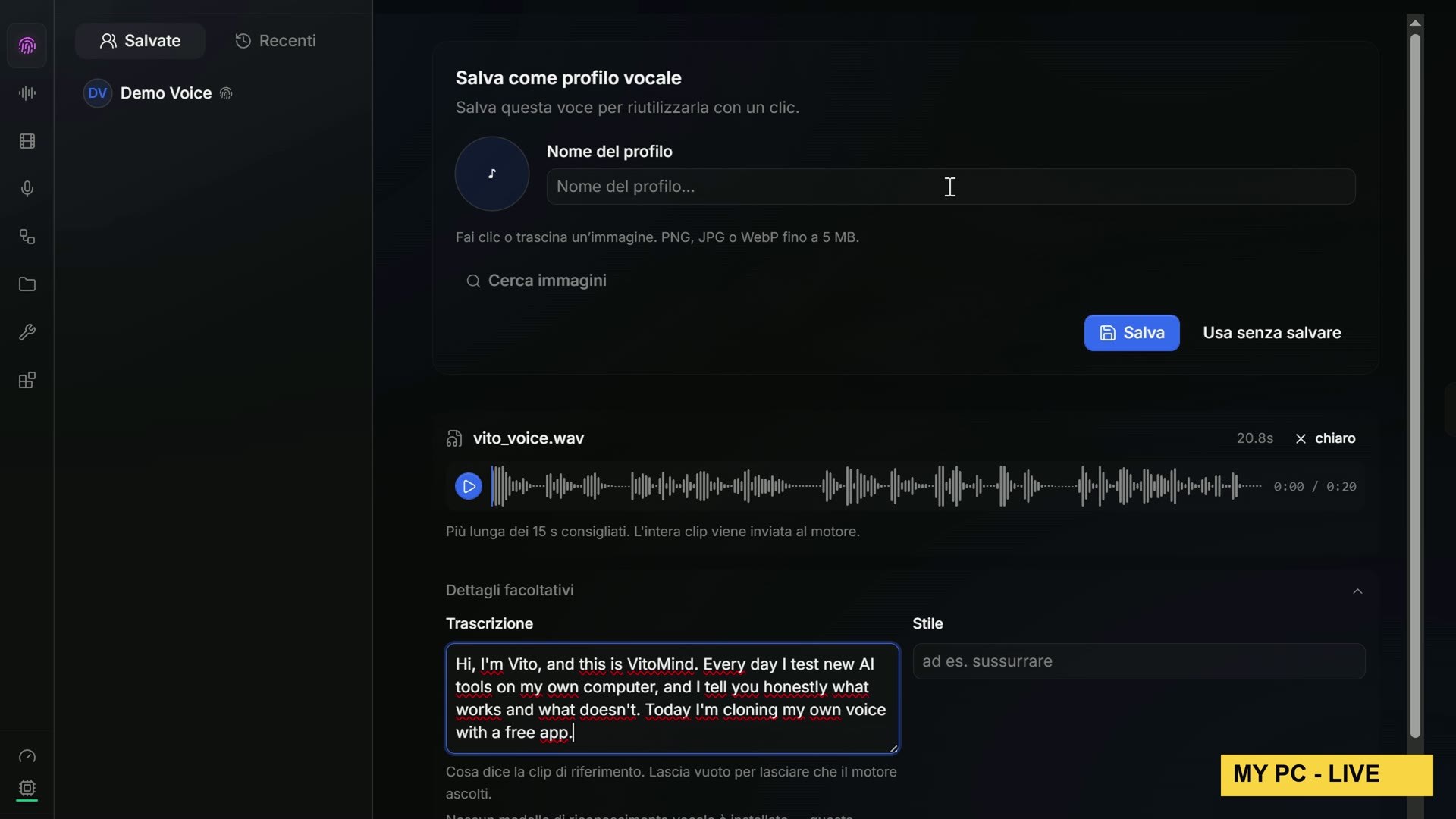
My graphics card took thirty-eight seconds for the first sentence, a little over seven seconds of audio, and about fifty seconds for a longer one of almost fourteen seconds. That is slower than real time on a 12 GB card, but nothing left my computer.
The Blind Test
In the video I play two clips. One is me, recorded into my microphone. The other is the clone, made by VoxCPM2 from those twenty seconds of my voice. They are not even the same sentence, so you can’t compare word by word: you have to listen to the voice.
I won’t spoil the answer here. Watch the video, make your guess, and write A or B in the comments before the reveal. I will tell you one thing: the clone says a sentence I never said, not once, and it was written in my voice on my own computer.
Verdict: Is VoiceStudio Worth It?
If you have an NVIDIA graphics card and some disk space, yes. It is free, it runs offline, and the clone surprised me. But use it the right way.
- Pick an engine whose licence matches what you do with the audio. For anything that earns money, that means VoxCPM2 or another commercial-friendly engine, not the default.
- Keep the watermark on. A cloned voice that can be identified as AI is a cloned voice that is harder to abuse.
- Clone only your own voice, or a voice whose owner said yes. The README says it too. Cloning someone without their permission can hurt real people, and in many countries it is also against the law.
Try the Design Test, and Get the Prompts
The three pages from my Impeccable vs Hallmark test are live, exactly as the model wrote them, with only one addition: a small bar at the bottom of each page saying the bike shop is fictional. Open them on your phone and on your laptop and decide for yourself which one you would put online: ruocco.it/ai-demos/impeccable-vs-hallmark-vs-no-skill-opus-5-5.
Every other demo from my videos is at ruocco.it/ai-demos. If you want the exact prompts and the script that ran the three builds, they are in the Ruocco Academy. It is a waiting list for now: join it and you get one message when it opens.
Sources
- HyperFrames on GitHub and its site, hyperframes.heygen.com
- Remotion on GitHub
- Orca on GitHub and orca.dev
- Impeccable on GitHub and impeccable.style
- Hallmark on GitHub and usehallmark.com
- AI Job Search on GitHub (it moved from MadsLorentzen/ai-job-search)
- Cloudflare security-audit-skill on GitHub
- VoiceStudio on GitHub, its LICENSE-NOTICE and model licence list
- VoxCPM2 on Hugging Face
How I Checked This
Star counts and release counts come from GitHub’s own API on November 3, 2026. The AI Job Search figures are quoted word for word from its README. The design test ran on Claude Opus 5.5 in Claude Code on November 3, one run per page; it is a sample, not a benchmark. VoiceStudio 0.5.7 was installed and used live on my own PC, and the installer’s fingerprint matched the one published on the release. I am not affiliated with any of these projects, and nobody sponsored this video.
If this saved you some time, subscribe to VitoMind on YouTube: every week I test new AI tools on my own PC, honestly.