
Published: November 1, 2026 | By Vito Ruocco
A free server with 32 gigabytes of video memory, no graphics card needed. That is the promise going around right now: run big AI models for free in the cloud, and use them from your own PC as if they were at home. It sounds too good, so I did the whole thing, step by step, on my real account, and I measured every part of it. Three things surprised me. The 32 gigabytes are not what they sound like. The server switched itself off in the middle of a job. And when I asked it to build something from my PC, it wrote zero files in three attempts. Then I ran the same model on my own five-year-old graphics card, and that result is the one that matters most, with an honest warning attached.
The Short Version
- What the trick is: a free Kaggle notebook with two graphics cards, Ollama running the model, and a Cloudflare tunnel that gives the notebook a public web address your PC can talk to.
- The 32 GB: two separate Tesla T4 cards, launched in 2018, each reporting 15,360 MiB. That is about 30 GB in two pieces. No single card holds 32 GB of anything.
- The real speed: Qwen3.8 27B in a 17 GB 4-bit file wrote at about 12.4 tokens per second, after a 91-second load and one slower cold run.
- The limits I hit: a queue (position 19, about three minutes), 30 hours a week, and a session that stopped 40 minutes after my last change in the notebook. Coming back took nine minutes and gave me a new address.
- The tunnel: it really works, at 13.1 tokens per second from my PC. It also has no password: anyone with the address can use your model while it is open.
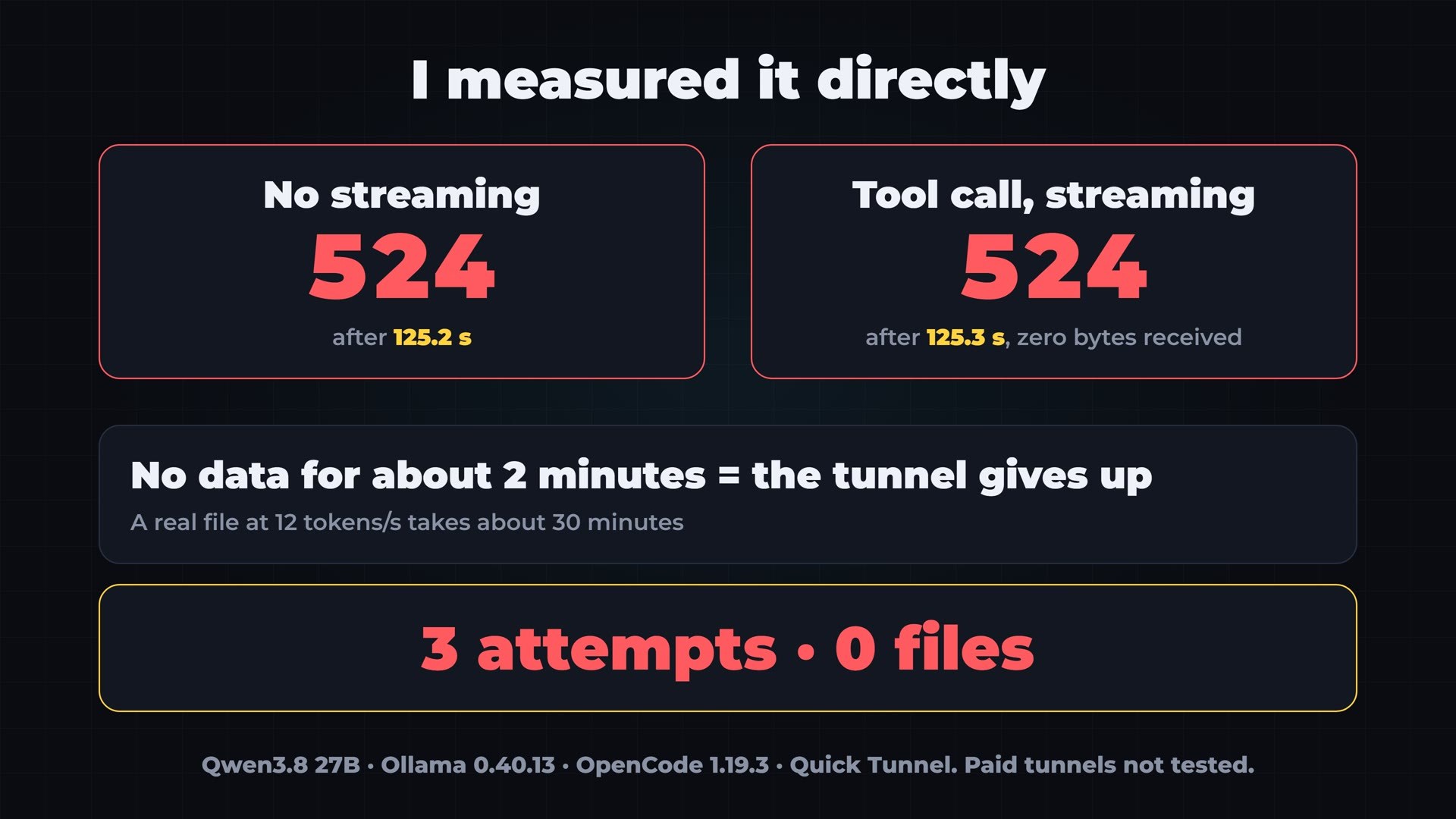
- The agent test: OpenCode through the tunnel wrote zero files in three attempts, for three different reasons: too much thinking, the session shutting down, and a cutoff after 125 seconds with no data moving.
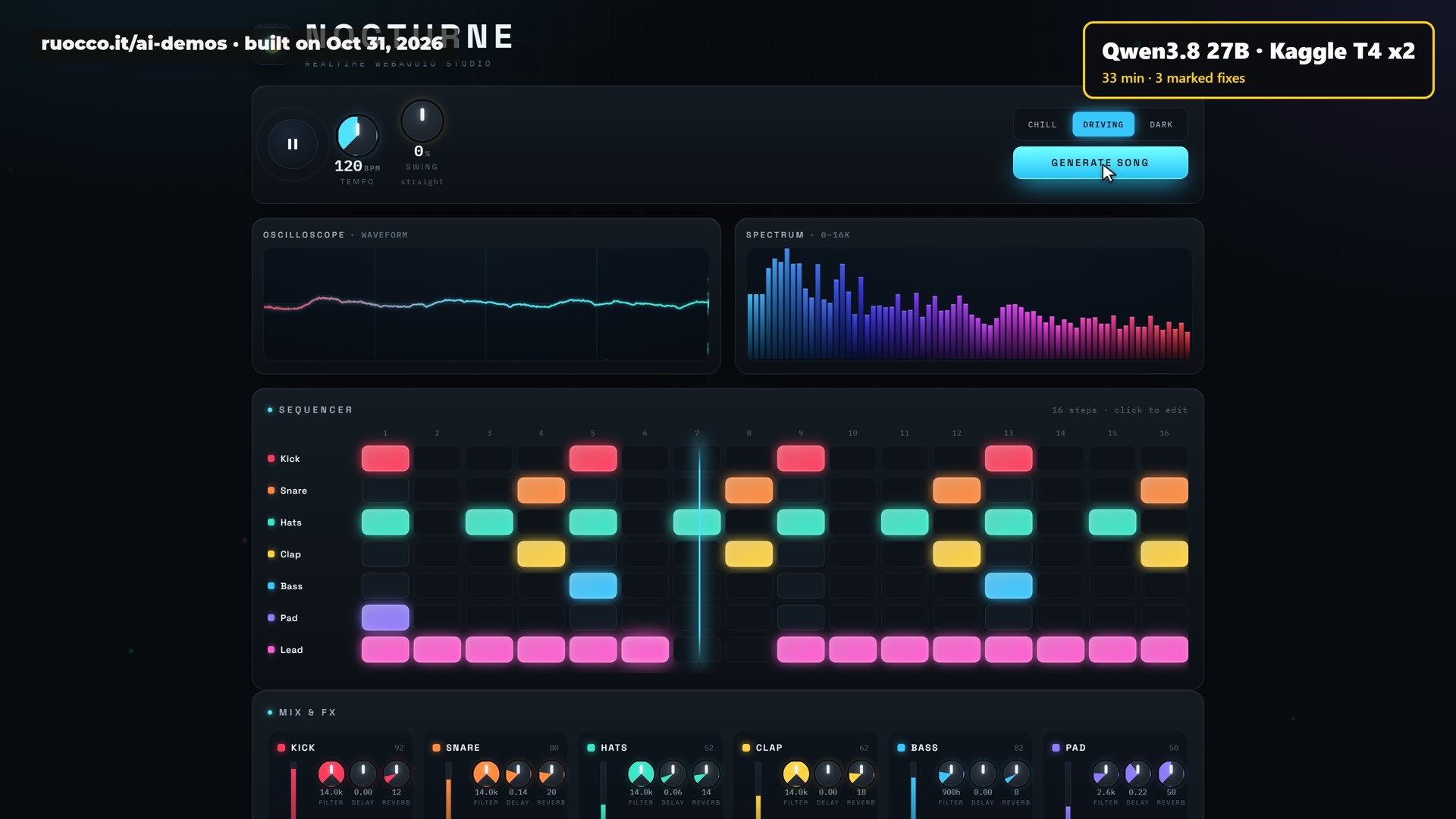
- Inside the notebook: the same prompts worked, about 33 minutes per build. Neither build ran as written; both ran after small marked fixes.
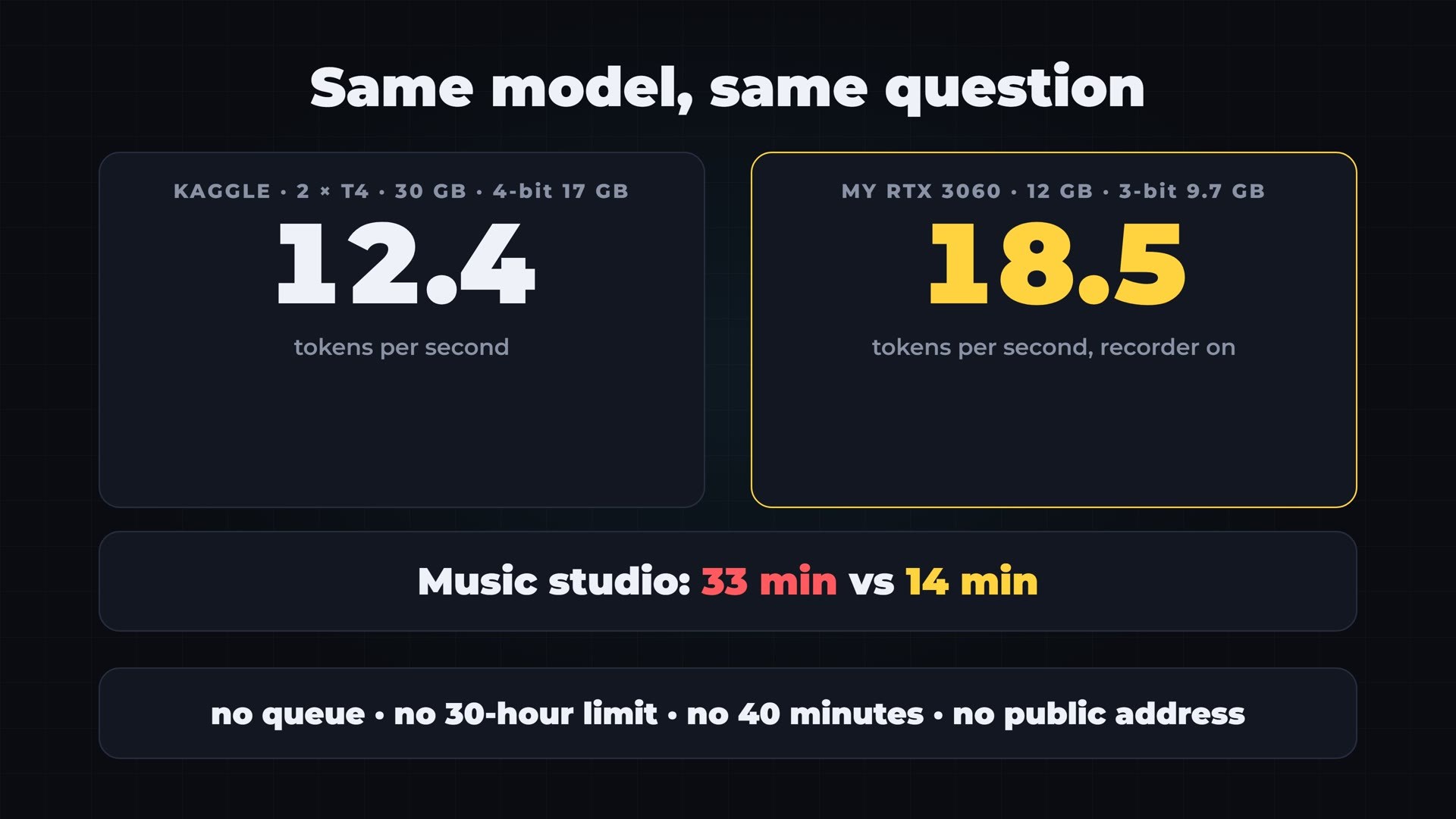
- My RTX 3060: the same 17 GB file ran at 2.7 tokens per second. A tighter 3-bit file of 9.7 GB, which fits entirely in the card, ran at 18.5.
- The honest part: the smaller file was faster, but neither of its two builds works. Speed is not quality.
- Try them yourself: every build runs in your browser at ruocco.it/ai-demos/free-32gb-kaggle-t4-vs-rtx-3060-qwen3-8-27b.
What This Trick Actually Is
Kaggle is a data science site owned by Google. Among other things, it lends you graphics cards inside a notebook, for free. A notebook is a page in your browser where you type commands into cells and run them on a machine in Google’s cloud. It was built for people who train and test machine learning models, and it is a genuinely generous service.
The trick that is going around has three pieces, and it helps to keep them separate in your head.
- Ollama runs the AI model on Kaggle’s machine. It is a free program that downloads a model and answers questions through a simple web interface.
- Cloudflare gives that machine a public web address. This is called a tunnel. Normally nothing outside can reach a Kaggle notebook, not even you. The tunnel opens one door to it.
- Your PC talks to that address as if the model were installed at home. Any program that can talk to an AI server can use it, including coding agents.
On paper, this means no graphics card, no subscription and no cost. So let me start with the part most people skip, before I touch anything.
Read the Rules First
Kaggle’s Terms of Use say you will use the services for your “own internal, personal, non-commercial use”. Its Acceptable Use Policy goes further. It says you must not abuse the resources offered, and its examples include “server farming” and “activity unrelated to ML data science”. It also says you must not “disable, interfere with or circumvent any aspect of the Services”.
Tunnels are not named anywhere in those pages. So I can’t tell you this setup is forbidden, and I can’t tell you it is allowed. Running a model on a data science platform sounds like data science. Turning that notebook into a public server for your daily coding sounds like something else. Where the line sits is Kaggle’s call, not mine.
Google’s other notebook service, Colab, is much clearer. Its FAQ has a list of things that are disallowed from all managed runtimes, and “connecting to remote proxies” is on that list, together with “file hosting, media serving, or other web service offerings not related to interactive compute”. Its free tier also disallows remote control such as SSH shells and remote desktops.
So I opened my tunnel only for this test, I used it only myself, and I closed it afterwards. If you want to try it, read the rules first. It is your account, and a violation is grounds for losing access to it.
Step by Step on My Real Account
Everything below happened on October 31, 2026, on my own Kaggle account, and I recorded it live.
The account and the graphics card
You need a Kaggle account with a verified phone number, or there is no graphics card at all. Then you click Create, then Notebook, and you get an empty page. In Settings, under Accelerator, you pick GPU T4 x2.
At that moment Kaggle writes the first limit right on the screen, in a small dialog: availability is limited to 30 hours per week. It also tells you the choice reduces the number of CPUs available and will only speed up image processing and neural networks. That is fair, and it is more than most tutorials tell you.
The queue
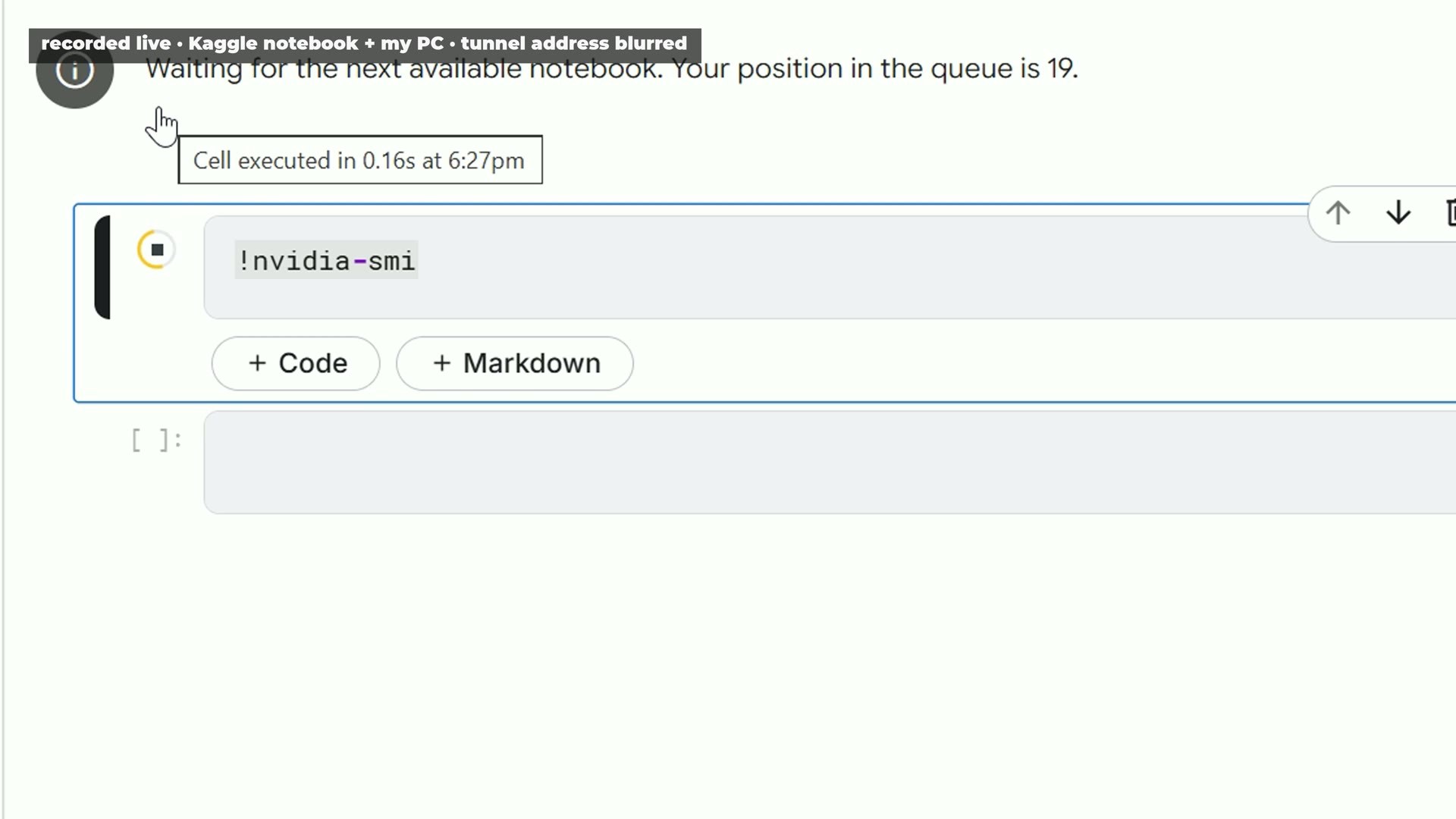
I ran one simple command, and I waited. “Waiting for the next available notebook. Your position in the queue is 19.” Free means you take a number. Three minutes later I was in. That is not long, but it is something you never experience on your own machine, and it may be longer or shorter at other times of day.
The first surprise: what 32 GB really means
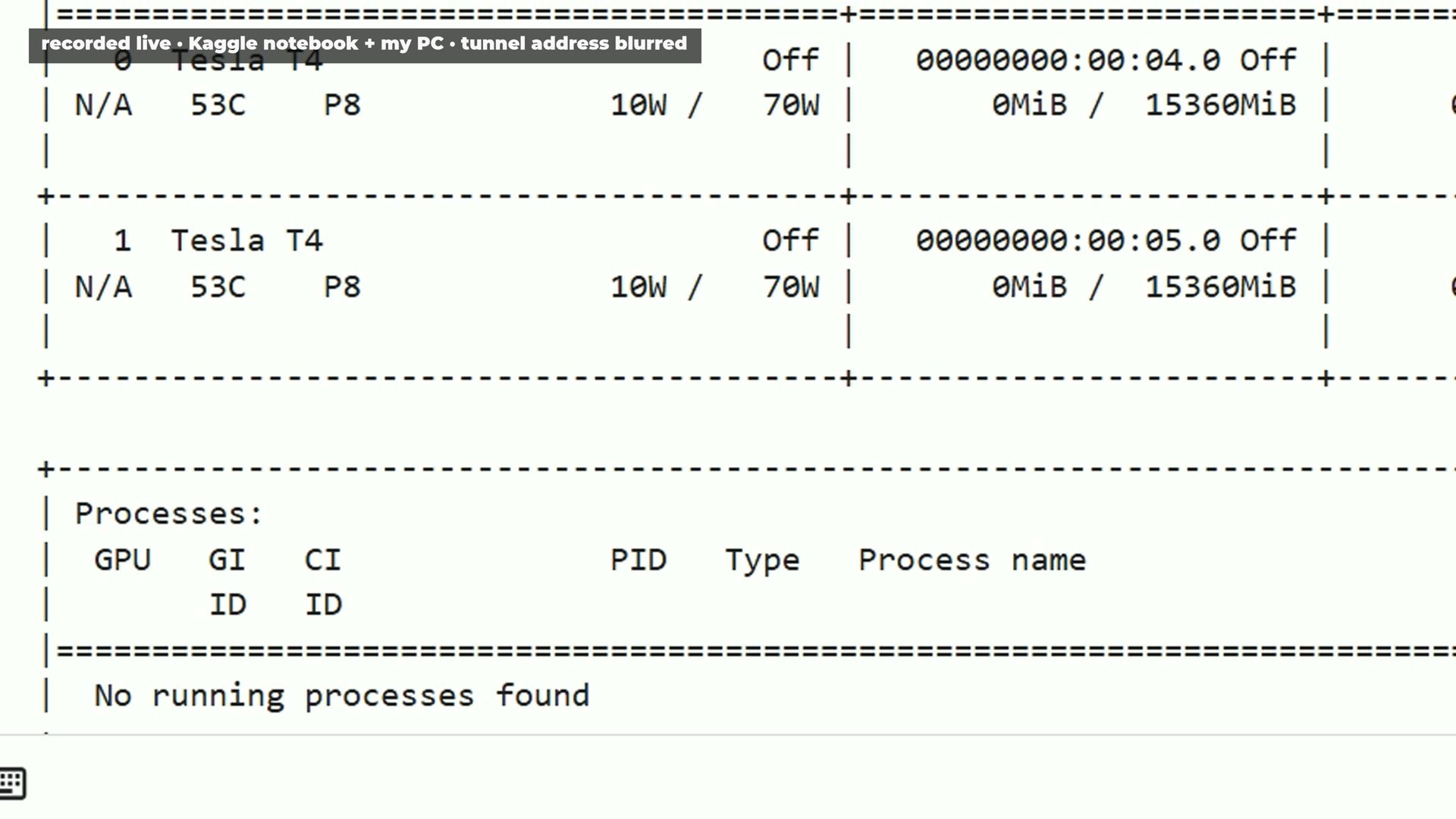
The first command I run on any new machine lists the graphics cards. Here it showed two Tesla T4 cards. The T4 launched in 2018, so these are eight-year-old cards. Each one reports 15,360 MiB of memory.
So it is about 30 gigabytes, not 32. The 32 comes from the T4’s 16 GB specification, counted twice. But the difference between 30 and 32 is not the real point. The real point is that it is two separate pieces. No single card here holds 32 gigabytes of anything. A model has to be split across both, and every time one half needs something from the other half, the data has to travel between them.
Installing everything
I installed Ollama and Cloudflare’s tool, and I started the server. It answered with the code 200, which means it is alive. Then the model: Qwen3.8 27B, in a 4-bit file of 17 gigabytes. It does not fit in one card, so this really is a job for both of them. I deliberately used a normal, official-weights build from a well-known packager, because I want to know what the hardware does, not what a modified model does.
The download is the one thing that flies here: about 400 megabytes per second. Kaggle’s network is a real advantage, and worth saying.
The Real Number: About 12 Tokens per Second
I used the same question for every test on every machine: explain how a hash table works, in about 200 words. A token is roughly a short word or a piece of a long one, so tokens per second tells you how fast the model writes.
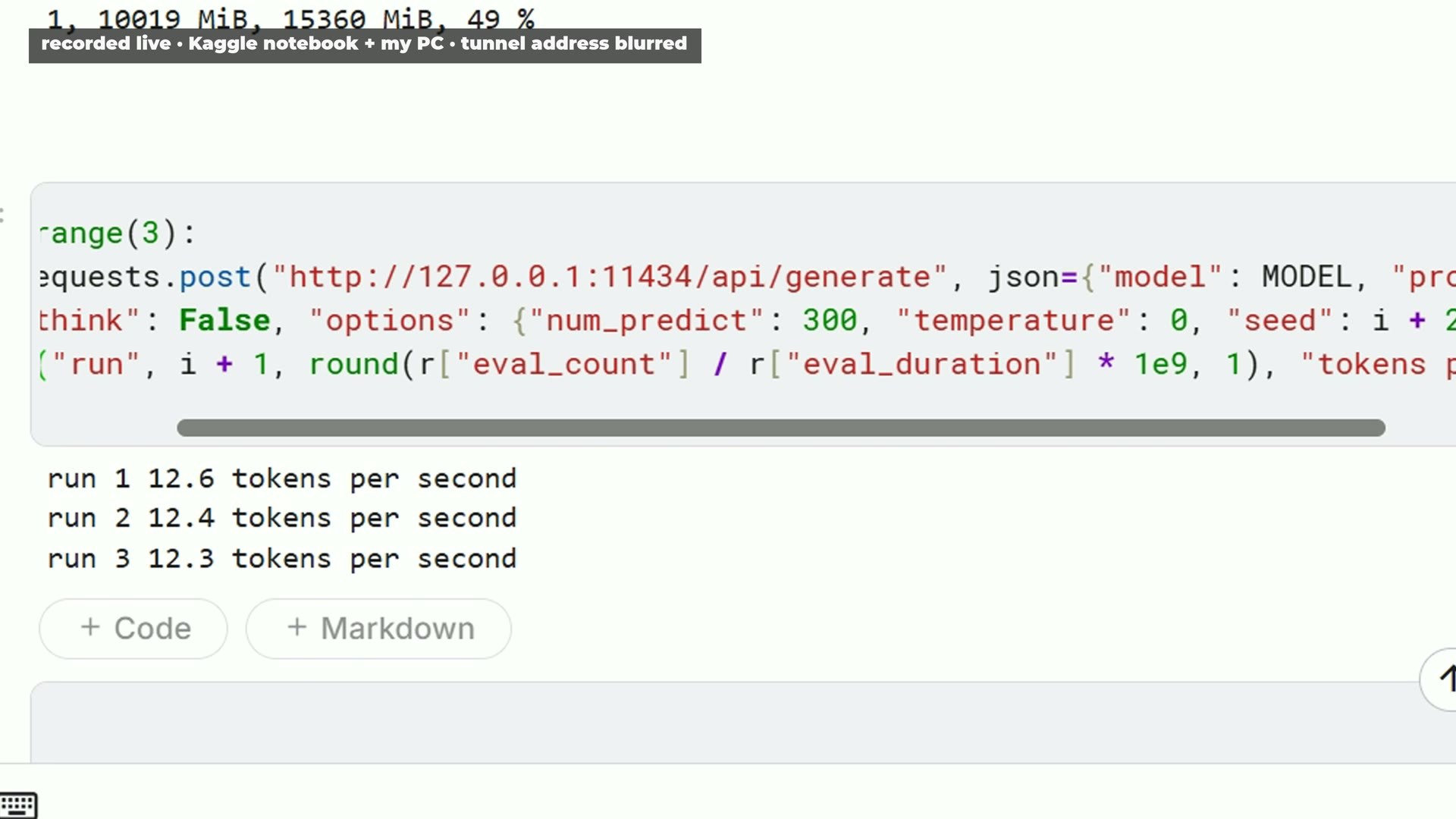
The model took 91 seconds to load, and the first answer came at 7.7 tokens per second. That is the cold start, so I asked three more times with the model loaded: 12.6, 12.4 and 12.3 tokens per second. Ollama reported the model sitting 100 percent on the graphics cards, with about ten gigabytes on each one.
So that is the honest number for this file: about 12 tokens per second, from two eight-year-old cards. It is usable for questions and short answers. For long code, it is slow, as you will see.
The Tunnel Works, and It Has No Password
One more cell, and Cloudflare prints a public address. In the video I blurred it. From my own PC, I sent the same question to that address. The model answered on Kaggle’s cards at 13.1 tokens per second. So let me be clear: it really works. That is a genuinely impressive thing to get for free.
But look at what I needed to get in: nothing. No password and no key. My test read the list of installed models and sent real questions, without sending any credentials at all. Anyone who has that address can use your model while it is open.
Cloudflare says so itself. Its documentation for Quick Tunnels says “Anyone with the URL can access your local service”. It says Quick Tunnels “are for testing and development”, that each one supports up to 200 requests in flight, that they have no uptime guarantee, and that the hostname changes every time you create one. It also says they do not support Server-Sent Events, which is the way most AI clients stream their answers word by word. In my test, streaming did go through, with 121 events and no gap longer than a tenth of a second. I’m telling you what I saw and what the page says; both are true on the day I tested.
The address is long and random, so nobody is likely to stumble on it by chance within an hour. But do not paste it in a screenshot, do not send anything sensitive through it, and close it when you finish. Closing it is one line in a notebook cell, and I checked from outside afterwards: the address was dead.
Three Attempts, Zero Files
A question-and-answer test is one thing. The reason people want this setup is to point a coding agent at it. So I tried exactly that: OpenCode on my PC, pointed at the tunnel, working in an empty folder with shell access switched off. One prompt: a music studio in a single web page, the same prompt I used in my earlier test of Claude Opus 5.5 and GPT-6.1 Sol.
Attempt one: 28 minutes of thinking
This model likes to think before it writes. Twenty-eight minutes later, it had spent all 16,000 output tokens I allowed it on thinking. Zero files. That one is fair, and it is on my settings: at 12 tokens per second, a long reasoning phase eats half an hour. I stopped it and switched thinking off.
Attempt two: “Are you still there?”
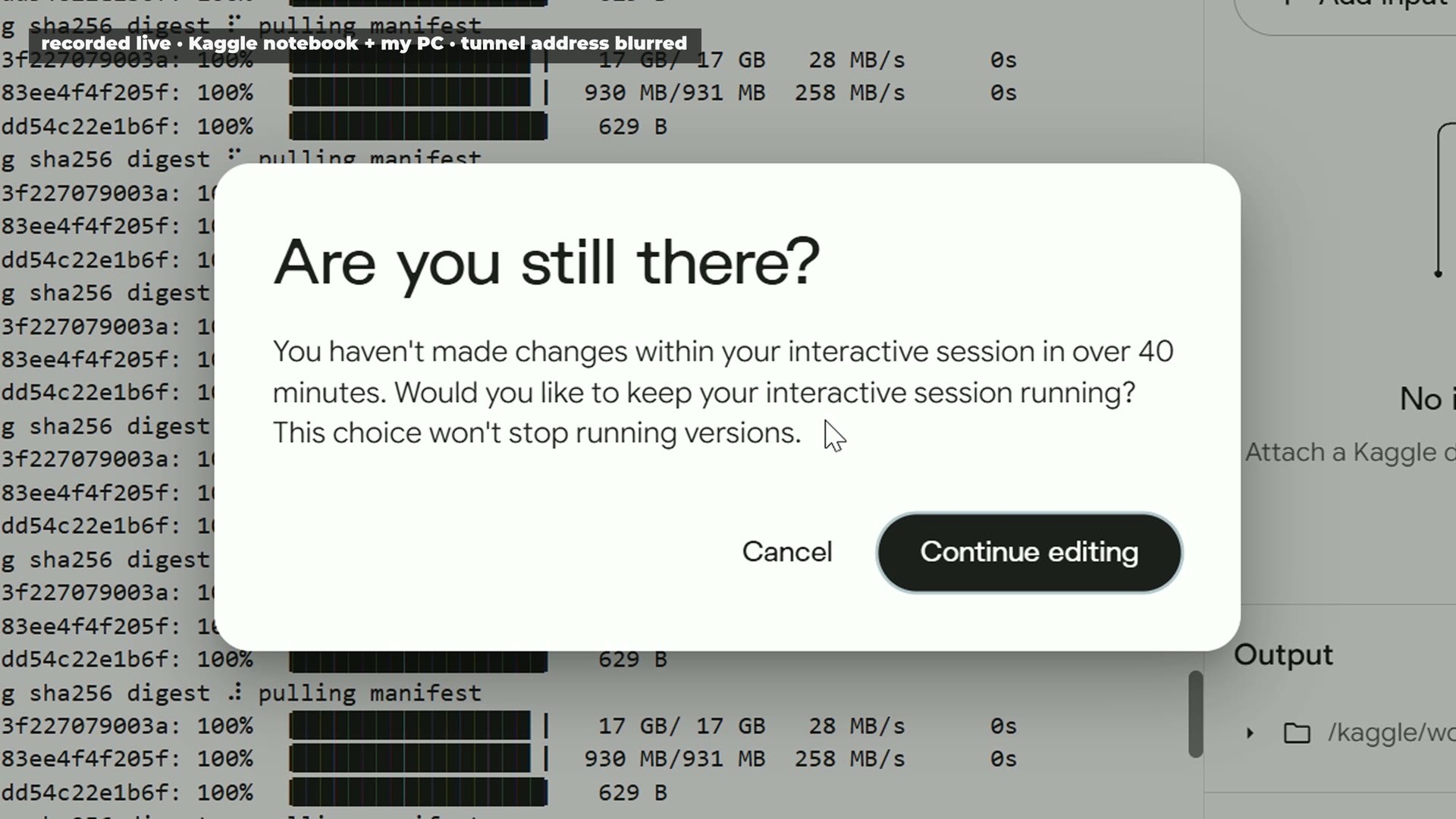
One minute after I pressed enter, the connection was gone. I went to Kaggle, and there it was, a dialog on the screen: “Are you still there? You haven’t made changes within your interactive session in over 40 minutes.”
This is the part I find most important for anyone planning to use this as a server. The model was working the whole time, and my PC was sending it requests. But Kaggle only counts what you do inside the notebook. Forty minutes after my last cell, the session stopped, and the model and the tunnel died with it. Kaggle’s documentation mentions 20 minutes of idle time. I saw 40, as the dialog itself says.
Coming back took nine minutes: restart, reinstall, download the model again, reload it. And the address changes every time, so you have to edit the settings of your client again. A server that goes away when you stop clicking on it is not really a server.
Attempt three: the 125-second cutoff
With a new tunnel, the model said it would write the file, and stopped on an error from OpenCode. I told it to go ahead. Then every try died after about two minutes, with an empty error message. That smelled like a timeout, so I stopped using the agent and measured it directly.
I sent two long requests through the tunnel, one with streaming off and one with streaming on and a file-writing tool, the way an agent does it. Both gave the same result: HTTP error 524, after 125.2 and 125.3 seconds, with zero bytes received before the cut.
So the tunnel gives up when no data moves for about two minutes. And while the model was writing a big file for the agent, in my test not one byte arrived before the cut. At 12 tokens per second, a real file takes about half an hour. So the agent never finished.
Three attempts, zero files. To be clear about what that means: the three failures had three different causes, and only the last one is the cutoff. It also applies to this setup: this model, Ollama 0.40.13, OpenCode 1.19.3 and a free Quick Tunnel. I did not test a paid tunnel, or a faster model, or another agent. A faster model might finish its pieces in time. But on these cards with this model, this did not work for me.
The Simple Way Works
So I closed the tunnel and ran the build the simple way, inside the notebook, with no tunnel at all. I typed one small change in a cell along the way so the session would not fall asleep. I want to mention that plainly, because it is the kind of thing a rule against circumventing limits could cover. It is your call if you do the same.
I used two prompts from my earlier test, word for word: the music studio, and a 60-second animated short about one human life, drawn in code. One request each, thinking off, 24,000 output tokens at most.
- The music studio took 33 minutes, 24,000 tokens, at 12.2 tokens per second.
- The animated short took 32 minutes, 23,500 tokens, at 12.2 tokens per second.
Neither ran as the model wrote it. In the music studio, a table of musical scales opened with the wrong bracket, one function it called did not exist, and a variable overwrote a method with the same name. In the animated short, a list and a function shared a name, and a function called window() overwrote the browser’s own window object. After small fixes, all marked in the code with a comment, both of them work. The studio plays and generates songs, and the short runs through its life stages. I published the originals next to the fixed versions, so you can see exactly what the model wrote.
The Other Free Options
Kaggle is not the only free graphics card around, and the overview on gpuperhour.com, checked in September 2026, is a useful map.
- Google Colab’s free tier has no published quota, and sessions run at most 12 hours. As I said above, its rules are clearer about what you cannot do.
- Hugging Face ZeroGPU is good for short inference demos, not for long jobs.
- Modal gives $30 a month of free compute on its Starter plan, but it is code-first serverless, not a notebook.
- SageMaker Studio Lab is listed there as no longer open to new customers.
And there is one comparison that free options rarely mention. If you just want this exact model, it costs $2.30 per million output tokens through OpenRouter on the day I checked. One of my 24,000-token builds, the ones that took half an hour of Kaggle time, would cost about five cents. For many people, five cents is a better deal than a queue, a weekly quota and a notebook you have to keep awake. I did not run that API in this test, so I am only comparing the price here, not the speed or the result.
The Most Important Part: My Five-Year-Old RTX 3060
Now the same model on my own PC: an i5-12400, 64 GB of normal RAM, and an RTX 3060 with 12 GB of video memory. It is a five-year-old gaming card that many people already own.
The same file: a clear loss
I loaded the same 17 GB file in Ollama. Half of it does not fit in the card, so Ollama reported 49 percent on the processor and 51 percent on the graphics card. On camera, with my screen recorder running, it wrote at 2.74 tokens per second. Without the recorder, it was about 3.2. That is terrible. On this comparison, the free cloud cards win about four to one, and that is the comparison everybody shows you.
The smaller file: a different story
But nobody with 12 gigabytes should run that file. The same model also exists in a tighter 3-bit file of 9.7 gigabytes, which fits entirely in my card. I loaded it with llama.cpp, with the whole model on the graphics card and a 32,000-token context.
Same question: 15.4 tokens per second on the first run, then 18.5, 18.5 and 18.5, with the recorder on. That is faster than the two T4s, on one five-year-old card. The music studio took 14 minutes instead of 33, at 19.7 tokens per second.
And there is everything that comes with it: no queue, no 30-hour limit, no 40-minute shutdown, no public address, and my prompts stay on my own desk.
The honest part
Here is where I have to be careful, and it matters. Neither of those two builds works.
The music studio from my card has a syntax error. I fixed that one, marked in the file, and it then stops on a second bug in the audio code. So I stopped there, and I published it as it is. The animated short was worse: it hit my limit of 24,000 tokens before it finished the file, and it also contains a syntax error. Remember that the Kaggle builds also needed fixes, but those fixes got them working. These did not.
Three bits is less precise than four. Two builds are not a benchmark, and one prompt can go well or badly by chance. But the warning is real: the smaller file was faster, and on this test its results were worse. If you compare only tokens per second, as most charts do, you would call this a clear win for my card. It is a clear win on speed, and only on speed.
So Who Is This For?
If you have no graphics card at all, and you want to try a big model for an evening, inside the notebook, Kaggle is a real gift. You get real hardware and a very fast download for free, and you learn a lot. Just don’t call it a server: it can have a queue, it has a weekly quota, and it stops when you stop touching it.
If you want to use it as a server for a coding agent, my test says not this way, at least not with this model and a free tunnel. And read the rules before you try, because that is the use the terms are least clear about.
If you already have a gaming card with 12 gigabytes, try a smaller file before you chase a bigger cloud, and check what it writes, because speed is not quality.
If you just want results, a cheap API may cost you a few cents per build and none of the hassle. You give up the privacy of running at home, and the fun of it.
Try Every Build, and Get the Code
Every build from this test runs in your browser, with nothing to install, as the model wrote it and with the fixes marked: ruocco.it/ai-demos/free-32gb-kaggle-t4-vs-rtx-3060-qwen3-8-27b. The ones that do not work are labelled and published too, because that is part of the result.
The exact prompts, every notebook cell and every command I used are in the Ruocco Academy. It is a waiting list right now, and you can join it from that page.
How I Tested, and What I Did Not Test
- Date: October 31, 2026. Kaggle changes its offer, so check your own account for current limits.
- Kaggle: GPU T4 x2, Ollama 0.40.13, Qwen3.8 27B UD-Q4_K_XL (17 GB), 32,000-token context.
- My PC: i5-12400, RTX 3060 12 GB, 64 GB DDR4, Windows 10. The same file in Ollama, then Qwen3.8 27B GSQ-RCO IQ3_XXS (9.7 GB) in llama.cpp.
- Speed test: the same question, up to 300 tokens, thinking off. On-camera numbers include my screen recorder, which shares the card.
- Agent: OpenCode 1.19.3 in an empty folder, shell, web and outside folders denied.
- Not tested: paid or named Cloudflare tunnels, other agents, other models on the T4 cards, and any tuning of Ollama for two cards. A different setup may give different results.
- Not claimed: I do not know whether Kaggle considers tunnels acceptable. I saw no warning on my account during this test, but that says nothing about the future.
- Sample size: two builds per setup are a sample, not a benchmark.
Sources
- Kaggle Terms of Use
- Kaggle Acceptable Use Policy
- Kaggle Notebooks documentation
- Google Colab FAQ
- Cloudflare Quick Tunnels documentation
- Free cloud GPUs in 2026, gpuperhour.com
- Qwen3.8 27B on OpenRouter
- Ollama and OpenCode
Product names are used only to describe them. This is not sponsored, and I am not affiliated with any of these companies.
If you like tests with real numbers instead of promises, subscribe to @VitoMind on YouTube. And tell me in the comments what your own card can run, and at how many tokens per second.