
Published: October 28, 2026 | By Vito Ruocco
Ask anyone how much video memory you need to run the big AI models at home, with the full context, and you get the same answer: 128 gigabytes. So I went through every way to get there, on the real store pages, on the day I wrote this. Then I put my own PC next to all of those machines: a five-year-old RTX 3060 with 12 GB of video memory and 64 GB of normal RAM, running a 125-billion-parameter model. On the way, llama.cpp shipped a brand-new feature built for exactly this situation, and nobody had tested it on a 12 GB card. I did, and the result surprised me. At the end, the most important part: what my card actually builds when I give it the same six prompts I gave to Claude Opus 5.5 and GPT-6.1 Sol.
The Short Version
- Why 128 GB: the model everyone wants to run locally right now is Qwen3.8 Flash Next from Alibaba. Its 4-bit versions weigh between 94 and 124 GB. They fit in 128 GB, and in nothing smaller.
- Why you might not need it: Flash Next is a mixture of experts. It has 125 billion parameters plus a 51-billion-parameter lookup table, but it only reads about 6 billion parameters for each word it writes. The rest can sit in normal RAM.
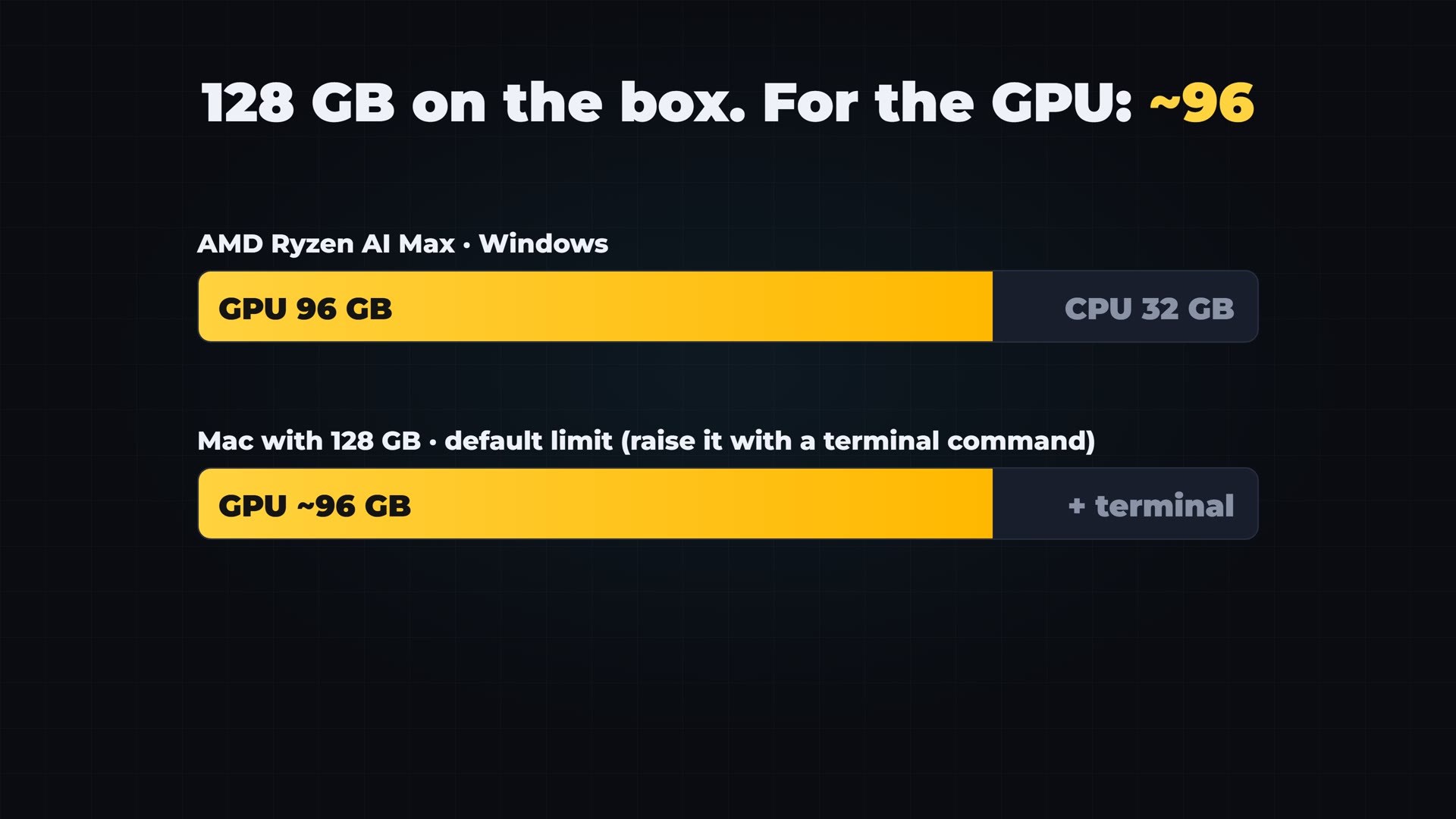
- The hidden limit: on a 128 GB AMD Ryzen AI Max mini PC, Windows gives the graphics side at most 96 GB. A 128 GB Mac also gives the graphics side about 96 GB by default. The 4-bit file starts at 94 GB, before any context.
- The seven routes: AMD Strix Halo mini PCs, the Mac Studio M5 Max, NVIDIA’s DGX Spark, RTX Spark laptops like the Surface Laptop Ultra, four 32 GB graphics cards, one 96 GB RTX PRO 6000, and the PC you already have plus RAM.
- llama.cpp’s new MoE cache on 12 GB: slower at every size I tried. The default setup wrote at 10.7 tokens per second; with 2, 4 and 6 GB of cache I got 7.3, 9.0 and 5.2.
- Strata 0.2.7 on the same file: 36.5 tokens per second, 3.4 times llama.cpp, and it read a 15,000-token document at 118 tokens per second.
- The fourth bit: in a public coding benchmark, the exact 3-bit file I use scored 91. The same model on a datacenter B300 scored 1.5 points more.
- The honest result: given the six prompts Opus 5.5 and Sol got, my card wrote all six builds in 52 minutes for $0. None of them ran exactly as written; three ran after small, marked fixes.
- Try them yourself: all 18 builds are free in your browser at ruocco.it/ai-demos/qwen3-8-flash-next-rtx-3060-vs-opus-5-5-sol.
Why Everyone Says 128 GB
The number comes from one model. Qwen3.8 Flash Next came out at the end of August as an experimental preview of the architecture Alibaba is building for its next generation, Qwen 4. Its model card describes it as 125 billion parameters with 6 billion activated per token, plus a 51-billion-parameter n-gram embedding table. In plain words: a huge model, plus a big lookup table for common word sequences that helps it write faster and better.
On local AI forums it quickly became the default answer to the question “what do I run on a big machine?”. The problem is size. The 4-bit versions, the ones most people want because they keep almost all of the quality, weigh between 94 and 124 GB depending on the format. That fits in 128 GB, and in nothing smaller. So the logic writes itself: get 128 GB, load the 4-bit file, done.
Why You Might Not Need It
But here is the trick that changes the whole calculation. Flash Next is a mixture of experts. Every layer of the model has 512 small “experts”, and only ten of them work on each word. So for every word it writes, the model only reads about six billion of its parameters. The lookup table works in a similar way, and the official vLLM recipe for the model says the table can be offloaded to normal system memory.
That means you do not need the whole model in fast memory at the same time. You need the part that is working right now on the graphics card, and the rest somewhere the card can reach, like your normal RAM. This is called expert offloading.
The image I use for it is a desk and a bookshelf. A 128 GB machine is a desk so big that every book you own is open on it at once. A normal PC is a small desk next to a shelf. If every word only needs a few pages, the shelf can be enough.
The Hidden Limit: 128 Is Not What the Graphics Chip Gets
Before the prices, one detail the boxes do not print on the front. On the AMD mini PCs with the Ryzen AI Max chip, Windows lets the graphics side take at most 96 GB of the 128. Bosgame writes it in the specifications on its own product page: if the system memory is 128 GB, a maximum of 96 GB can be allocated. On Linux you can raise that limit, and owners report going up to about 120 GB.
A Mac with 128 GB does something similar. By default macOS lets the graphics side lock only part of the memory, around 96 GB, and you raise that limit by hand with a terminal command. Now put 96 next to a 4-bit file that starts at 94, before you add a single token of context, and you see the problem.
Every Route to 128 GB, With Real Prices
These are the prices I found on the real pages on October 28, 2026. Prices on memory-heavy hardware are moving fast this year, so check them again before you buy.
Route 1: AMD Ryzen AI Max (Strix Halo)
The cheapest box is built around the AMD Ryzen AI Max+ 395, the chip everybody calls Strix Halo. Minisforum sells its MS-S1 MAX with 128 GB of memory for $3,919, with shipping estimated for late November. Framework sells the same chip in its Framework Desktop, and in the European store the 128 GB version is €3,919. Bosgame has one too, on pre-order. Same chip, same memory speed in all of them: about 256 gigabytes per second.
On this chip, the software you run matters more than the brand of the box. Gufo, an open-source engine made specifically for Strix Halo and released under the MIT license, reports more than 1,600 tokens per second when it reads a prompt with Flash Next. And if 128 GB is not enough, Framework now takes pre-orders for a version with the Ryzen AI Max+ PRO 495 and 192 GB: $6,799, Linux only, shipping in November, and in a single batch because memory is so scarce.
Route 2: Mac Studio M5 Max
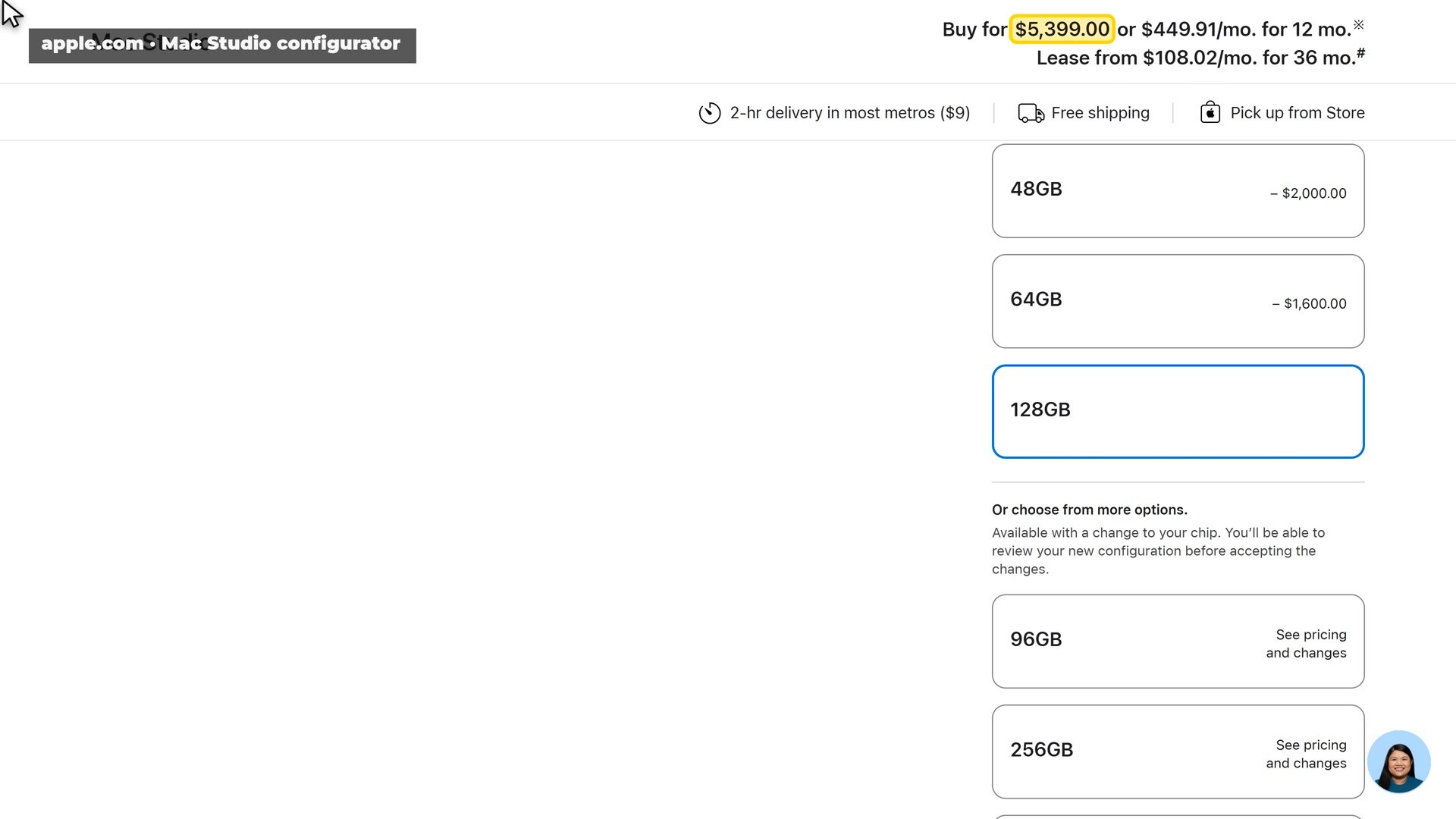
This is Apple’s real configurator. The Mac Studio with the M5 Max, the 40-core graphics chip and 64 GB of memory costs $3,799. Click 128 GB, and the price jumps by $1,600, to $5,399 with a 1 TB drive. That is $25 for every extra gigabyte. In exchange you get 614 gigabytes per second of memory speed, more than double the AMD boxes, in a machine that is completely silent.
Route 3: NVIDIA DGX Spark
The DGX Spark gives you 128 GB and the CUDA software almost every AI tool is built on. At the start of October NVIDIA raised its price to $6,950, almost 75 percent more than at launch, and the reason given was the price of memory. On October 23 a smaller DGX Spark with 64 GB went on sale through NVIDIA’s partners at $4,999, so two of those, to reach 128 GB, cost about $10,000.
And there is news from the day before I recorded: Strata, the engine I use later on my own PC, now runs on the DGX Spark too. Its developers measured Flash Next there at about 46 tokens per second with the 3-bit file.
Route 4: An RTX Spark Laptop
NVIDIA’s RTX Spark is a different chip from the DGX Spark, despite the name, and it goes into Windows laptops. Microsoft’s Surface Laptop Ultra starts at $2,599.99, and the version with 128 GB is $5,899.99. When it was announced, the advice was to wait for independent tests. They have arrived. StorageReview tested it on October 15 and measured 122 GB per second of memory speed, against about 300 on paper. The graphics side can take at most 96 GB. And two review units switched themselves off during a heavy test running on every core. Nobody has published a Flash Next test on it yet.
Route 5: Four 32 GB Graphics Cards
Four cards with 32 GB each make 128 GB of real video memory. With new cards that means AMD’s Radeon AI PRO R9700, which launched at around $1,300, or Intel’s Arc Pro B70 at about $950. So four to five thousand dollars for the cards alone, plus a big power supply and a motherboard with room for four cards. It can be the fastest route of all, but four cards pull hundreds of watts while they work, and you will see that on your electricity bill.
Route 6: One 96 GB Card, or Rent One
The RTX PRO 6000 Blackwell has 96 GB on a single card. It launched at about $8,500. On the day I checked, the lowest US price on the GPUPrix tracker was $17,987. If you only need it sometimes, you can rent one: on RunPod a 96 GB RTX PRO 6000 costs $2.49 an hour.
Route 7: The PC You Already Have
And the route almost nobody prices: a normal graphics card, plus a lot of normal RAM. This is where the memory crisis hits too. On Tom’s Hardware’s price tracker, 64 GB of DDR5-6000 cost $989 that day, and 64 GB of the older DDR4-3200 cost $469. My PC already has 64 GB of DDR4 and an RTX 3060 with 12 GB. So let’s see what this route really does.
My Test, Part 1: llama.cpp and the New MoE Cache
llama.cpp is the free engine that almost every local AI app is built on. And on the day I tested it, it shipped version 0.8.0. In its list of changes there is a line about the cache for the experts kept in normal memory: it is now a “50/50 SLRU cache” instead of a plain LRU cache. That cache is the feature I wanted to test. It was added on October 7 in pull request #29887 and shipped in version 0.7.0. It keeps the most used experts on the graphics card, so only the missing ones travel over from the RAM. Its author measured up to 2.2 times faster writing, on cards with 24 and 32 GB. Not on 12.
Everything in the video is recorded live on my PC, step by step. On the release page I scrolled down to the files and downloaded the Windows build for NVIDIA cards with CUDA 13, plus the CUDA libraries next to it. In the command prompt I made a folder and unpacked both files with one command each. Then I started the server on the same Flash Next file I use with Strata: the ISTA-DASLab GSQ-RCO IQ3_S version, 3-bit, 78 GB on disk. Twelve seconds later it was listening. I opened its page in the browser and asked for a complete Python module with an LRU cache class and unit tests. With its default settings, llama.cpp wrote at about 9.5 tokens per second on camera.
Then the new cache. I restarted the server with all the experts in RAM and 4 GB of cache on the card, and asked the same question. It was slower, much slower: less than one token per second, because with the browser and my screen recorder open, the card was completely full.
So I measured it properly, with nothing else open, three runs each, 256-token answers, and took the median:
- Default settings: 10.7 tokens per second.
- All experts in RAM, no cache: 10.4.
- 2 GB of cache: 7.3.
- 4 GB of cache: 9.0.
- 6 GB of cache: 5.2, with the card full again.
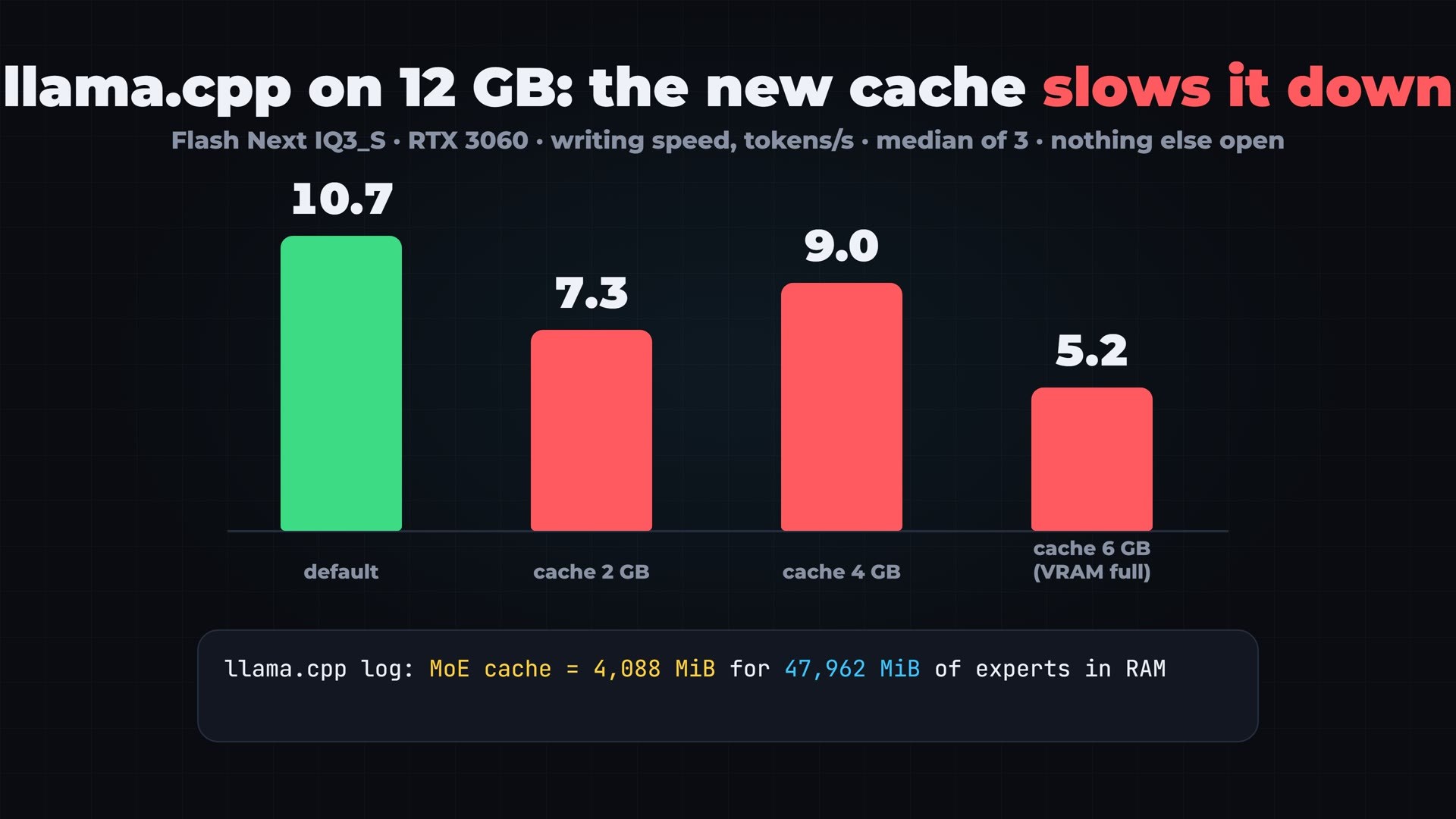
The llama.cpp log explains why. Four gigabytes of cache hold 4,088 MiB of experts, against 47,962 MiB of experts sitting in my RAM. That is less than one tenth. The author of the feature found that about 10 percent of the expert size works well, and on a 12 GB card that is all the room left after the rest of the model and the context. There is simply no space for the cache to help. On bigger cards it does help, and the author shows real gains. On mine, it made every setting slower. That is one PC, one model file and one context size, so read it as a measurement, not a verdict on the feature.
My Test, Part 2: Strata 0.2.7
Strata is an engine built specifically for this model family, open source under the MIT license. It had an update waiting: version 0.2.7, whose release notes say it is faster on 12 GB NVIDIA cards. I updated the app from its settings, and the engine with one command in the terminal. The engine update only switches after the new engine has started and answered a test question, which is a nice safety net.
One practical note from my side. The engine update first failed its test start, twice. The log said Windows was out of “commit” memory: my page file could not grow because my system drive was almost full. After I freed about 50 GB, the same update passed at once. If Strata refuses to start on your PC with plenty of RAM, check the free space on your C: drive.
Then I picked the same 3-bit file, 256,000 tokens of context, the “Full performance” mode, and asked the same question. With the screen recorder running, Strata wrote at 27 tokens per second. With nothing else open, measured the same way as llama.cpp: 36.5 tokens per second, and it read a 15,000-token document at 118 tokens per second. The previous version I tested a week earlier gave me 32 to 33.
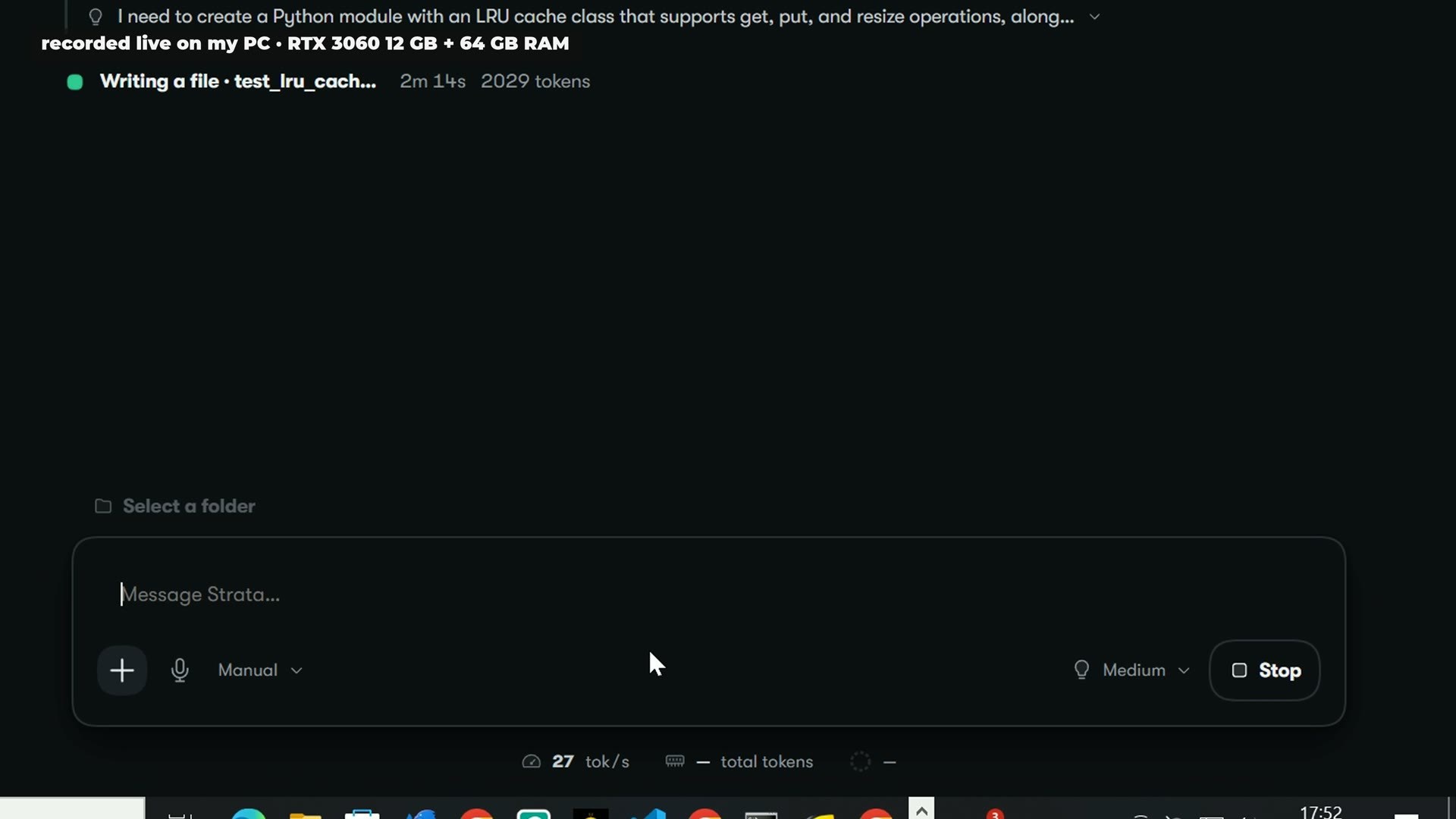
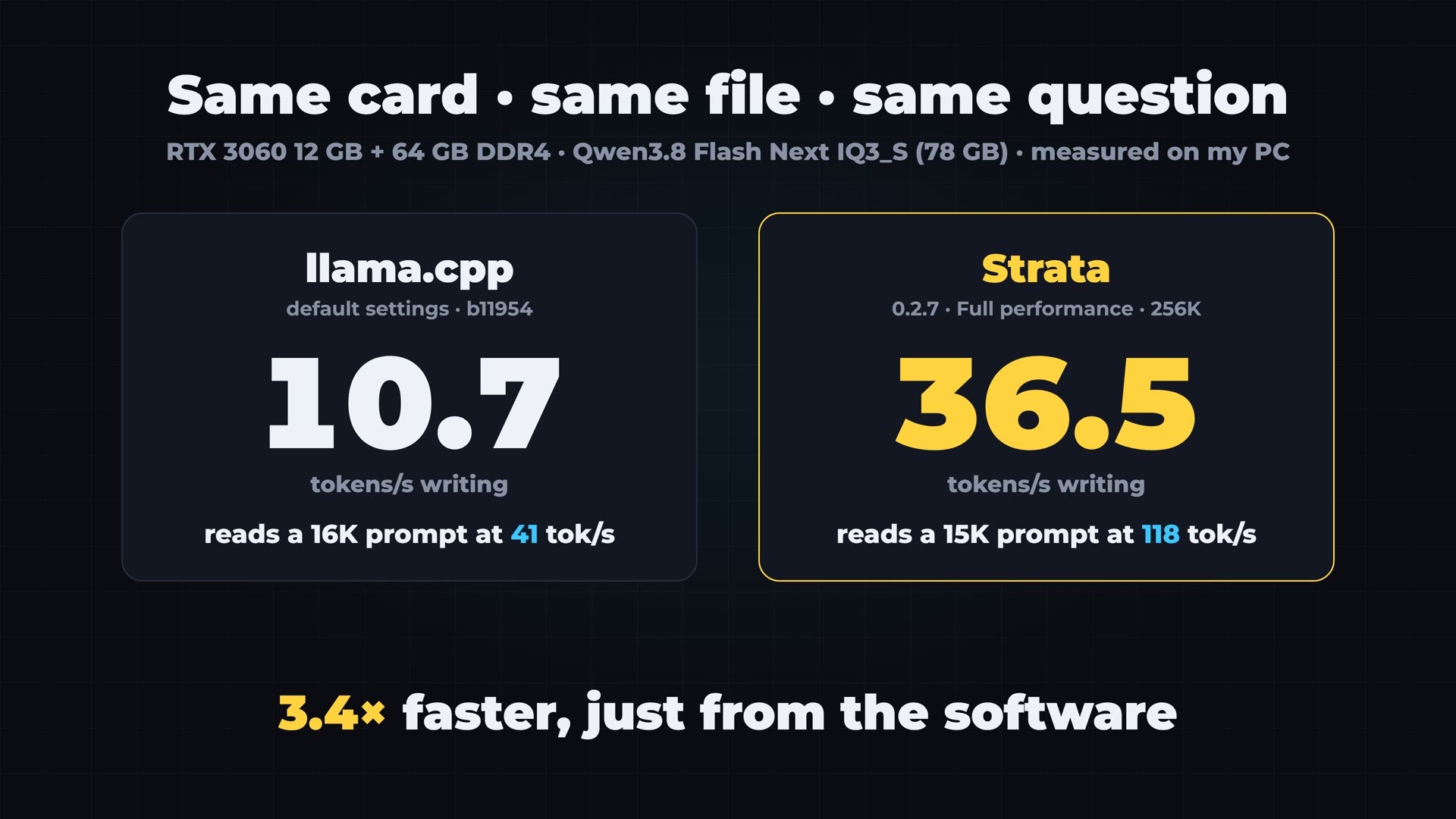
Same card, same file, same question. llama.cpp: 10.7. Strata: 36.5. Three and a half times faster, just from the software. Strata’s own developers measured an even smaller file, the IQ3_XXS, on the same RTX 3060 at 53 tokens per second on stories and 62 on code.
My Card Next to the 128 GB Boxes
Now put my number next to the boxes. These are not the same test: the other numbers are the ones their own developers published, with their own prompts and settings. But they give you the order of magnitude.
- My RTX 3060 with Strata: 36.5 tokens per second, measured by me, 3-bit.
- DGX Spark with Strata: about 46, measured by Strata’s developers.
- Strix Halo with Halogen: 54 on prose, the engine’s own claim.
- Mac Studio M5 Max with MLX: about 40 on prose at deep context, according to the developer of the mlx-serve engine.
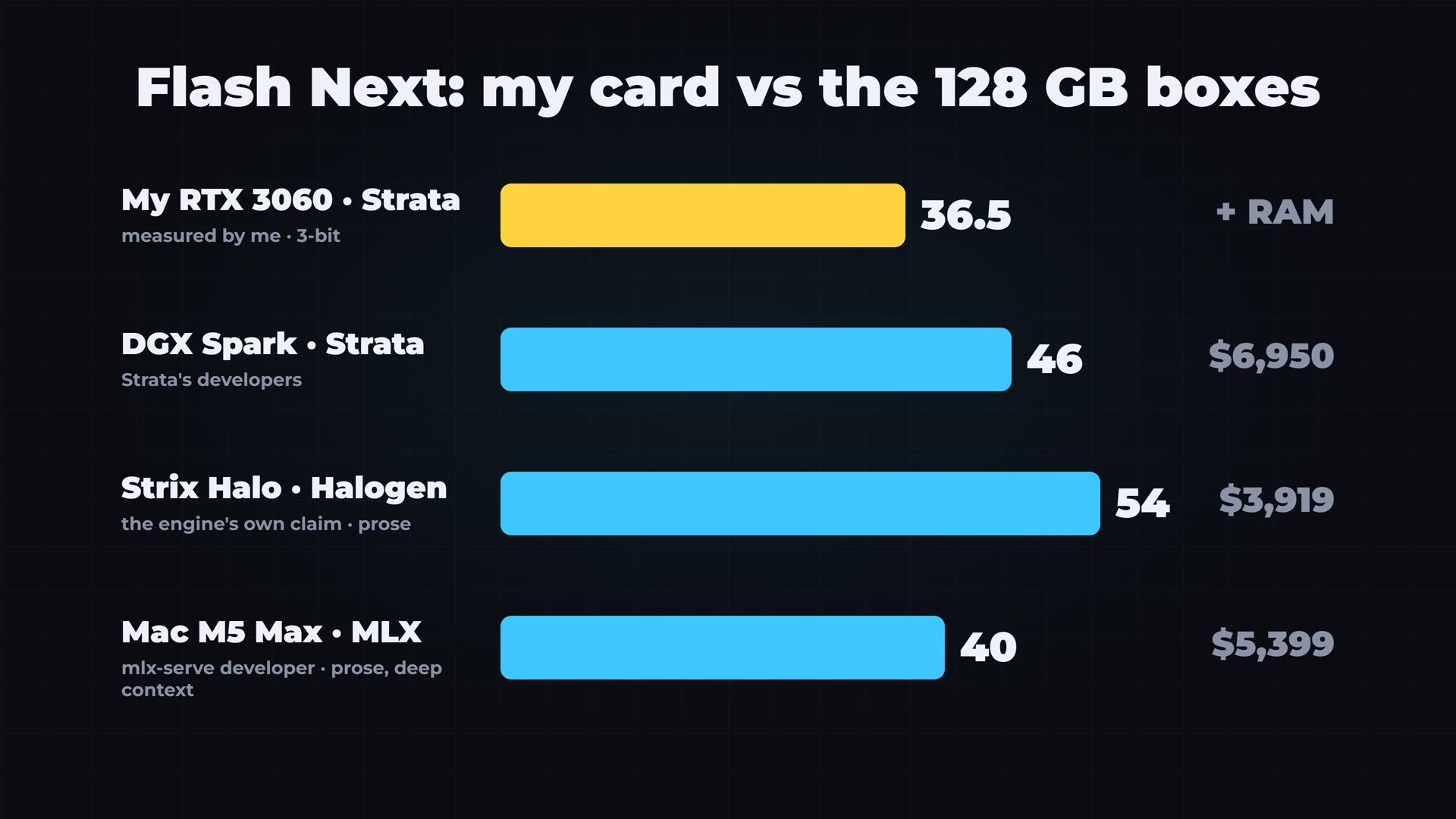
My five-year-old card is in the same range, on a model this big. That is the real news of this test.
The Honest Part: What the Fourth Bit Buys You
My file is 3-bit. The big boxes run the 4-bit version, which does not fit in my 64 GB of RAM. So what does that fourth bit buy you? For once there is a real answer. In Akita on Rails’ public LLM Benchmark v4, seven sprints of real work inside OpenCode, the exact 3-bit IQ3_S file I use, served by Strata on an RTX 5090, scored 91 out of 100. The same model on a datacenter B300 scored 1.5 points more. That is the quality you give up.
And the price: if you already own a gaming PC with a 12 GB card, 64 GB of RAM cost between $470 and $1,000 today, depending on whether you need DDR4 or DDR5. The cheapest 128 GB box I found was $3,919. So the fourth bit, plus a box that does not need your PC, costs you about three thousand dollars more.
Limits, and Who Should Buy What
Two limits, to be fair. This works so well because of how this specific model is built: few active experts, and a lookup table that can live outside the card. Strata now runs a smaller Qwen and DeepSeek V4.1 Flash too, but not every model. And Qwen 4 is not out yet. If the next model is built differently, the PC route may not work as well, while a big box will load whatever comes next.
So who should buy what? If you serve a team, or run many agents at the same time, the big boxes and the multi-card PCs make sense, because they share their speed across many users. If you only use local AI now and then, renting is cheaper. If silence and one simple box matter to you, the Mac. If your work needs CUDA, the Spark. But if you already have a gaming PC: add RAM, pick the right engine, and try that first, before you spend four thousand dollars.
The Most Important Part: What My Card Actually Builds
Speed is nice, but what does my card build? I gave this exact 3-bit file, running on Strata, the six prompts I gave Claude Opus 5.5 and GPT-6.1 Sol two weeks ago, word for word, read from the same files:
- an animated short about a whole human life, drawn in code;
- a voxel castle school for young wizards on a mountain lake;
- a 75-second short film in a storm at sea;
- a 3D showroom for an electric SUV;
- a coastal sunset driving game;
- a browser music studio with a sequencer and three synths.
One request per build, thinking turned off, no agent, no second try. All six took 52 minutes on my card, at about 30 tokens per second, and cost nothing but electricity. A first attempt with the model’s thinking turned on produced nothing in 24 minutes, so I stopped it and ran them again without thinking.
The honest result
Not one of the six ran perfectly as written. Three worked after small fixes, and every fix is marked in the code with a comment, with the untouched original published next to it:
- Every Frame, the life animation, needed three small fixes, all in its sound code: the reverb was left undefined, some notes were scheduled in the past, and a note index was not a whole number. After that, it plays.
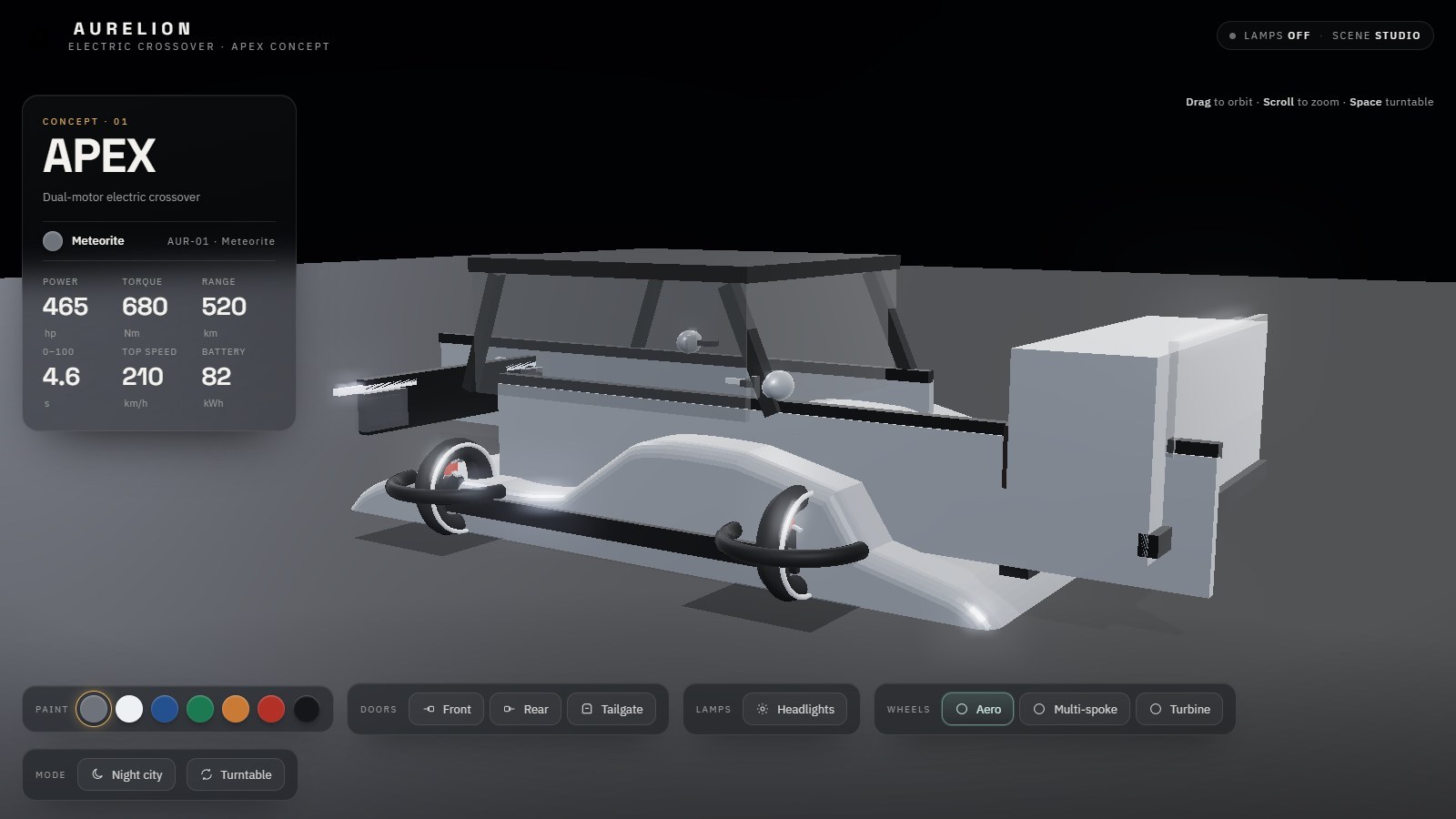
- The SUV showroom needed one line: the reflective floor was created with numbers instead of a shape. It works, but the car came out blocky, with parts floating around it.
- The driving game needed one line: the start position asked for a point outside the road. After that, you can drive it.

The other three did not work as written. The castle, the short film and the music studio each had several bugs, one after the other. In the castle, a minus sign in the wrong place breaks the script, and then a variable is used outside the loop that defines it. In the film, the JavaScript calls a function that only exists inside the graphics shader, and then the shader itself does not compile. In the music studio, the table of chords has broken brackets, and the code reads a list of notes the model never wrote. Fixing those would mean rewriting the model’s work. So I did not, and I published them exactly as the model wrote them.
The comparison
For comparison, in my earlier test Claude Opus 5.5 needed one line fixed in two of its six builds, for $2.69, and GPT-6.1 Sol ran all six on the first try, for 77 cents. And a week ago, inside OpenCode, where it could run and fix its own files, this same model built a working game by itself.
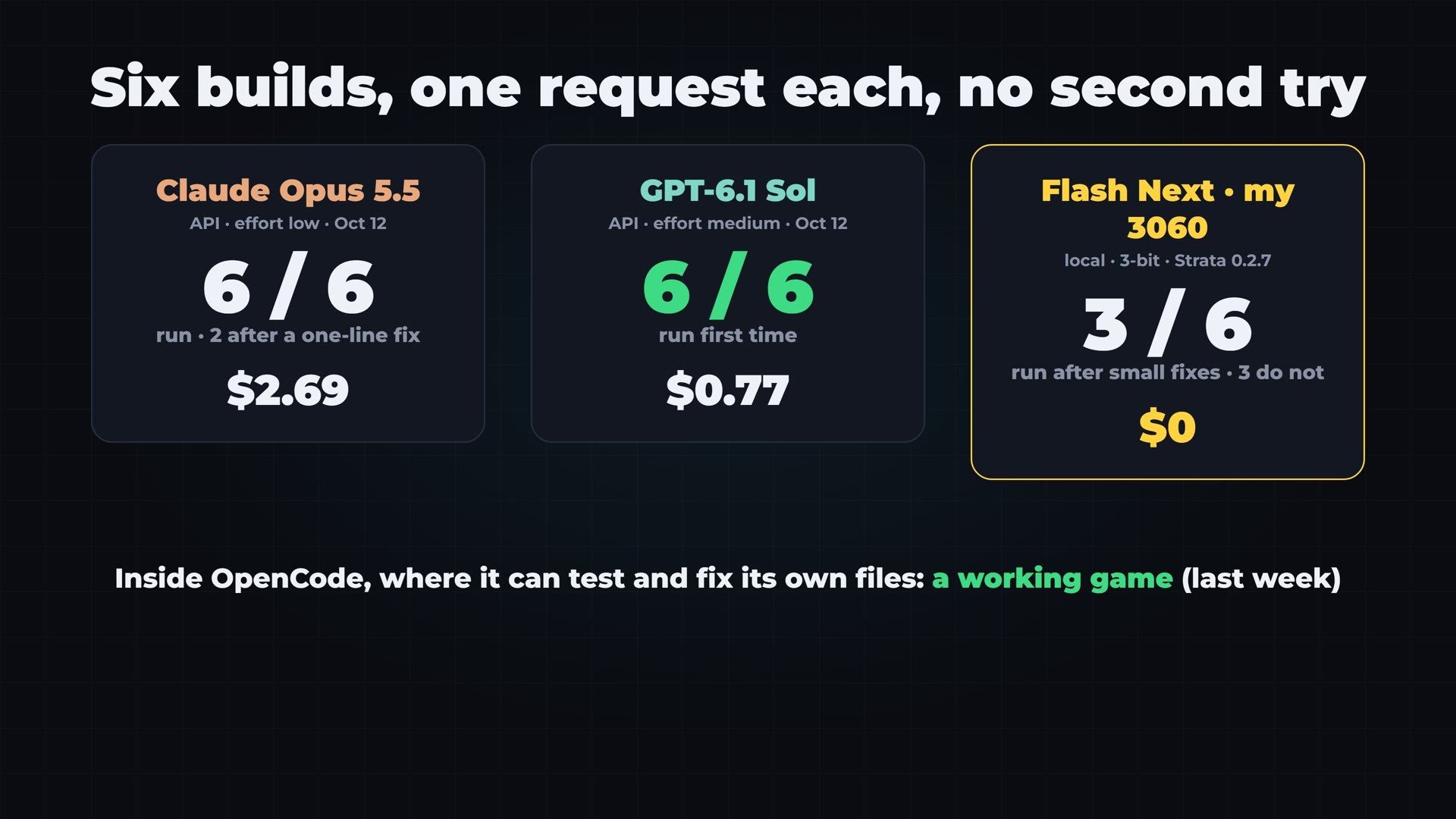
So my conclusion is simple. On a 12 GB card, this 125B model is fast and free for chat, and for coding inside an agent that checks its own work. For a complete app in one single answer, the big cloud models are still clearly ahead.
Try Every Demo, and Get the Code
All 18 builds from this test are on my website, free to use in your browser: the six from my RTX 3060 next to the Opus 5.5 and GPT-6.1 Sol versions, with time, cost and the result of each one. The three broken builds are there too, exactly as written, and the fixed ones have their originals next to them.
Open the gallery: Qwen3.8 Flash Next on an RTX 3060 vs Opus 5.5 and Sol
If you want the exact prompts, the full code and every command I used, from the llama.cpp launch line to the benchmark scripts, they are in the Ruocco Academy. It is not open yet, and you can join the waiting list on the same page.
My Test Setup
- PC: Intel Core i5-12400, NVIDIA RTX 3060 12 GB, 64 GB DDR4, Windows 10.
- Model file: ISTA-DASLab Qwen3.8-Flash-Next GSQ-RCO IQ3_S, 3-bit, 78 GB in two files.
- Engines: llama.cpp b11954 for the measurements and 0.8.0 (build b11960) on camera; Strata 0.2.7 with engine 0.1.52.
- Method: writing speed is the median of three 256-token answers to the same coding question, with nothing else open. On-camera numbers are lower because the screen recorder shares the card.
- Other machines: their speeds are the numbers published by their own developers, not my measurements.
- Prices: as shown on the pages on October 28, 2026; Framework in euros, from the European store.
- Builds: one per prompt is a single sample, not a benchmark.
Sources
- Qwen3.8-Flash-Next model card (Hugging Face)
- vLLM recipe for Qwen3.8-Flash-Next
- Bosgame M5 product page
- Minisforum MS-S1 MAX
- Framework Desktop
- Gufo on the Framework community forum
- Guru3D: Framework Desktop with Ryzen AI Max+ PRO 495 and 192 GB
- Apple Mac Studio
- The Register: DGX Spark prices
- Strata 0.2.7 release notes
- Microsoft Surface Laptop Ultra
- StorageReview: Surface Laptop Ultra review
- TechRadar: Radeon AI PRO R9700
- PC Gamer: Intel Arc Pro B70
- GPUPrix: RTX PRO 6000 Blackwell prices
- RunPod pricing
- Tom’s Hardware RAM price index
- llama.cpp pull request #29887: GPU cache for MoE experts
- llama.cpp releases
- Akita on Rails: Strata with Qwen 3.8 Flash Next
- mlx-serve
Product names are used only to describe the products. This article is not sponsored, and I am not affiliated with any of these companies.
If you like real tests like this one, subscribe to VitoMind on YouTube and tell me in the comments which route to 128 GB you would pick.